19
IR Sensitivity
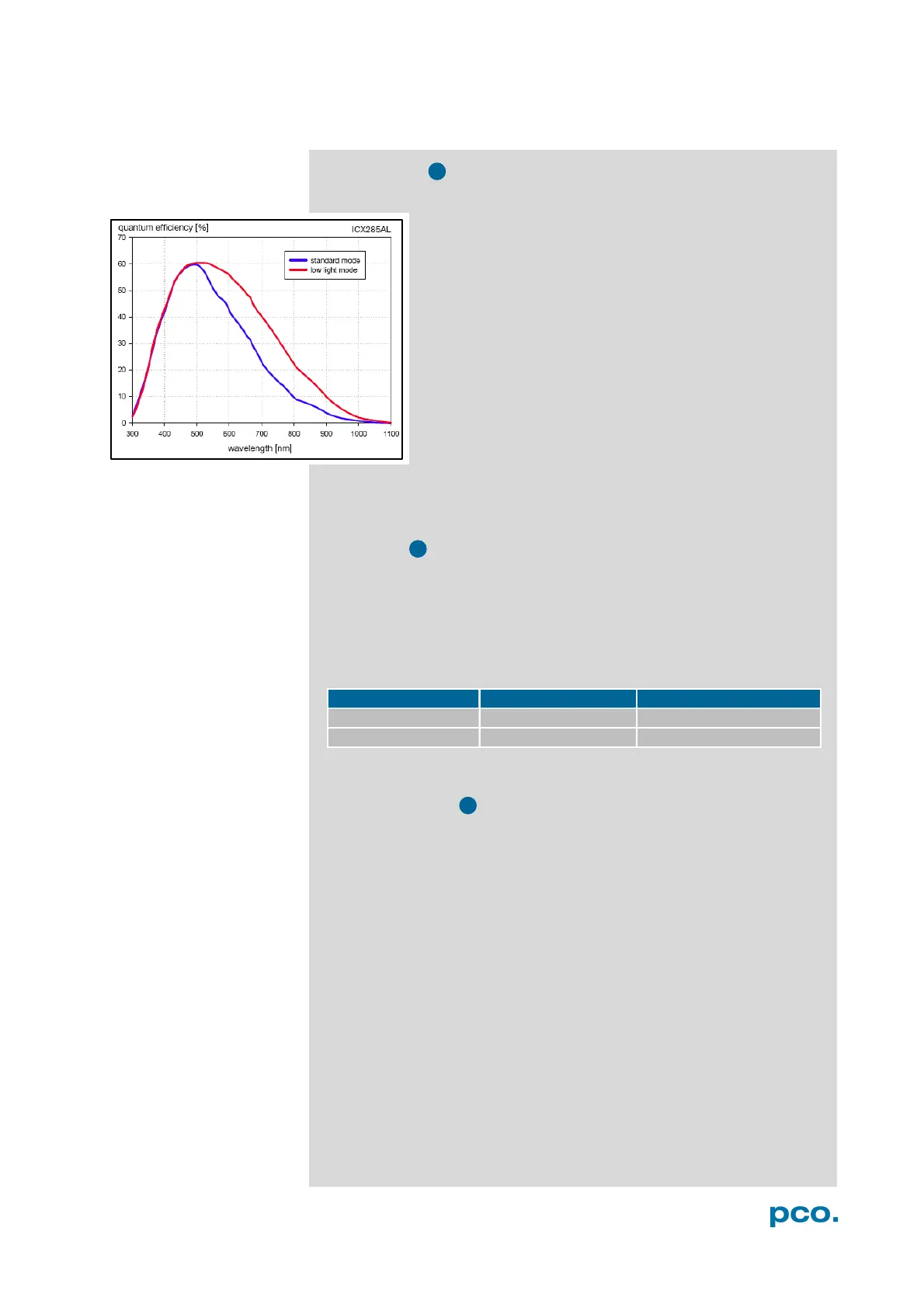
This feature uses a special image sensor control
method, allowing greater sensitivity in the near
infrared spectral range (red line in graph), in most
cases at the expense of decreased anti-blooming
performance
.
Minimum exposure time is 5 ms. It is recommended to
use the IR sensitivity mode for long exposure times
>120ms
The integrated hot pixel correction is only active for
standard mode. If
y
o
u
need to correct hot pixels in IR
mode, please follow instructions in chapter 6.9.3
(Create Hot Pixel List). Or see A1.3.
Pixel Clock
The pixel clock sets the clock frequency and therefore the image
sensor readout speed.
At 12 MHz the image quality will be higher due to very
l
ow readout
noise
(
rea
d out at a higher b
an
dw
i
d
t
h
)
.
At 24 MHz the image sensor is read out with nearly double speed,
achieving higher frame rates.
Conversion Factor
The conversion factor defines how many charges (electrons), which
have been generated by light in each pixel, are necessary to generate
one count (one intensity level) in the digital image. Therefore, the
conversion factor describes the gain when converting electrons into a
digital value.
The pco.pixelfly has two conversion factors: 1.0 e
-
/count and 1.5 e
-
/count, which both can be used in standard and binning mode. As
mentioned in 6.3.2 binning is available for the pco.pixelfly. The usable
extended fullwell-capacity rises in binning mode from 16000 to
24000e
-
. In standard mode it makes sense to keep 1.0e
-
/count; if you
change the conversion factor to 1,5e
-
, you can’t use the high dynamic
of 16384 grey scale. In binning mode you can use both conversion
factors: If you have a lowlight scene the 1.0e
-
/count mode helps you
to spread the few available information – in normal light scenes it
makes sense to use 1.5e
-
/count for full dynamic availability.


 To Next Page