36
6.9.4 ACQUISITION MENU
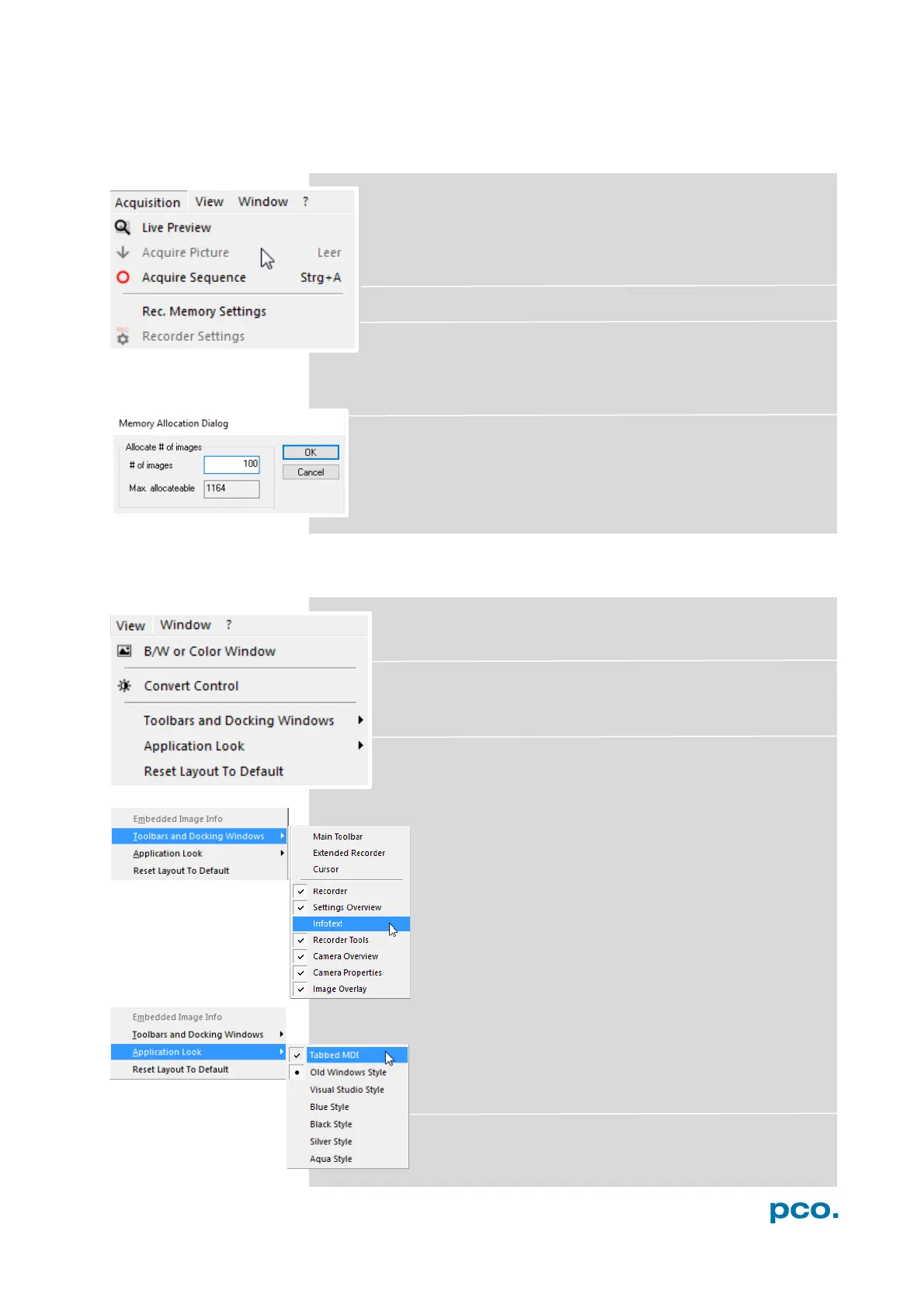
Live Preview
The Live Preview is useful for fast and easy adjusting and
focusing of the camera. The active window will be updated. To
see another window, simply click on the window. This option is
not available in double shutter mode.
Acquire Picture (not available)
Acquire Sequence
Starts recording images into the system memory according to Trigger
Mode selection (see 6.3.1). During recording, all camera controls are
locked.
Rec. Memory Settings
This sets the number of images recorded in one sequence. The
maximum is defined by approved RAM size.
6.9.5 VIEW MENU
B/W or Color Window
Use this command to open a new display window.
Convert Control
See 6.3.5
Toolbars and Docking Windows
Standard toolbars of Camware 4 are Recorder/
Recorder Tools / Camera Overview / Camera Properties
and Image Overlay. Additional Toolbars known from
Camware 3.x are displayable, but not essentially
needed: Main Toolbar / Extended Recorder / Cursor.
For function Infotext see 6.9.1
Application Look
The Style and Look of Camware can be customized;
many different style sheets are selectable. The Tabbed
MDI function (un)docks the view windows.
Reset layout to default
This resets all your customized changes and restores
the default layout.


 To Next Page