44
A3 HOT PIXEL UTILITY
From time to time it makes sense to check the camera for
new hot pixels, because after long operating times, due to
physical reasons, further hot/defective pixel may occur.
Therefore we created the program Pixelfly_DEFPIX.exe. It
can be used to create or edit the hot/defective pixel list of
a pco.pixelfly usb with hot/defective pixel option enabled
(firmware 1.0.28 or higher).
There are two choices. Auto-create a new list of defective
pixels or edit an existing one.
Auto create list of hot/ defective pixels
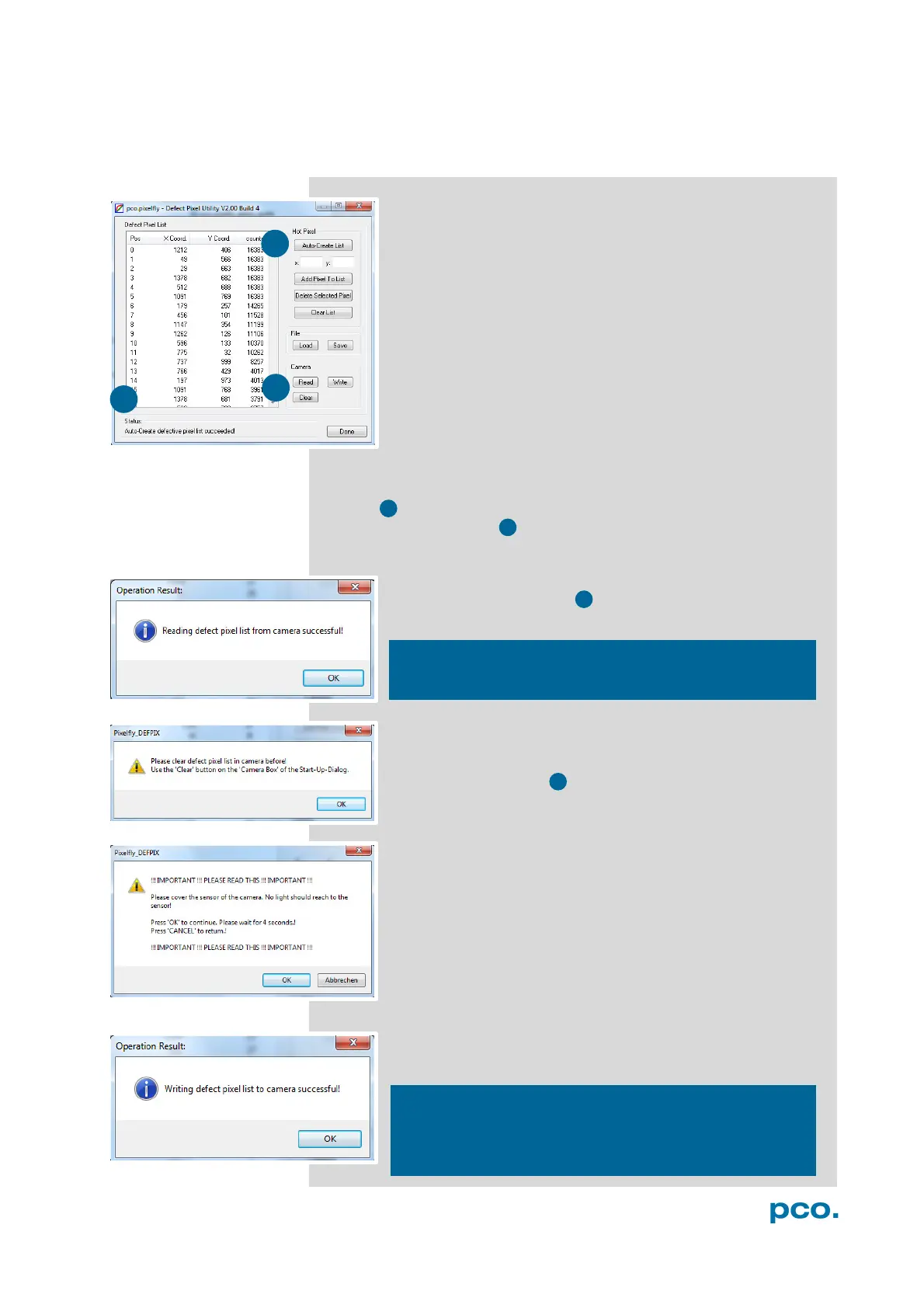
After start-up of the program the dialog on the left is shown
(this can take a few seconds):
The Defective Pixel Utility tries to initialize a possibly connected
camera. In case a camera is connected the Read, Write and Clear
button inside the camera group will be enabled.
Additionally the Status
will show the camera type and its serial
number.
In order to simplify the creation of a new list the user should
use the Auto Create List button. Firstly the current list is
read from the camera
Only if the list is empty the Auto-Create-List process can
continue. If the camera contains a list of defective pixel the
program will return to the start-up dialog. In this case please
use the Clear button of the Camera Box to delete the
current list of defective pixel from the camera.
If the camera doesn’t contain a list of defective pixel the
program will return to the Start-Up dialog.
Please cover the sensor with the supplied c-mount
transportation cap! It´s not enough just to set up lens
cap!
Press OK to continue. An image with an exposure time of
four seconds will be recorded. Please wait for about four
seconds till the image is recorded successfully. After that a
list of defective pixels is created using the recorded image.
The process ends with the message box.
The last step is that the list of defective pixels is
automatically written to the camera. The list is automatically
sorted by ascending hot pixel counts order.
The default list of defective pixels always has 220 entries.
This doesn’t mean that your camera has 220 hot or
defective pixels!
Quit Camware before using the defective pixel utility.


 To Next Page