49
A5.4 TROUBLE SHOOTING
If you have a question, which is not adequately addressed in this
manual, please contact PCO or your local dealer.
To speed your request, we need the following information:
Short description of the problem
Description of your application
Type and version of camera
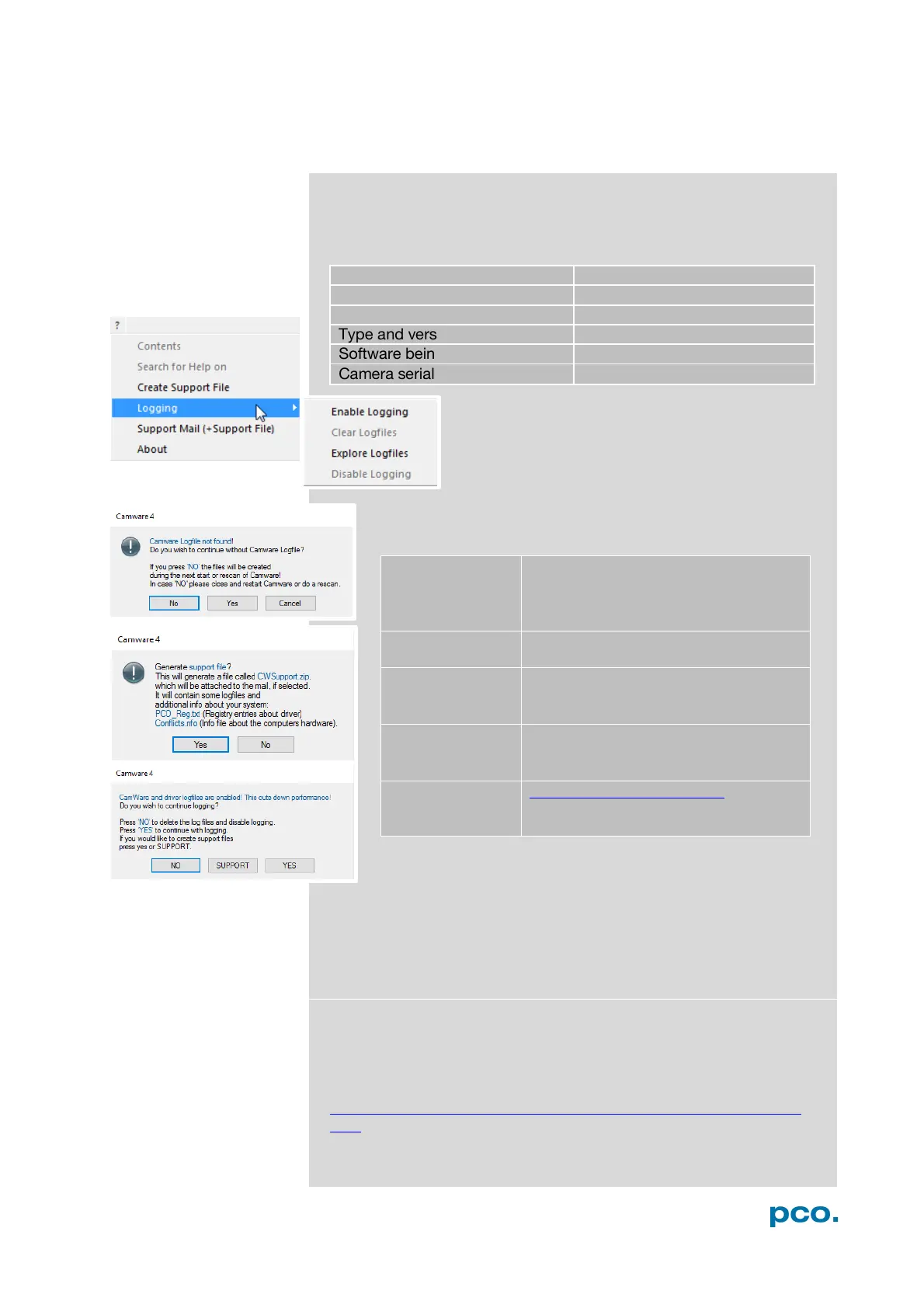
How to create a logfile:
Repair
Before sending the camera for repair, first contact your local
dealer or PCO respectively.
When shipping the camera for repair, be certain to carefully pack the
camera with proper shipping materials. If possible use the original
packaging. Use the protection cap to protect the camera on the lens
thread.
Firmware, Software and Driver Update
You will find all necessary software and drivers on the accompanying
USB storage device.
For the latest versions please check our website:
http://www.pco.de/support/interface/sensitive-cameras/pcopixelfly-
usb/
? Help Menu → Logging → Enable
Logfile →Camware will ask you to
press NO to activate Logfiles after
the workflow which produces the
faults
Menu
Click Support Mail (+ Support File) →
Camware will ask you: Generate
support file?
(CWSupport.zip – don’t rename it)
and send it to PCO Support
website:
http://www.pco.de/support/ and
upload the support file with our
support form


 To Next Page