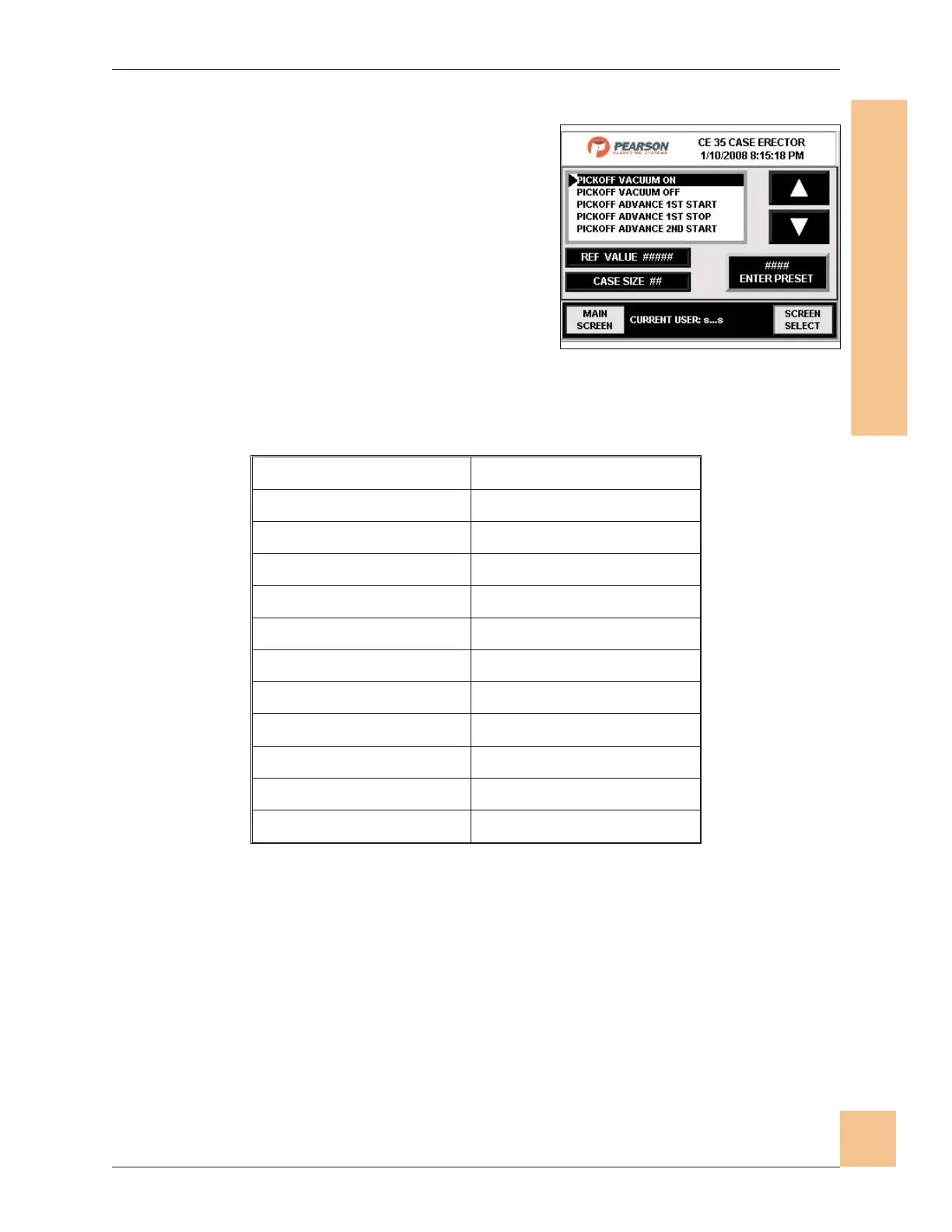
Register Screen
1. The register screen values are variables
for each case.
2. These include timer and counter settings
specific to each case size, and
dimensions.
3. When there are slight variations in stock
these values sometimes need to be
changed.
4. Use the up/down keys to select the value
to be adjusted.
5.
Following the display, use the function keys to alter the value.
6. Press "Enter Preset" to set the new values.
7. Press the Screen Select button to navigate to the screen select screen.
8. Press the Main Screen button to navigate to the main operator screen.
Operations Manual CE35-T Case Erector
M-CE35T-2c Horiz Mag 3/2/2010
Human-Machine Interface
(HMI)
81
Fig. 77: Register Screen
Pickoff Vacuum On Minor Flap Kicker Extend
Pickoff Vacuum Off Cycle Stop Position Window
Pickoff Advance 1st Start Flight Time Exceeded Delay
Pickoff Advance 1st Stop Case at Sealing Jam Check
Pickoff Advance 2nd Start Machine Start Delay
Pickoff Advance 2nd Stop Discharge High Level Delay
Setup Vacuum On Discharge High Level Reset Dly
Setup Vacuum Off Master Flight Timer
Mandrel Extend Energy Saver Delay (Sec.)
Mandrel Retract Magazine Depleted Preset
Setup Arm Down Magazine Empty Counter
Setup Arm Up


 To Next Page