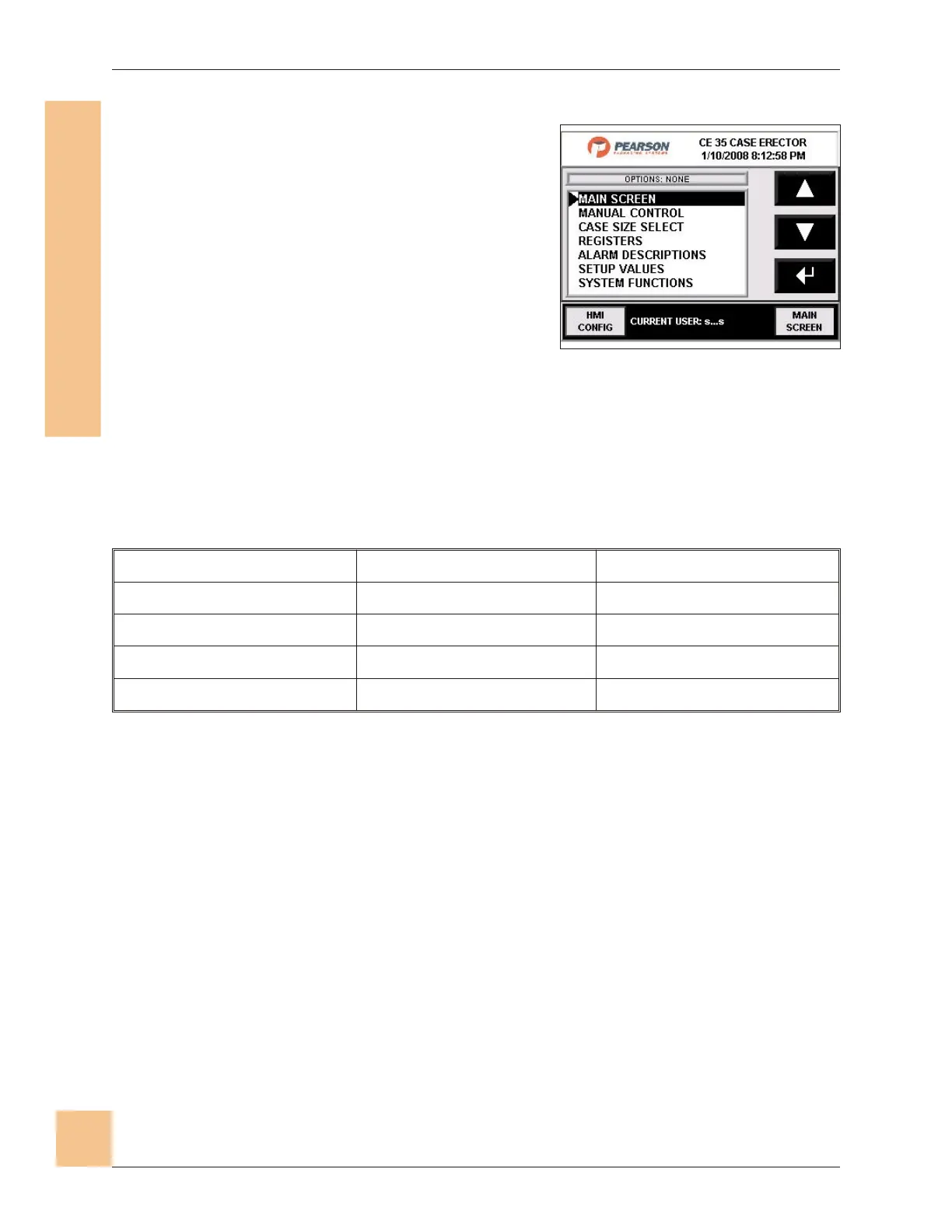
Screen Select Screen
1. The screen select screen is used to
access the different screens described
here for operation, setup, and diagnostic/
service purposes.
2. Use the up/down arrows to scroll to the
desired screen, then press Enter (8 ) to
go to that selection.
3. Pressing Main Screen will return to the
Main Operator screen.
4. Press HMI Configure Screen button to go to the password- protected
Configuration screen, which is not intended to be used by the operator (it is
for diagnostic and service use only) and is not described herein.
5. The screen select list appears below:
Main Screen Alarm Descriptions Change Password
Manual Control Setup Values Alarm Status
Case Size Select System Functions Phase Manager Display
Speed Select Log In/Out Cycle Count
Registers Alarm History
6. Press up/down arrows to page through the list.
7. Press Main Screen to go to the Main Operator Screen.
CE35-T Case Erector Operations Manual
3/2/2010 M-CE35T-2c Horiz Mag
82
ecafretnI enihcaM-namuH
)IMH(
Fig. 78: Screen Select Screen


 To Next Page