172
5
Editing and Printing Images
6
Press the zoom button towards
the right (y).
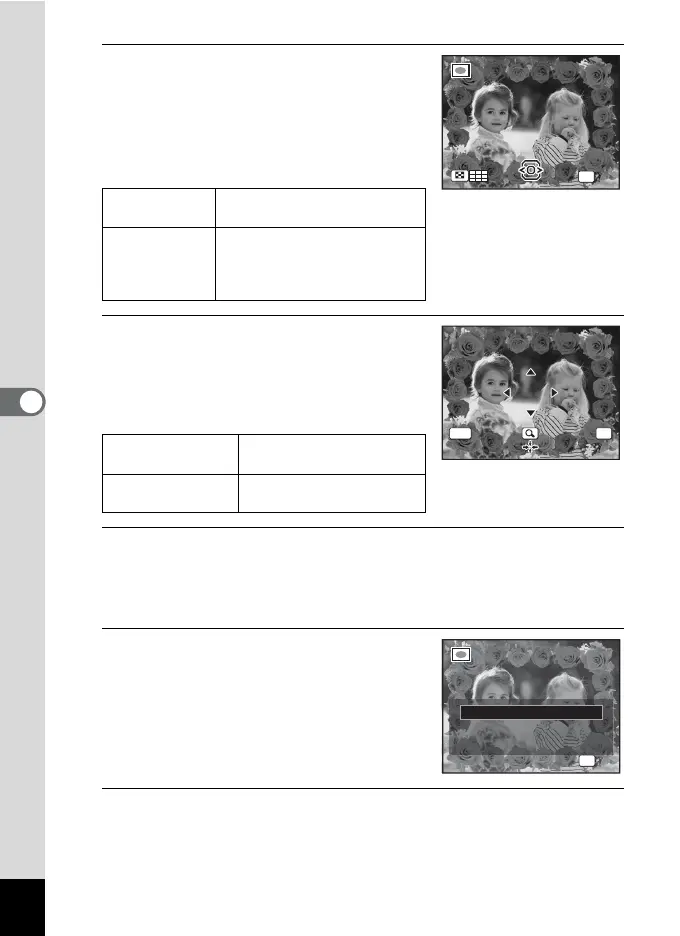
The selected frame appears in single-image
display.
You can choose another frame using either
of the following operations.
7
Press the 4 button.
The frame position and size adjustment
screen appears.
You can adjust the image using either of the
following operations.
8
Press the 4 button.
A confirmation dialog for overwriting the image appears.
If the selected image is protected, the processed image is saved as a
new image and the following confirmation dialog does not appear.
9
Use the four-way controller (23)
to select [Overwrite] or [Save as].
10
Press the 4 button.
The edited image is saved with the recorded pixels of h
(2048×1536).
Four-way
controller (45)
Press to choose a different
frame.
Zoom button
towards the left
(f)
Press to return to the 9-frame
display of the frame selection
screen, and then perform Step
5 to choose a different frame.
Four-way controller
(2345)
Press to adjust the position
of the image
Zoom button Press to make the image
larger or smaller.
OK
OK
OKMENU
Cancel
Cancel
OK
OK
OK
Overwrite
Save as
Cancel
O v er w r i te
o r ig i n a l i m a ge ?
Overwrite
original image?












 To Next Page