115
4
Playing Back and Deleting Images
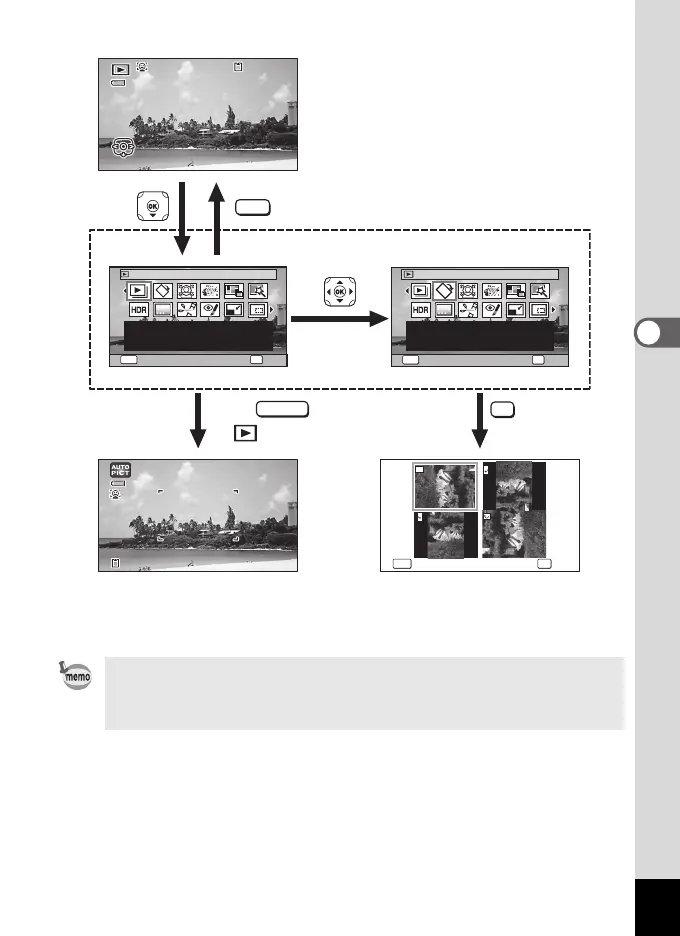
• When the frame is placed over an icon on the Playback Mode Palette, the
guide of that function appears.
• You can set the guide of the function not to display on the Playback Mode
Palette (p.163).
OKMENU
1/2
OKMENU
Image Rotation
1/2
Slideshow
10100
-
0030038100
-
0038
EditEditEdit
OK
Cancel
Rotates captured images.
Useful when viewing
vertical images on a TV
OK
Cancel
14:2514:2511/11/202311/11/2023 14:25
OKMENU
For continuously playing
back images. Screen or
sound effects can be set
OKCancel
11/11/2023
OK
MENU
SHUTTER
'10/02/02 14:25
3 838
Goes to the screen for
selected playback function
Closes the Playback Mode
Palette and goes to A mode
halfway
or
Press
' 1 0 / 0 2 / 0 2 1 4 : 2 5
' 1 0 / 0 2 / 0 2 1 4 : 2 5
1 00
-
0 038
3 8
Edit
14:2502/02/'12
' 1 0 / 0 2 / 0 2 1 4 : 2 5
' 1 0 / 0 2 / 0 2 1 4 : 2 5
1 00
-
0 038
3 8
Edit
14:2502/02/'12
SHUTTER
e_kb635_EN.book Page 115 Thursday, November 9, 2023 9:17 AM


 To Next Page
 Loading...











