EasyManua.ls Logo

Pentax SF1 - Attaching and Removing Lenses

Pentax SF1
72 pages
Print Icon
To Next Page IconTo Next Page
To Previous Page IconTo Previous Page
Loading...
ATTACHING
AND
REMOVING
LENSES
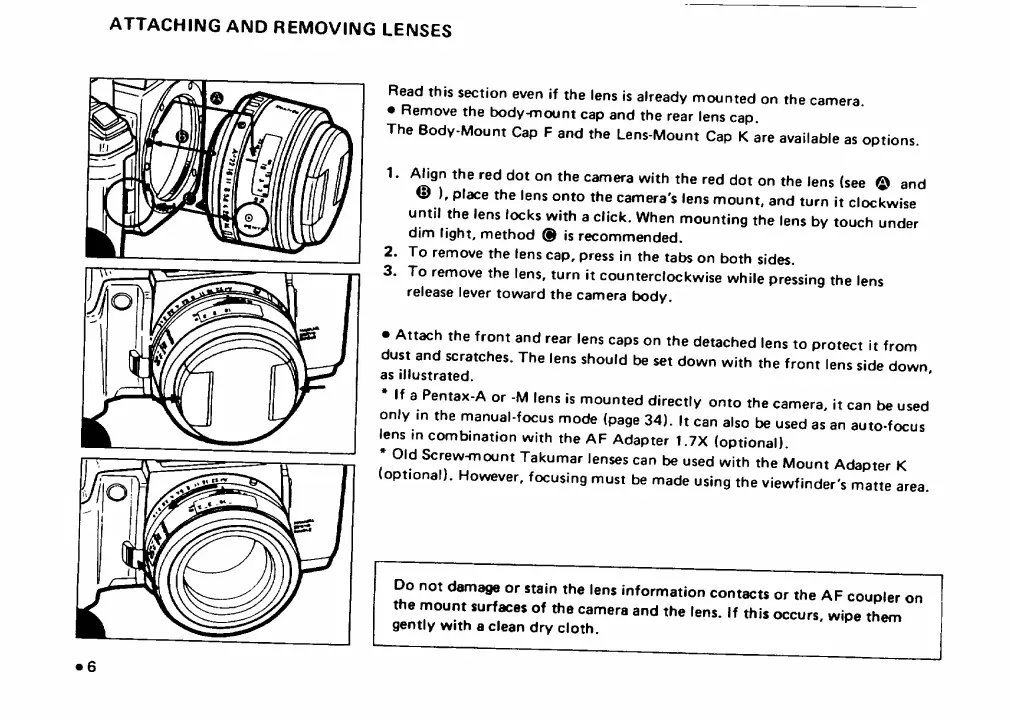
Read
this
section
even
if
the
lens
is
already
mounted
on
the
camera.
Remove
the
body-mount
cap
and
the
rear
lens
cap.
The
Body-Mount
Cap
F
and
the
Lens-Mount
Cap
K
are
available
as
options.
1.
/^gn
the
red
dot
on
the
camera
with
the
red
dot
on
the
lens
(see
®
and
®
),
place
the
lens
onto
the
camera's
lens
mount,
and
turn
it
clockwise
until
the
lens
locks
with
a
click.
When
mounting
the
lens
by
touch
under
dim
light,
method
®
is
recommended.
2.
To
remove
the
lens
cap,
press
in
the
tabs
on
both
sides.
3.
To
remove
the
lens,
turn
it
counterclockwise
while
pressing
the
lens
release
lever
toward
the
camera
body.
Attach
the
front
and
rear
lens
caps
on
the
detached
lens
to
protect
it
from
dust
and
scratches.
The
lens
should
be
set
down
with
the
front
lens
side
down
as
illustrated.
If
a
Pentax-A
or
-M
lens
is
mounted
directly
onto
the
camera,
it
can
be
used
only
in
the
manual-focus
mode
(page
34).
It
can
also
be
used
as
an
auto-focus
lens
in
combination
with
the
AF
Adapter
1.7X
(optional).
Old
Screw-mount
Takumar
lenses
can
be
used
with
the
Mount
Adapter
K
(optional).
However,
focusing
must
be
made
using
the
viewfinder's
matte
area.
Do
not
damage
or
stain
the
lens
information
contacts
or
the
AF
coupler
on
the
mount
surfaces
of
the
camera
and
the
lens.
If
this
occurs,
wipe
them
gently
with
a
clean
dry
cloth.

Related product manuals