EasyManua.ls Logo

Pentax SF1 - Shooting in the Shutter-Priority AE Mode

Pentax SF1
72 pages
Print Icon
To Next Page IconTo Next Page
To Previous Page IconTo Previous Page
Loading...
SHOOTING
IN
THE
SHUTTER-PRIORITY
AE
MODE
Shutter-Priority
AE
Mode
Once
the
desired
shutter
speed
is
set,
the
camera
automaticaify
selects
an
appropriate
aperture
Wording
to
the
lighting
conditions
surrounding
the
subject
for
a
perfect
exposure.
Use
this
mode
to
capture
a
fast*
moving
subject
(as
in
sports)
as
well
as
for
taking
ordinary
snapshots.
to
the
UP
position.
Slide
it
to
the
DOWN
position
to
select
a
slower
shutter
speed.
One
push
moves
the
shutter
speed
to
the
next
setting,
and
the
speed
is
shifted
continuously
if
the
select
switch
is
held
at
one
position.
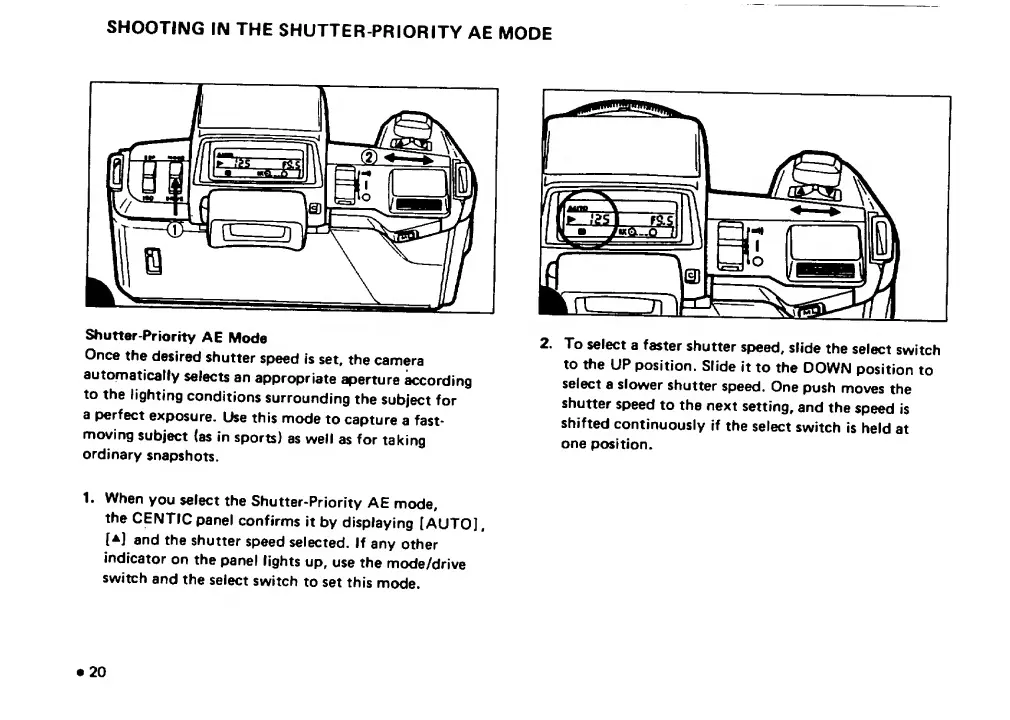
1.
When
you
select
the
Shutter-Priority
AE
mode,
the
CENTIC
panel
confirms
it
by
displaying
[AUTO],
[A]
and
the
shutter
speed
selected.
If
any
other
indicator
on
the
panel
lights
up,
use
the
mode/drive
switch
and
the
select
switch
to
set
this
mode.
20

Related product manuals