EasyManua.ls Logo

Pentax SF1 - Page 25

Pentax SF1
72 pages
Print Icon
To Next Page IconTo Next Page
To Previous Page IconTo Previous Page
Loading...
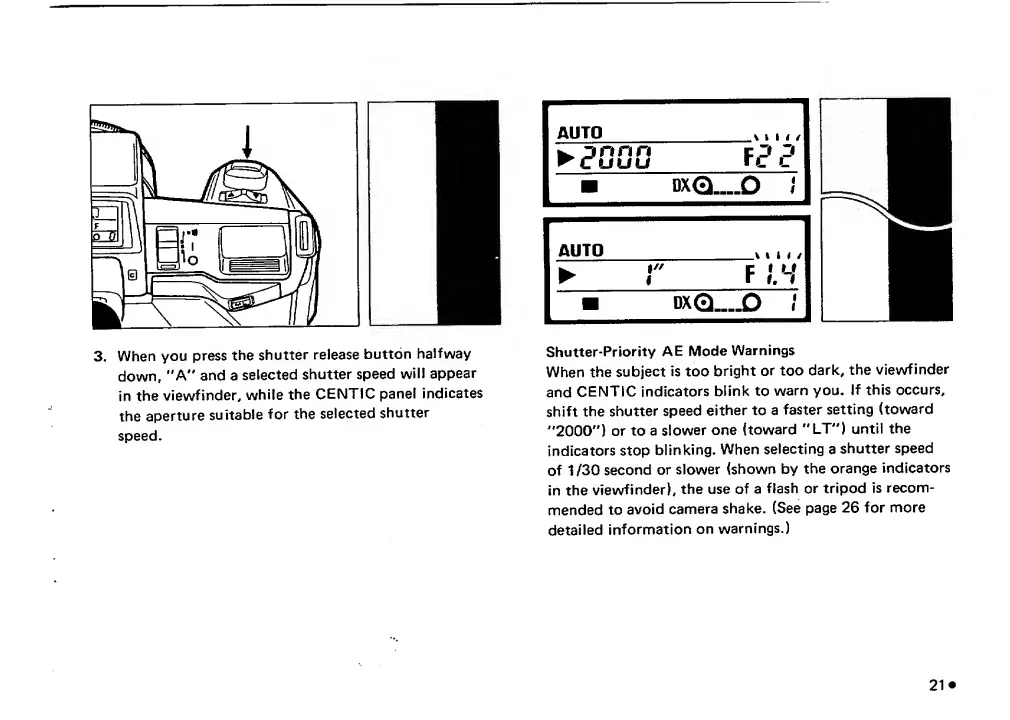
3.
When
you
press
the
shutter
release
button
halfway
down,
"A"
and
a
selected
shutter
speed
will
appear
in
the
viewfinder,
while
the
CENTIC
panel
indicates
the
aperture
suitable
for
the
selected
shutter
speed.
Shutter-Priority
AE
Mode
Warnings
When
the
subject
is
too
bright
or
too
dark,
the
viewfinder
and
CENTIC
indicators
blink
to
warn
you.
If
this
occurs,
shift
the
shutter
speed
either
to
a
faster
setting
(toward
'*2000'')
or
to
a
slower
one
(toward
"'LT”)
until
the
indicators
stop
blinking.
When
selecting
a
shutter
speed
of
1
/30
second
or
slower
(shown
by
the
orange
indicators
in
the
viewfinder),
the
use
of
a
flash
or
tripod
is
recom¬
mended
to
avoid
camera
shake.
(See
page
26
for
more
detailed
Information
on
warnings.)

Related product manuals