EasyManua.ls Logo

Pentax SF1 - Exposure Compensation

Pentax SF1
72 pages
Print Icon
To Next Page IconTo Next Page
To Previous Page IconTo Previous Page
Loading...
EXPOSURE
COMPENSATION
The
exposure
compensation
system
is
used
to
change
the
basic
exposure
value
or
to
intentionally
under-
or
overexpose
the
subject
in
the
AE
modes.
Sample
Subjects
Compensation
Value
Back-lit
subjects
Landscapes
with
a
large
amount
of
blue
sky
Person
(s)
on
the
snow
Person(s)
with
the
sky
in
background
Approx.
+1
to
+3.5
EV
Subjects
with
dark
background
Subjects
on
stage
Night
scenes
Approx.
-1
to
-3.5V
50
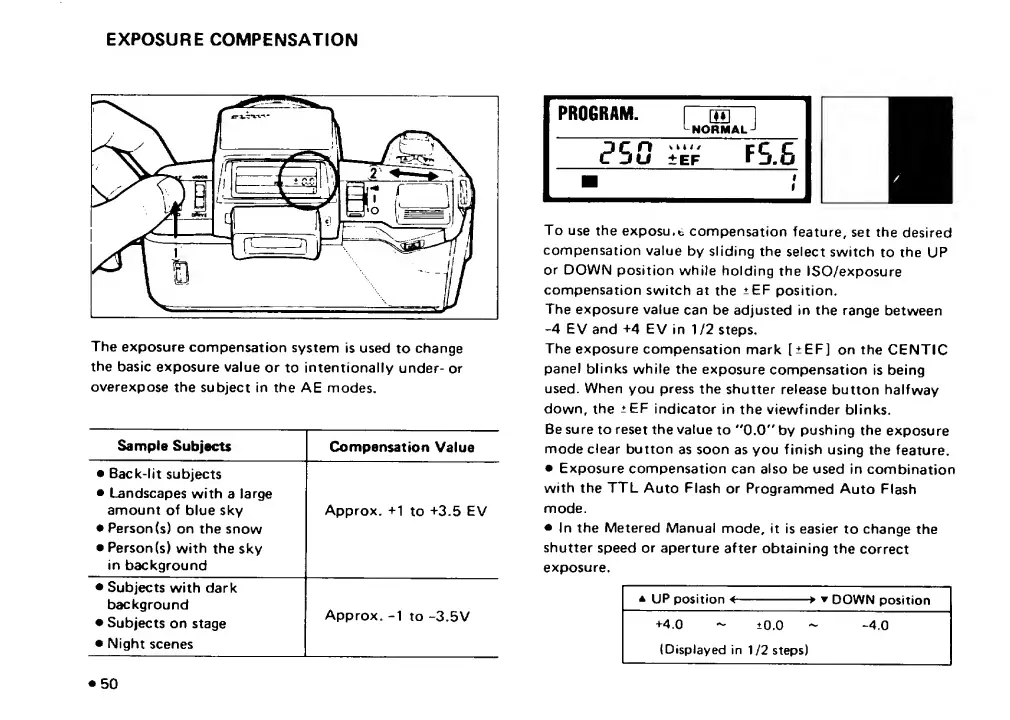
To
use
the
exposu.t
compensation
feature,
set
the
desired
compensation
value
by
sliding
the
select
switch
to
the
UP
or
DOWN
position
while
holding
the
ISO/exposure
compensation
switch
at
the
+EF
position.
The
exposure
value
can
be
adjusted
in
the
range
between
-4
EV
and
+4
EV
in
1/2
steps.
The
exposure
compensation
mark
[
+
EF]
on
the
CENTIC
panel
blinks
while
the
exposure
compensation
is
being
used.
When
you
press
the
shutter
release
button
halfway
down,
the
:?^EF
indicator
in
the
viewfinder
blinks.
Be
sure
to
reset
the
value
to
*'0.0"
by
pushing
the
exposure
mode
clear
button
as
soon
as
you
finish
using
the
feature.
Exposure
compensation
can
also
be
used
in
combination
with
the
TTL
Auto
Flash
or
Programmed
Auto
Flash
mode.
In
the
Metered
Manual
mode,
it
is
easier
to
change
the
shutter
speed
or
aperture
after
obtaining
the
correct
exposure.

Related product manuals