EasyManua.ls Logo

Pentax SF1 - Setting an Exposure Mode with a Pentax-F Lens

Pentax SF1
72 pages
Print Icon
To Next Page IconTo Next Page
To Previous Page IconTo Previous Page
Loading...
BASIC
OPERATIONS
SETTING
AN
EXPOSURE
MODE
WITH
A
PENTAX-F
LENS
Setting
and
Releasing
the
Auto
Lock
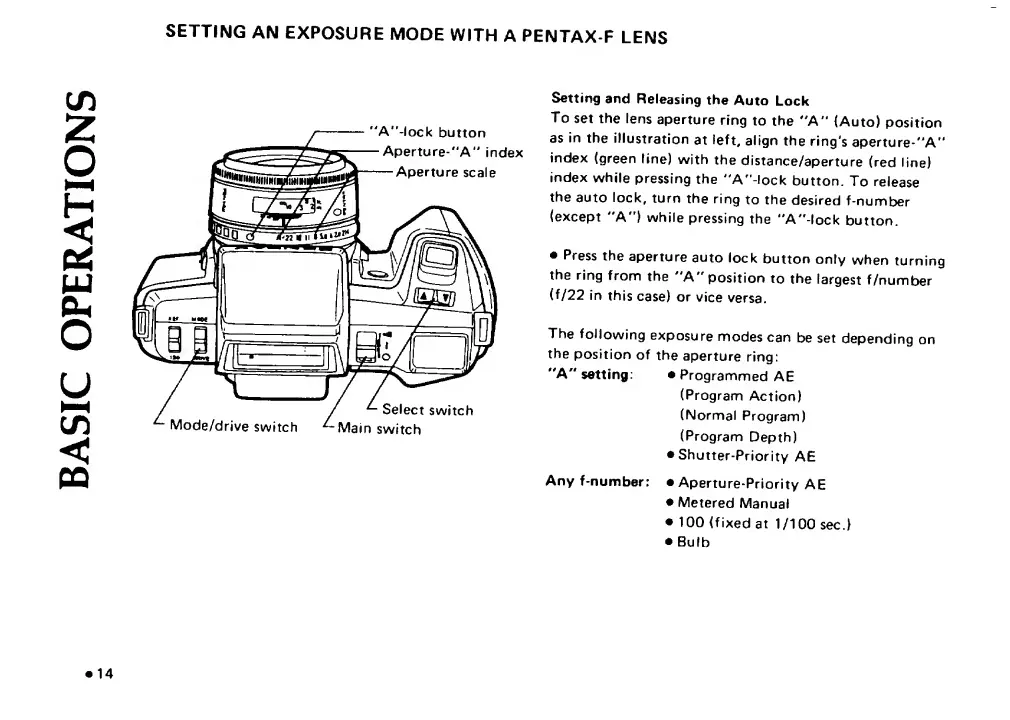
To
set
the
lens
aperture
ring
to
the
''A'*
(Auto)
position
as
in
the
illustration
at
left,
align
the
ring's
aperture-"A''
index
(green
line)
with
the
distance/aperture
(red
line)
index
while
pressing
the
"A"-!ock
button.
To
release
the
auto
lock,
turn
the
ring
to
the
desired
f-number
(except
"A")
while
pressing
the
"A"
lock
button.
Press
the
aperture
auto
lock
button
only
when
turning
the
ring
from
the
A"
position
to
the
largest
f/number
(f/22
in
this
case)
or
vice
versa.
The
following
exposure
modes
can
be
set
depending
on
the
position
of
the
aperture
ring:
"A''
setting:
Programmed
AE
(Program
Action)
(Normal
Program)
(Program
Depth)
Shutter-Priority
AE
Any
f-number:
Aperture-Priority
AE
Metered
Manual
100
(fixed
at
1/100
sec.)
Bulb
14

Related product manuals