EasyManua.ls Logo

Pentax SF1 - Page 19

Pentax SF1
72 pages
Print Icon
To Next Page IconTo Next Page
To Previous Page IconTo Previous Page
Loading...
Setting
an
Exposure
Mode
To
set
an
exposure
nnode,
turn
the
main
switch
on
[
I
•»)
].
Then,
slide
the
select
switch
to
the
UP
or
DOWN
position
while
pressing
the
mode/drive
switch
to
the
desired
mode
position.
One
move
of
the
select
switch
changes
the
mode
once,
and
the
mode
is
shifted
continuously
if
the
switch
is
held
at
the
position.
The
selected
mode
is
indicated
on
the
CENTIC
panel
each
time
the
mode
is
shifted.
The
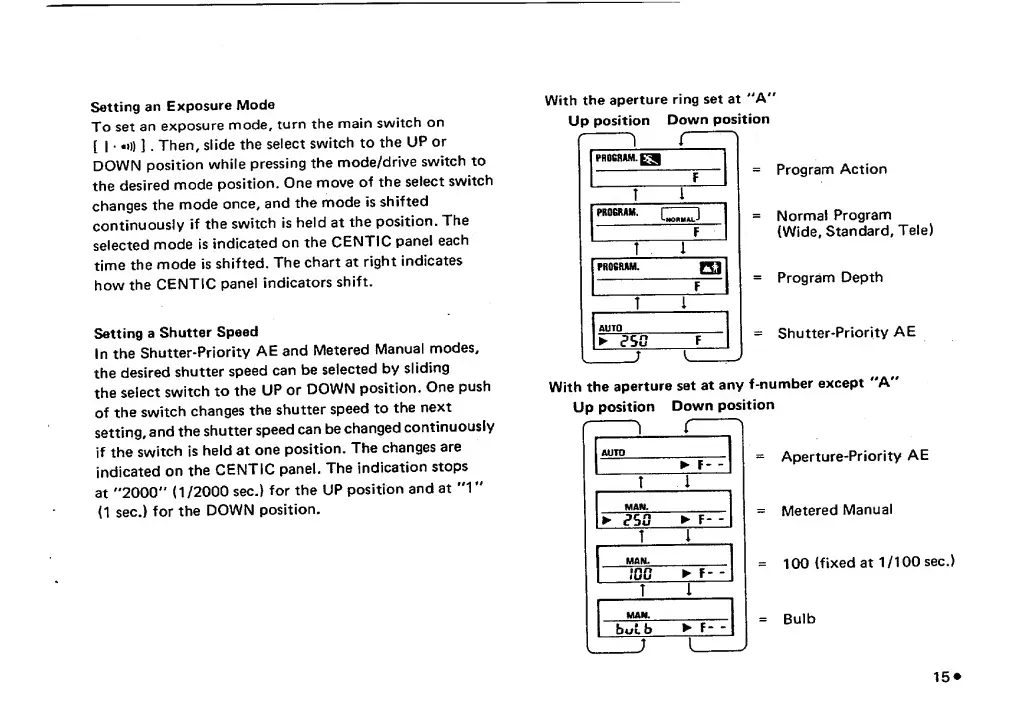
chart
at
right
indicates
how
the
CENTIC
panel
indicators
shift.
Setting
a
Shutter
Speed
In
the
Shutter-Priority
AE
and
Metered
Manual
modes,
the
desired
shutter
speed
can
be
selected
by
sliding
the
select
switch
to
the
UP
or
DOWN
position.
One
push
of
the
switch
changes
the
shutter
speed
to
the
next
setting,
and
the
shutter
speed
can
be
changed
continuously
if
the
switch
is
held
at
one
position.
The
changes
are
indicated
on
the
CENTIC
panel.
The
indication
stops
at
"2000"'
(1/2000
sec.)
for
the
UP
position
and
at
"V
(1
sec.)
for
the
DOWN
position.
With
the
aperture
ring
set
at
'"A"
Up
position
Down
position
=
Program
Action
=
Normal
Program
{Wide,
Standard,
Tele)
=
Program
Depth
=
Shutter-Priority
AE
With
the
aperture
set
at
any
f-number
except
"A"
Up
position
Down
position
Aperture-Priority
AE
Metered
Manual
100
(fixed
at
1/100
sec.)
Bulb
15^

Related product manuals