EasyManua.ls Logo

Pentax SF1 - Usable Film

Pentax SF1
72 pages
Print Icon
To Next Page IconTo Next Page
To Previous Page IconTo Previous Page
Loading...
USABLE
FILM
(OX-coded
film
and
non-DX-coded
film)
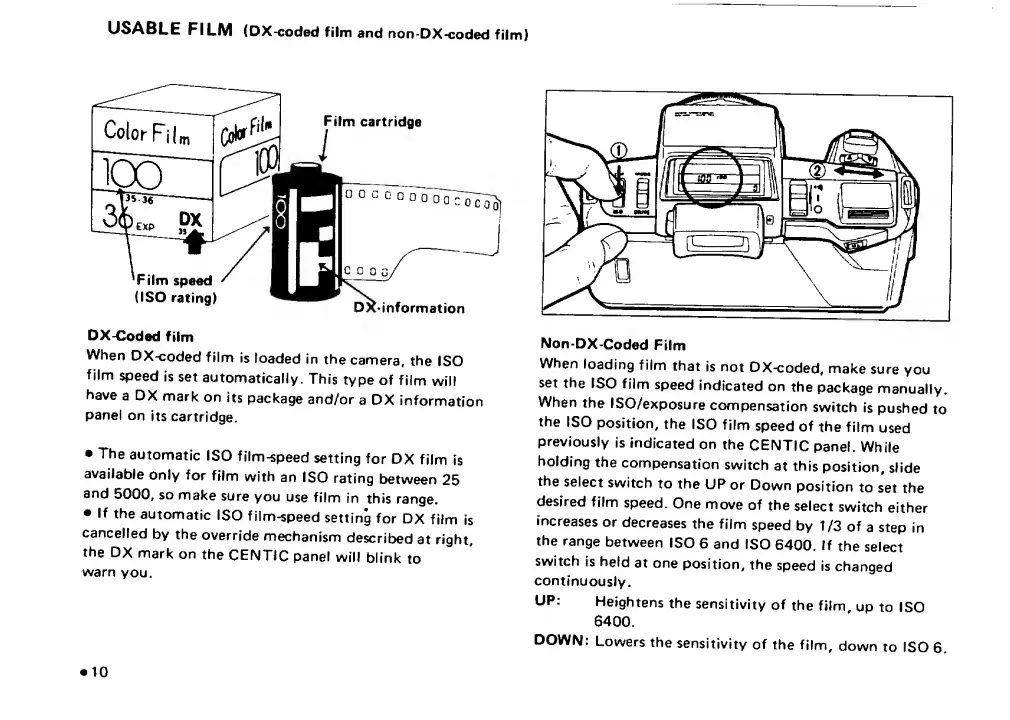
DX-Coded
film
When
DX^oded
film
is
loaded
in
the
camera,
the
ISO
film
speed
is
set
automatically.
This
type
of
film
will
have
a
DX
mark
on
its
package
and/or
a
DX
information
panel
on
its
cartridge.
The
automatic
ISO
film-speed
setting
for
DX
film
is
available
only
for
film
with
an
ISO
rating
between
25
and
5000.
so
make
sure
you
use
film
in
this
range.
If
the
automatic
ISO
film-speed
setting
for
DX
film
is
cancelled
by
the
override
mechanism
described
at
right,
the
DX
mark
on
the
CENTIC
panel
will
blink
to
warn
you.
Non-DX-Coded
Film
When
loading
film
that
is
not
DX-coded,
make
sure
you
set
the
ISO
film
speed
indicated
on
the
package
manually.
When
the
ISO/exposure
compensation
switch
is
pushed
to
the
ISO
position,
the
ISO
film
speed
of
the
film
used
previously
is
Indicated
on
the
CENTIC
panel.
While
holding
the
compensation
switch
at
this
position,
slide
the
select
switch
to
the
UP
or
Down
position
to
set
the
desired
film
speed.
One
move
of
the
select
switch
either
increases
or
decreases
the
film
speed
by
t/3
of
a
step
in
the
range
between
ISO
6
and
ISO
6400,
If
the
select
switch
is
held
at
one
position,
the
speed
is
changed
continuously.
UP:
Heightens
the
sensitivity
of
the
film,
up
to
ISO
6400.
DOWN:
Lowers
the
sensitivity
of
the
film,
down
to
ISO
6.
10

Related product manuals