EasyManua.ls Logo

Pentax SF1 - Self-Timer

Pentax SF1
72 pages
Print Icon
To Next Page IconTo Next Page
To Previous Page IconTo Previous Page
Loading...
SELF-TIMER
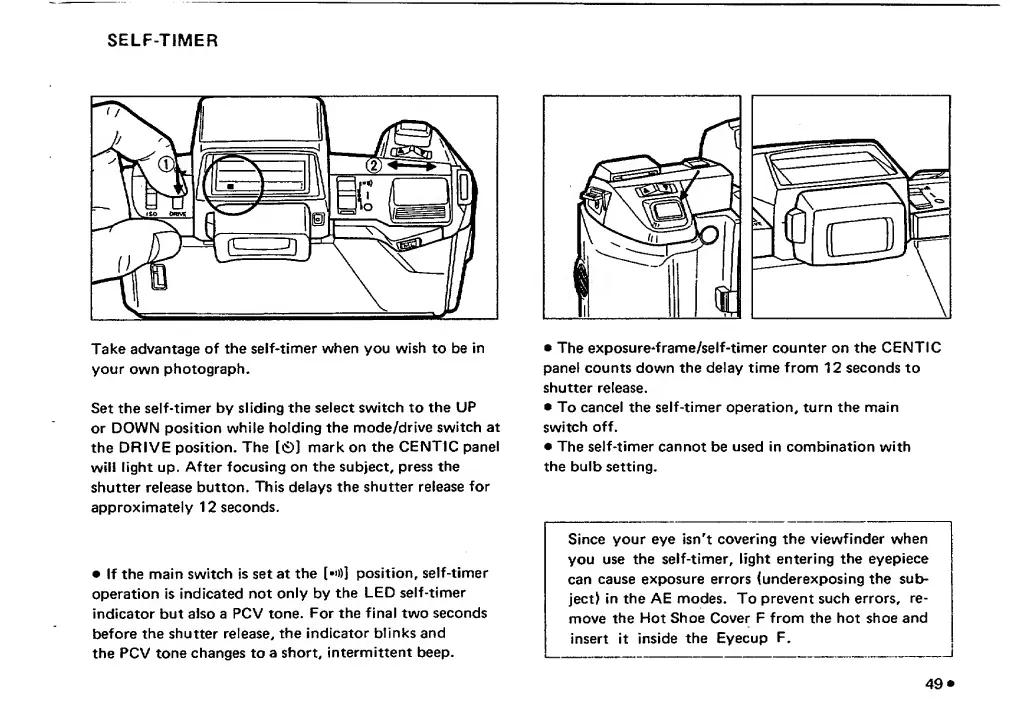
Take
advantage
of
the
self-timer
when
you
wish
to
be
in
your
own
photograph.
Set
the
self-timer
by
sliding
the
select
switch
to
the
UP
or
DOWN
position
while
holding
the
mode/drive
switch
at
the
DRIVE
position.
The
[0]
mark
on
the
CENTIC
panel
will
light
up.
After
focusing
on
the
subject,
press
the
shutter
release
button.
This
delays
the
shutter
release
for
approximately
12
seconds.
If
the
main
switch
is
set
at
the
[•»)]
position,
self-timer
operation
is
indicated
not
only
by
the
LED
self-timer
indicator
but
also
a
PCV
tone.
For
the
final
two
seconds
before
the
shutter
release,
the
indicator
blinks
and
the
PCV
tone
changes
to
a
short,
intermittent
beep.
The
exposure^frame/self-timer
counter
on
the
CENTIC
panel
counts
down
the
delay
time
from
12
seconds
to
shutter
release.
To
cancel
the
self-timer
operation,
turn
the
main
switch
off.
The
self-timer
cannot
be
used
in
combination
with
the
bulb
setting.
Since
your
eye
isn't
covering
the
viewfinder
when
you
use
the
self-timer,
light
entering
the
eyepiece
can
cause
exposure
errors
(underexposing
the
sub¬
ject)
in
the
AE
modes.
To
prevent
such
errors,
re¬
move
the
Hot
Shoe
Cover
F
from
the
hot
shoe
and
insert
it
inside
the
Eyecup
F.
49
*

Related product manuals