EasyManua.ls Logo

Pentax SF1 - Unloading Film

Pentax SF1
72 pages
Print Icon
To Next Page IconTo Next Page
To Previous Page IconTo Previous Page
Loading...
UNLOADING
FILM
(Be
sure
to
remove
the
film
from
the
camera
in
the
shade.)
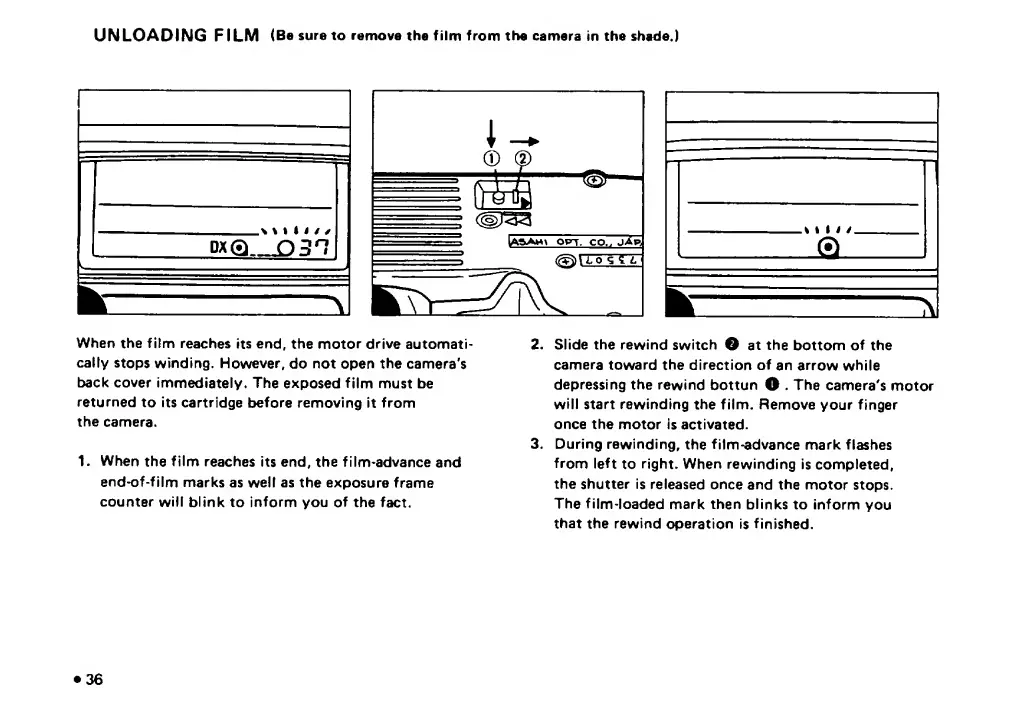
When
the
film
reaches
its
end,
the
motor
drive
automati¬
cally
stops
winding.
However,
do
not
open
the
camera's
back
cover
immediately.
The
exposed
film
must
be
returned
to
its
cartridge
before
removing
it
from
the
camera.
1.
W
h
en
the
film
reaches
its
end,
the
film-advance
and
end-of-film
marks
as
well
as
the
exposure
frame
counter
will
blink
to
inform
you
of
the
fact.
2.
Slide
the
rewind
switch
e
at
the
bottom
of
the
camera
toward
the
direction
of
an
arrow
while
depressing
the
rewind
bottun
O
.
The
camera's
motor
will
start
rewinding
the
film.
Remove
your
finger
once
the
motor
is
activated.
3.
During
rewinding,
the
film-advance
mark
flashes
from
left
to
right.
When
rewinding
is
completed,
the
shutter
is
released
once
and
the
motor
stops.
The
film-loaded
mark
then
blinks
to
inform
you
that
the
rewind
operation
is
finished.
36

Related product manuals