EasyManua.ls Logo

Pentax SF1 - Page 33

Pentax SF1
72 pages
Print Icon
To Next Page IconTo Next Page
To Previous Page IconTo Previous Page
Loading...
mat:
DRIVE
MODE
AMI
»CUSING
MODE
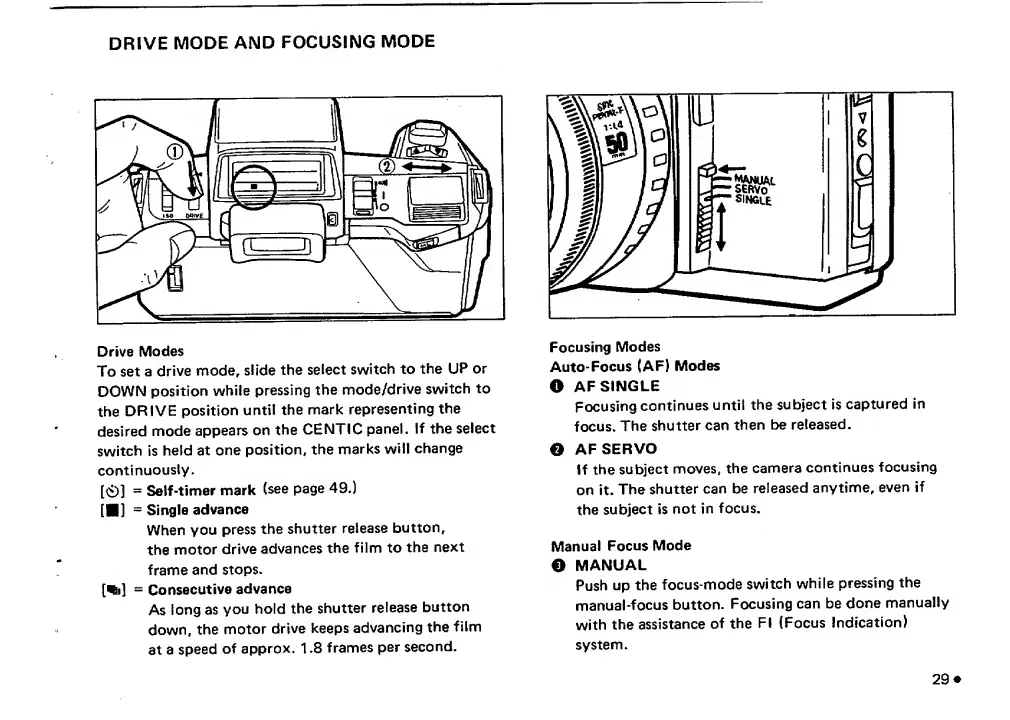
Drive
Modes
To
set
a
drive
mode,
siide
the
select
switch
to
the
UP
or
DOWN
position
while
pressing
the
mode/drive
switch
to
the
DRIVE
position
until
the
mark
representing
the
desired
mode
appears
on
the
CENTIC
panel.
If
the
select
switch
is
held
at
one
position,
the
marks
will
change
continuously.
[Ci)]
Self-timer
mark
(see
page
49.)
IM]
-
Single
advance
When
you
press
the
shutter
release
button,
the
motor
drive
advances
the
film
to
the
next
frame
and
stops.
[%]
-
Consecutive
advance
As
long
as
you
hold
the
shutter
release
button
down,
the
motor
drive
keeps
advancing
the
film
at
a
speed
of
approx.
1.8
frames
per
second.
Focusing
Modes
Auto-Focus
(AF)
Modes
O
AF
SINGLE
Focusing
continues
until
the
subject
is
captured
in
focus.
The
shutter
can
then
be
released.
e
AFSERVO
If
the
subject
moves,
the
camera
continues
focusing
on
it.
The
shutter
can
be
released
anytime,
even
if
the
subject
is
not
in
focus.
Manual
Focus
Mode
O
MANUAL
Push
up
the
focus-mode
switch
while
pressing
the
manual-focus
button.
Focusing
can
be
done
manually
with
the
assistance
of
the
FI
(Focus
Indication)
system.
29
#

Related product manuals