169
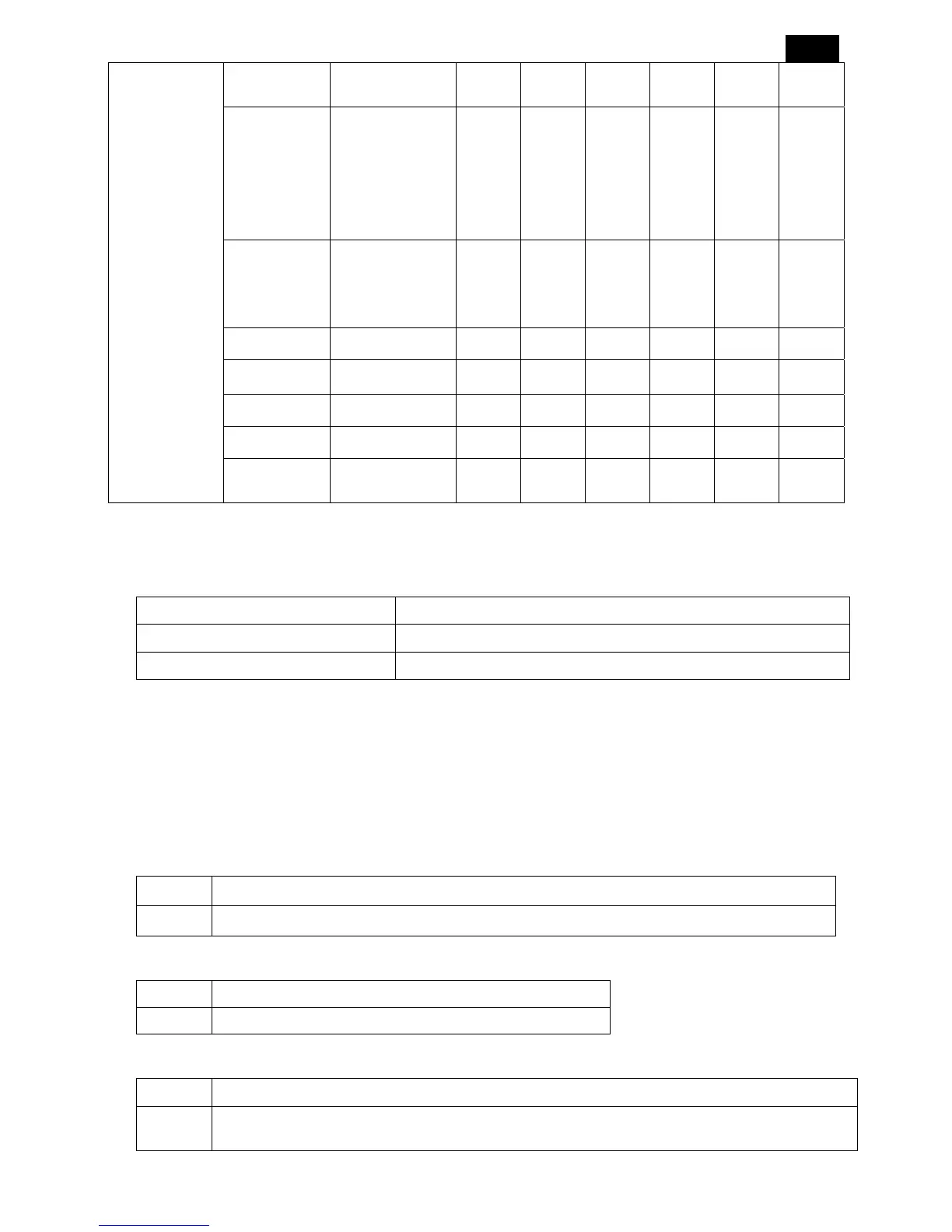
Keyboard
Control
Yes/No No No No No No No
Tiling
H Monitors: 1~5
V Monitors: 1~5
Position: 1~25
Frame Comp.:
No/Yes
Enable: No/Yes
1
1
1
No
No
1
1
1
No
No
1
1
1
No
No
1
1
1
No
No
1
1
1
No
No
1
1
1
No
No
Date And
Time
Year/Month/Day/
Hour/Minute/Day
light/Current
Time
Schedule On/Off/Input - - - - - -
Monitor ID 1~26 1 1 1 1 1 1
DDC/CI On/Off ON ON ON ON ON ON
Smart Power High/Medium/Off OFF OFF OFF OFF OFF OFF
Advanced
Option Reset
No/Yes No No No No No No
6.3 Time-out
Summary of Time-out values:
Description Value
OSD Turn Off 5-120 seconds
Information OSD 10
6.4 Last Status
A variable can be classified as “last status” variable. This means if the variable is changed it may take up to 3
seconds before the variable is stored in NVM. This automatic storage mechanism is not operational when the
Display is in Factory mode.
5.4.1 Audio last status
Region Audio Last Status
ALL Mute, Treble, Bass, Balance
5.4.2 Video last status
Region Video Last Status
ALL Brightness, Color, Contrast, Sharpness, and Smart Picture.
5.4.3 Function last status
Region Function Last Status
ALL
Language, RS232 ID , Switch On Channel , Switch On Volume , Power On ,Volume Indicator,
Display , Power LED , Keyboard Lock , Sleep timer , Smart Power




 To Next Page