15
15. MENU Button
To turn the OSD menu on/off
16. “+” Button
y To increase the adjustment with OSD menu
y To move the sub-picture right when in “PIP” mode
17. EXIT Button
To return to a previous channel or menu screen.
18. ▼ Button
y To move the highlight bar down to adjust the
selected item when OSD menu is on
y To move the sub-picture down when in “PIP”
mode.
19. VOL UP Button
To increase the audio output level.
20. VOL DOWN Button
To decrease the audio output level.
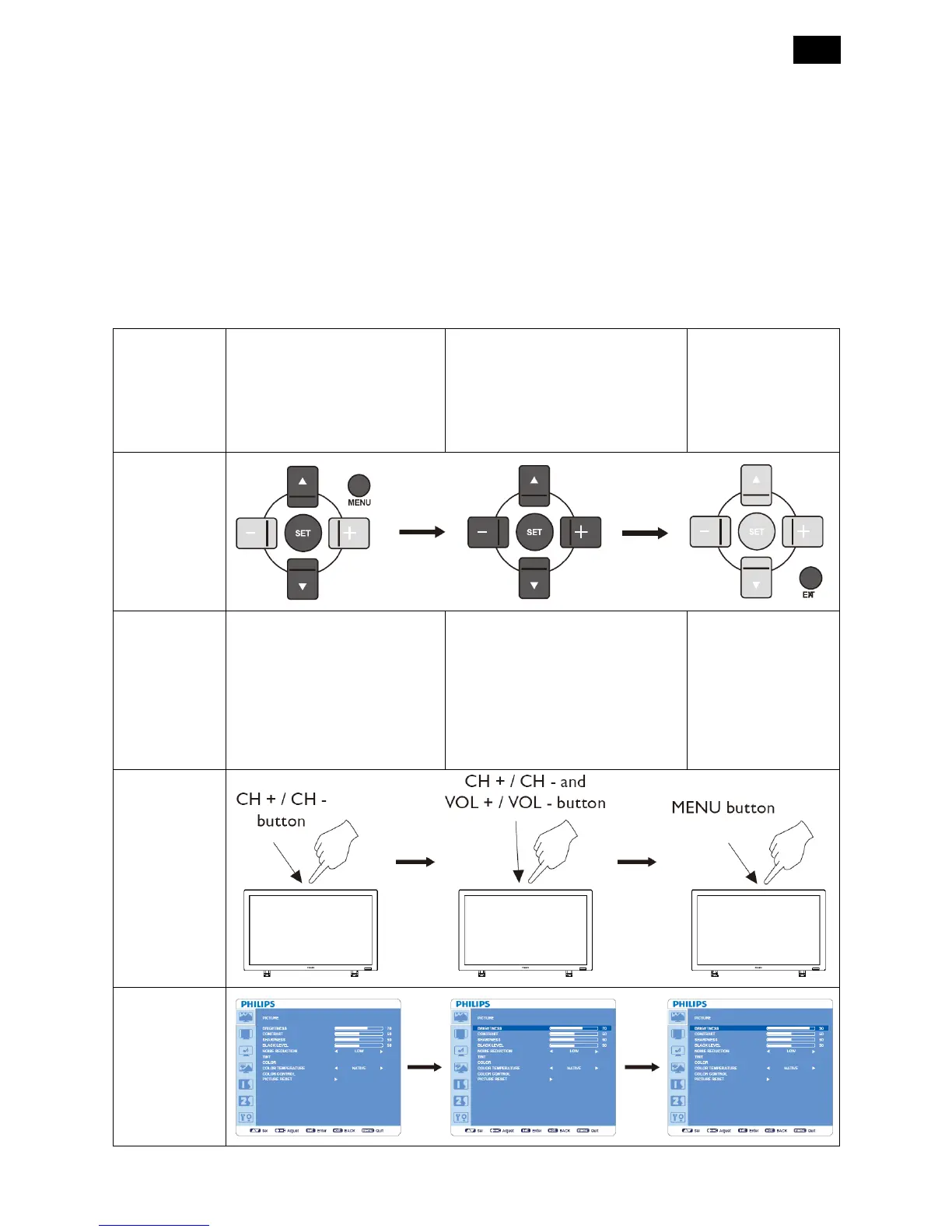
3.4 OSD Controls
Press MENU button to open
Main menu. Press ▲ or ▼
button to select the sub-menu
Press ▲ or ▼, and “+” or “-”
button to make selection or
adjust the setting. Press SET
button to enable the setting.
Press MENU or
EXIT button to exit.
Remote
Control
Press MENU button to open
Main menu. Press CH + or CH
- button to select.
Press CH + or CH - as ▲ or ▼
button, and VOL + or VOL - as ►
or ◄ button to make selections or
adjust the settings.
Press VOL + as ► button to
enable the setting.
Press MENU button
to exit.
Control Panel
OSD Screen












 To Next Page