User Manual BDL5545E
14
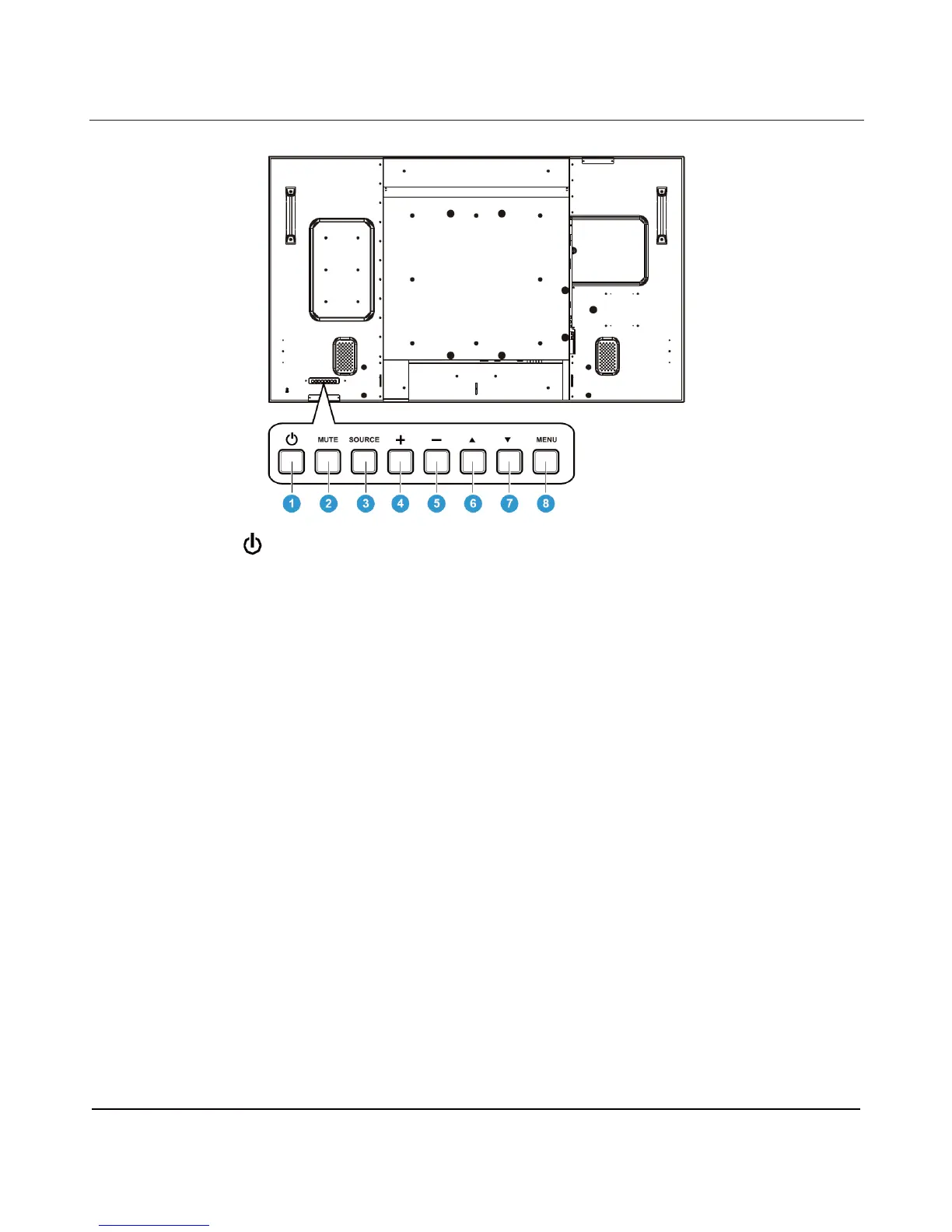
2.2. REAR VIEW
1. POWER button (
)
To switch the power on or put the display to standby.
2. MUTE button
To switch the audio mute ON/OFF.
3. SOURCE button
Use this button to select the input
sour
ce
.
When the On Screen
Display
menu is active, this is also used as the SET
button.
4. PLUS (+) button
To increase the adjustment while OSD menu is on, or to increase the audio output level while the OSD
menu is off.
5. MINUS (-) button
To decrease the adjustment while OSD menu is on, or to decrease the audio output level while the OSD
menu is off.
6. UP (
) button
To move the highlight bar up to adjust the selected item while OSD menu is on.
7. DOWN (
) button
To move the highlight bar down to adjust the selected item while OSD menu is on.
8. MENU button
Activates the OSD Menu. Once OSD is activated, pressing this button will return to the previous menu.
Note: Keyboard Control Lock Mode This function completely disables the access to all Keyboard Control
functions. To enable the keyboard control lock, press both of “S” and “T” buttons and hold down continuously
for around 3 seconds. To recover back to the user mode, press both of “S” and “T” and hold continuously for
three 3 seconds.












 To Next Page