8
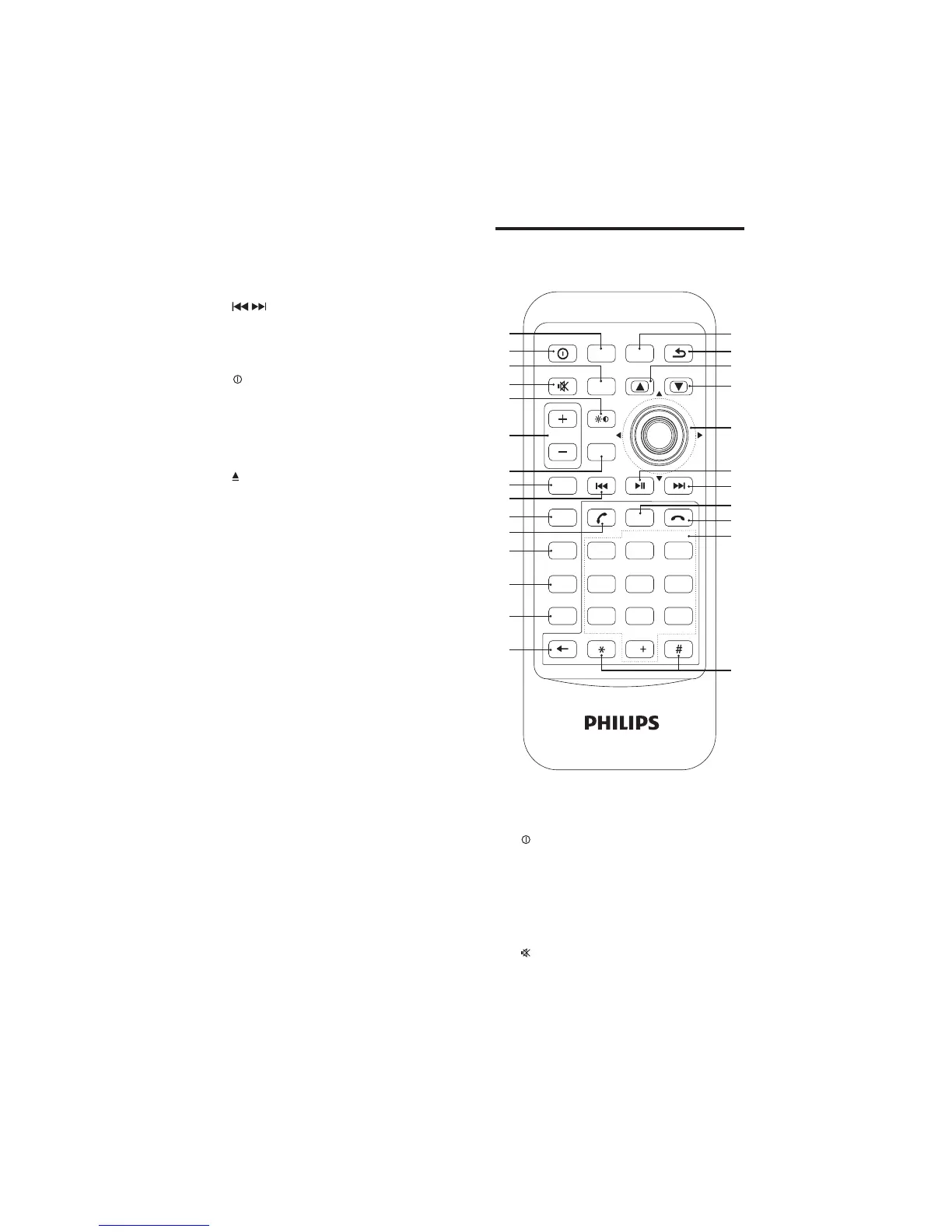
Overview of the remote
control
a HOME
Access main menu.•
b
PWR
Turn the unit on or off.•
c BAND
Select radio band.•
Select video input format under •
DVD mode.
d
Mute or unmute audio.•
a
b
c
d
e
f
g
h
i
j
k
l
m
n
o
z
y
x
w
v
u
t
s
r
q
p
PWR
VOLUME
HOME
BAND
EQ
1
4
7
2
5
8
0
3
6
9
AUDIO
GOTO
SHUFF
ENTER
SRC
ZOOM ANGLE
REPEAT
DVD
MENU
SUB
TITLE
i DISP
Switch back light mode. •
During video play, press and hold to •
adjust display contrast.
j
/
Tune to a radio station.•
Skip track.•
Fast backward/forward playback.•
k
/MUTE/OK
Turn the unit on or off.•
Turn mute on or off.•
Confirm selection.•
l SD/SDHC/MMC card slot
m
Eject disc.•
n Panel power connection
o RESET
Reset the unit when it hangs up.•
p Disc slot
EN



 To Next Page