INTELIA 03 USER INSTRUCTIONS
Saeco International Group Rev. 01 / September 2011 Page / 05
02
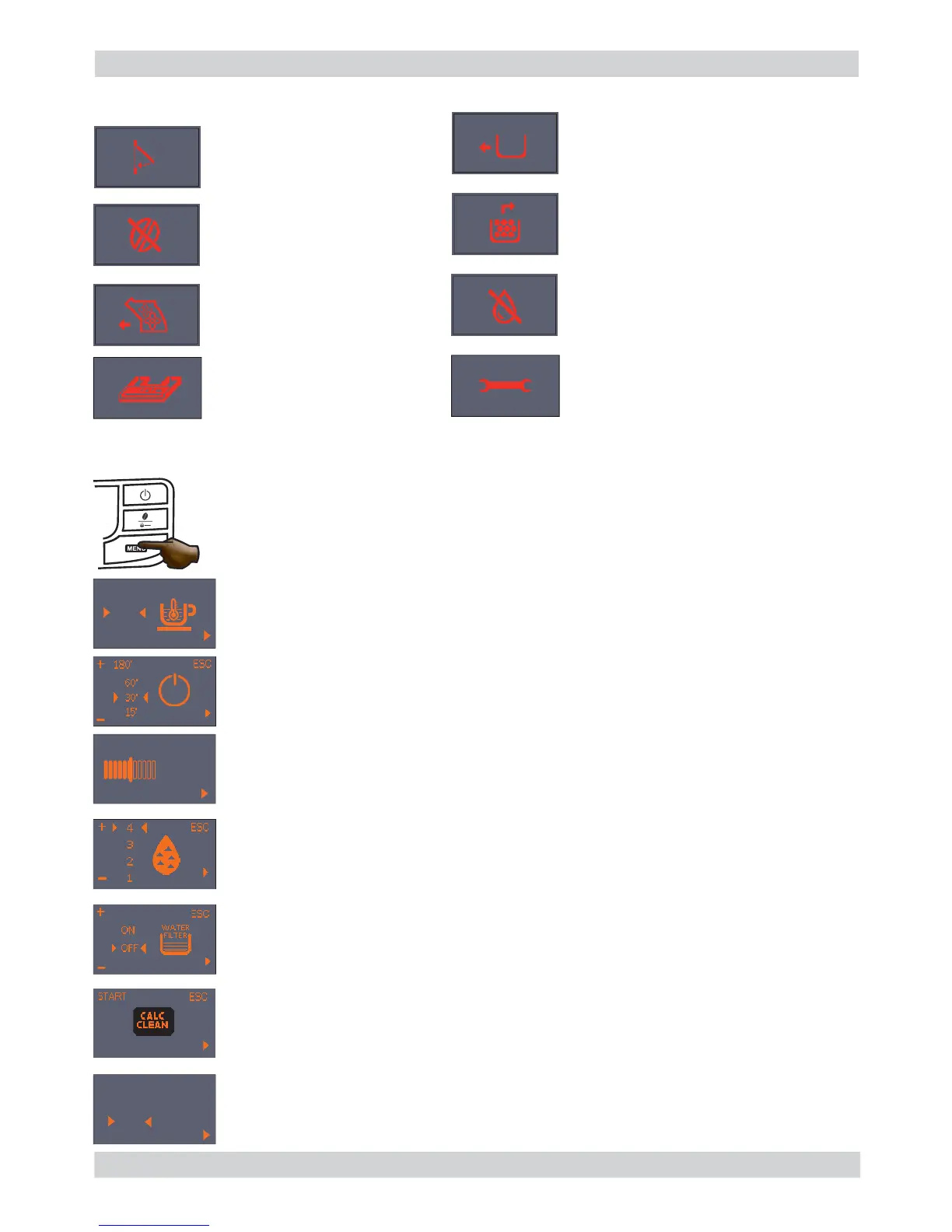
Alarm signals (RED)
MENU (commands and programming)
Close the service door.
No beans inside the coffee
container.
After fi lling the container, the
cycle can be restarted.
The Brewing Unit must be
inserted in the machine.
Insert the dreg drawer.
Empty the dreg drawer and the drip
tray.
Fill water tank.
Insert the drip tray as far as it
will go.
You can access the programming menu only when the machine is on.
Press the menu button to access programming.
Coffee temperature:
This function allows the coffee dispensing temperature to be adjusted.
Timer (stand-by)
This function lets you adjust the time for switching to Stand By after the last
dispensing.
Contrast
This function lets you adjust the display contrast for better viewing of the
messages.
“INTENZA+” water fi lter
This function lets you manage the “INTENZA+” water fi lter.
For details see the paragraph concerning the fi lter management.
Descaling Cycle
This function lets you execute a descaling cycle.
Factory settings
This function allows the factory values to be reset.
Water hardness
This function lets you adjust the water hardness so that machine maintenance is
managed better:
1 = very soft water 2= soft water 3 = hard water 4 = very hard water
Switch the machine off, wait for
30 seconds and switch it back on
again. Repeat 2 or 3 times.
If the machine does NOT start, contact
the service center.
ESC
-
+
Display
contrast
ESC
-
+
MAX
MED
MIN
ESC
-
+
YES
NO
DEFAULT
SETTINGS









 To Next Page