Map the audio inputs to the
connected devices
• Before you start, ensure that the audio output of
the HDMI TV and other HDMI devices have been
connected to the audio input jacks on this Home
Theater System,
General Setup
Disc Lock O One Touch Play
....................Dispiay D!m................................................................................................................................
Screen Saver O Audio Input Mapping
Steep Timer
DivX(R) VOD Code
1 Press DISC.
2 Press _ SETUP.
L_ [General Setup] menu is displayed.
3
4
5
Press _,
Select [EasyLink Setup], then press _.
- [One Touch Play] and [One Touch
Standby] functions are turned on by
default in the factory.
Select [System Audio Control] > [On],
then press OK to start scanning devices.
Once complete, audio input mapping
menu is displayed.
6
7
8
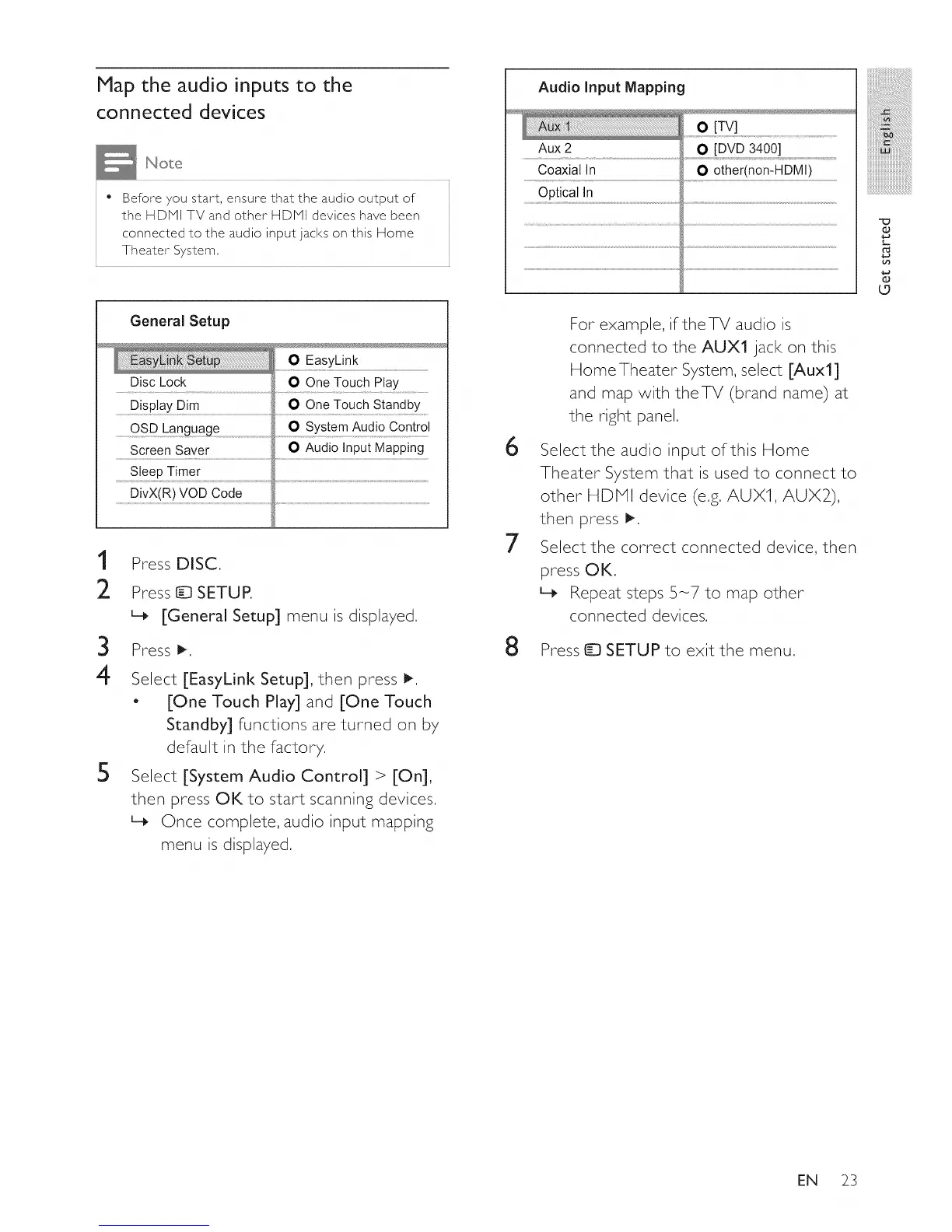
Audio Input Mapping
Aux 2 O [DVD 3400]
Coaxial In O other(nomHDMI)
Optical In
For example, iftheTV audio is
connected to the AUXl jack on this
Home Theater System, select [Auxl]
and map with theTV (brand name) at
the right panel.
Select the audio input of this Home
Theater System that is used to connect to
other HDHI device (e.g. AUX1, AUX2),
then press _.
Select the correct connected device, then
press OK.
L_ Repeat steps 5-7 to map other
connected devices,
Press ID SETUP to exit the menu,
O
L.
O
o
EN 23















 To Next Page