Play from iPod
Control iPod music
Simply connect your iPod to the docking station
to enjoy your iPod play through this Home
Theater System.
List of supported iPod range:
iPod classic iPod nano
iPod touch 2G iPod nano 2G
iPod touch iPod nano 3G
iPod nano 4G
Pod 5G
Pod photo
Pod 4G
Pod mini
• Refer to the Philips website for latest updates on the
supported iPod range,
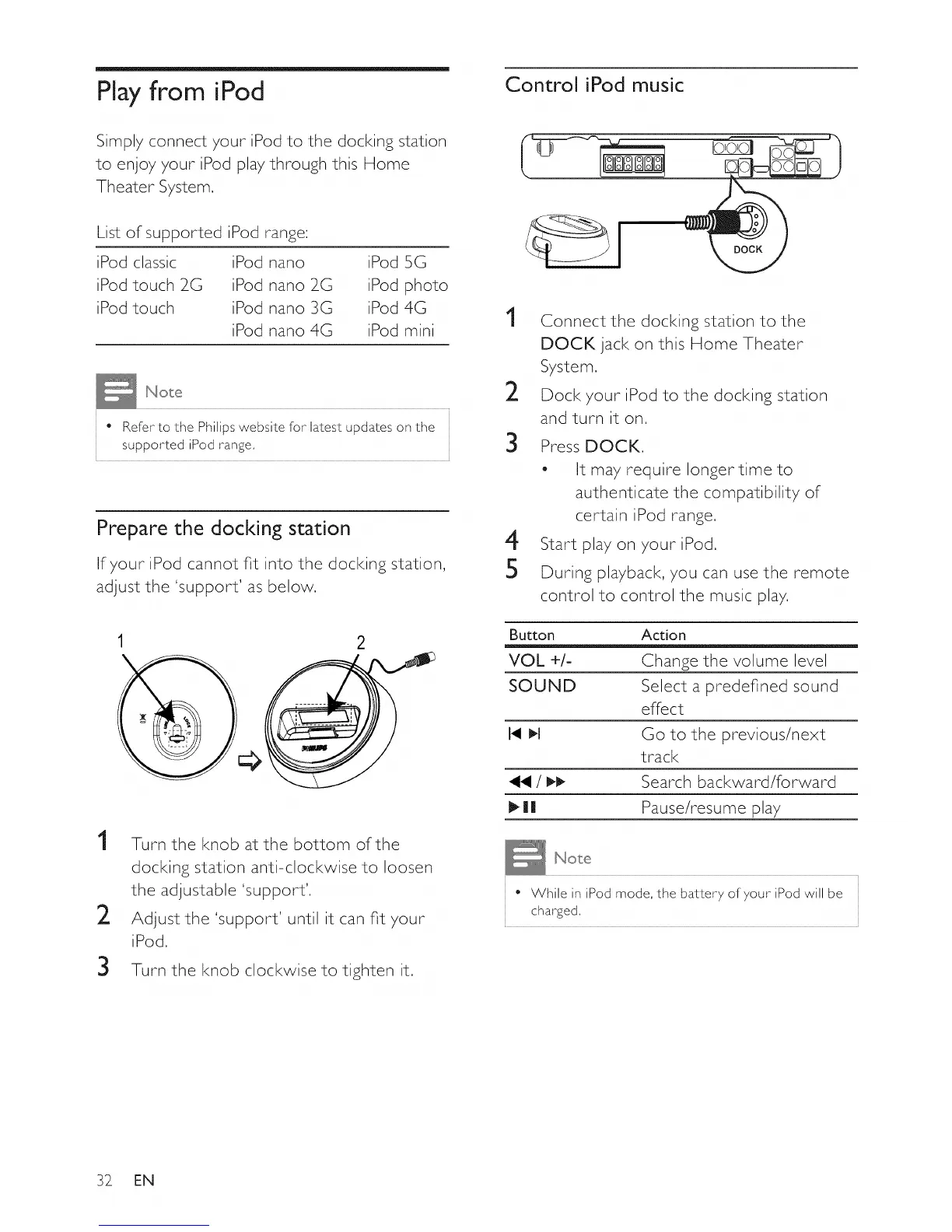
Prepare the docking station
If your iPod cannot fit into the docking station,
adjust the 'support' as below.
2
1
2
Turn the knob at the bottom of the
docking station anti-clockwise to loosen
the adjustable 'support',
Adjust the 'support' until it can fit your
iPod,
3 Turn the knob clockwise to tighten it.
1
2
3
4
5
Connect the docking station to the
DOCK jack on this Home Theater
System.
Dock your iPod to the docking station
and turn it on.
Press DOCK.
- It may require longer time to
authenticate the compatibility of
certain iPod range,
Start play on your iPod,
During playback, you can use the remote
control to control the music play,
Button Action
VOL +/- Change the volume level
SOUND Select a predefined sound
effect
I_ I,I Go to the previous/next
track
/ _ Search backward/forward
1_1| Pause/resume play
• While in iPod mode, the battery of your iPod will be
charged,
32 EN















 To Next Page