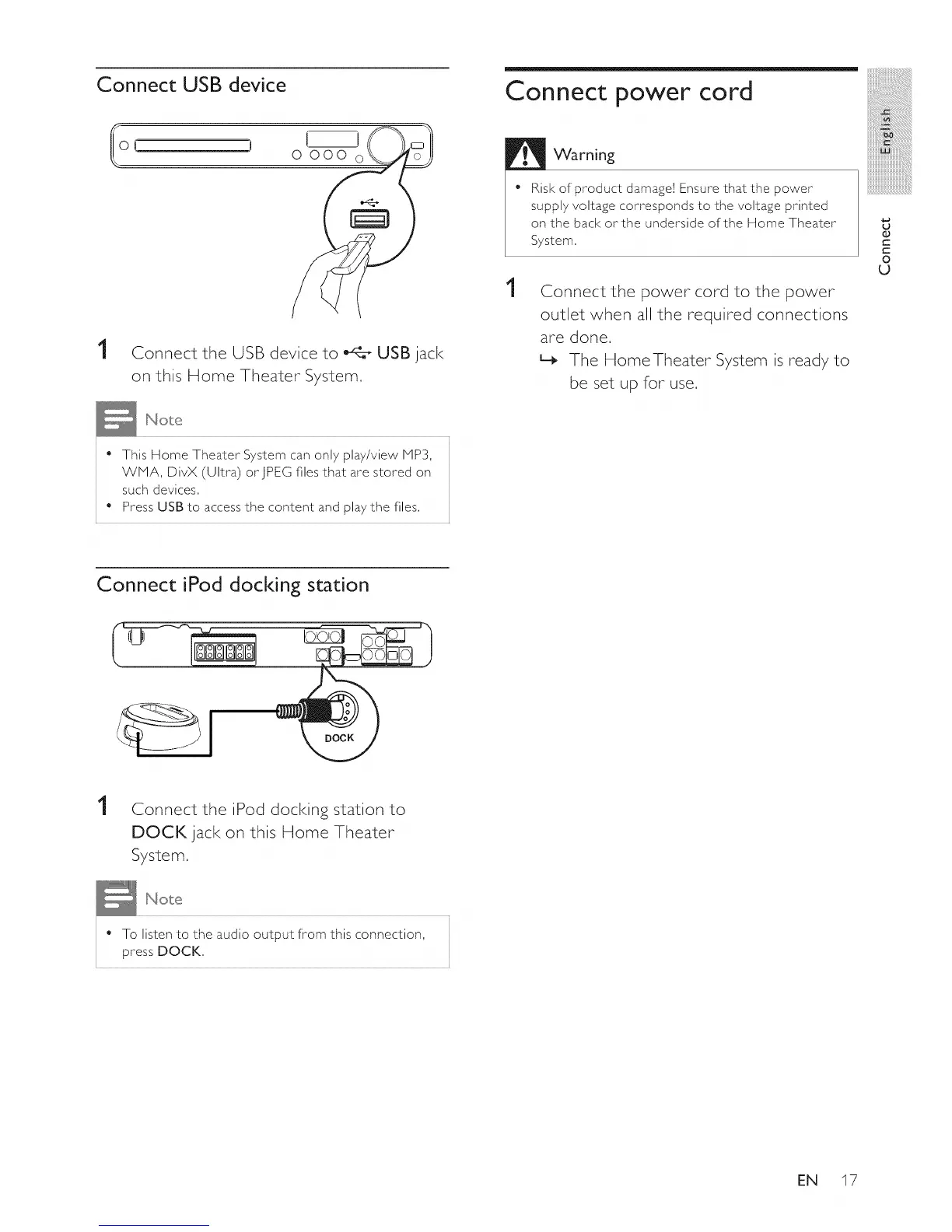
Connect USB device
0 000 o
1
Connect the USB device to _ USB jack
on this Home Theater System,
Connect power cord
1
Warning
Risk of product damage] Ensure that the power
supply voltage corresponds to the voltage printed
on the back orthe underside of the Home Theater
System,
Connect the power cord to the power
outlet when all the required connections
are done,
L_ The HomeTheater System is ready to
be set up for use,
iii_!iiiiiiiiiiiiiiii_iii!iiiiiiiii!ii
iiiiiiiiiiiiiii_!i!i!i!i!i
iiiiiiiiiiiiiiiiiii@!_i!i!ili!i
iiiiiiiiiiiiiiiiiiiiiiiiiiiiii_.........
u
O
C
C
O
u
• This Home Theater System can only play/view MP3,
WMA, DivX (Ultra) orJPEG files that are stored on
such devices,
Press USB to access the content and play the files,
Connect iPod docking station
1
Connect the iPod docking station to
DOCK jack on this Home Theater
System,
• To listen to the audio output from this connection,
press DOCK,
EN 17















 To Next Page