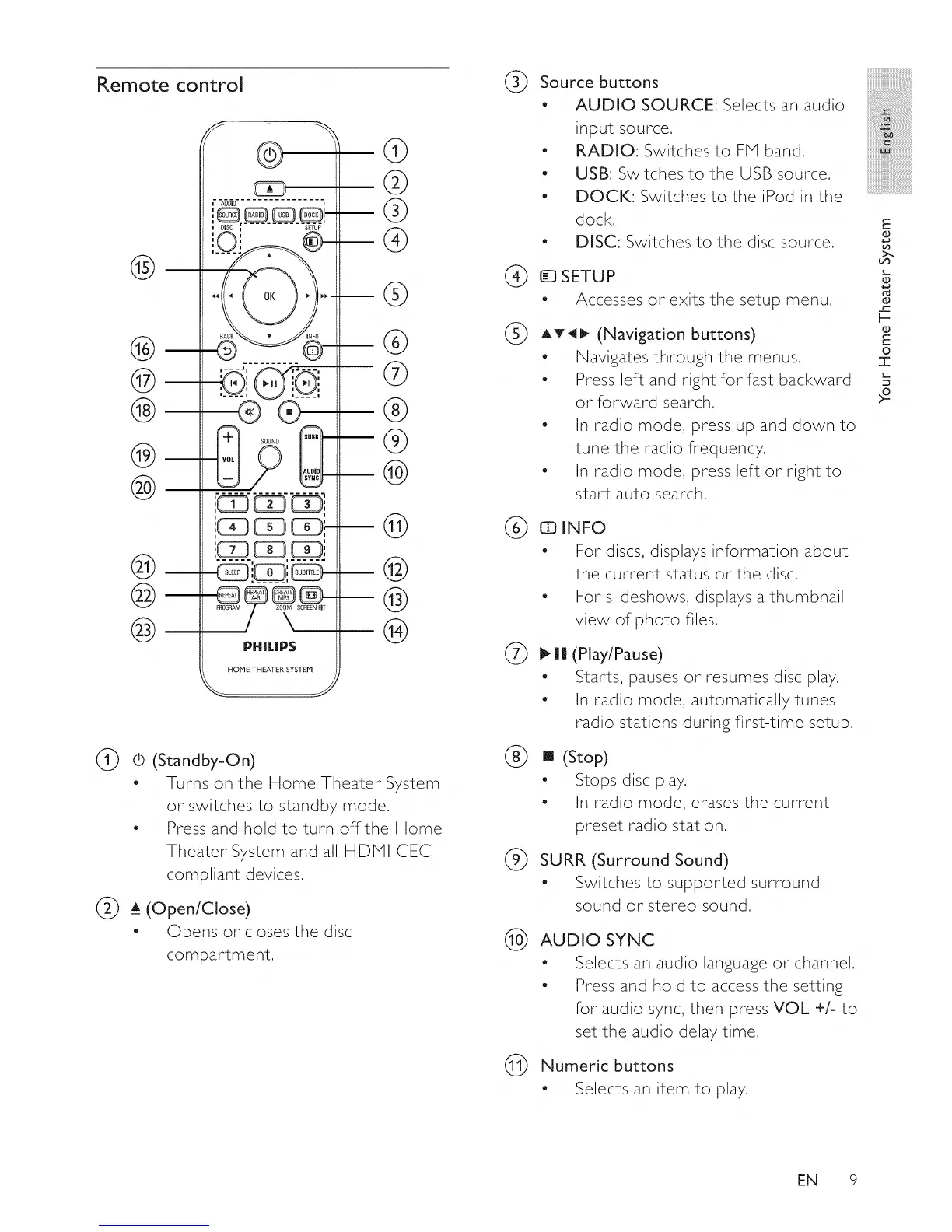
Remote control
@
®
@
®
®
@
@
@
@
%
@
®
\
PHILIP5
HOHE THEATER SYSTEH
@
@
®
@
®
®
@
®
®
@
©
@
@
®
(_ 0 (Standby-On)
- Turns on the Home Theater System
or switches to standby mode,
- Press and hold to turn off the Home
Theater System and all HDPII CEC
compliant devices,
(_ a__(Open/Close)
- Opens or closes the disc
compartment,
®
Source buttons
- AUDIO SOURCE: Selects an audio
input source.
- RADIO: Switches to FM band,
- USB: Switches to the USB source,
- DOCK: Switches to the iPod in the
dock,
- DISC: Switches to the disc source,
®
ETUP
Accesses or exits the setup menu.
AT4_ (Navigation buttons)
- Navigates through the menus.
- Press left and right for fast backward
or forward search,
- In radio mode, press up and down to
tune the radio frequency,
- In radio mode, press left or right to
start auto search,
(_) EElINFO
- For discs, displays information about
the current status or the disc,
- For slideshows, displays a thumbnail
view of photo files,
®
®
(Play/Pause)
Starts, pauses or resumes disc play,
In radio mode, automatically tunes
radio stations during first-time setup,
[] (Stop)
" Stops disc play,
- In radio mode, erases the current
preset radio station,
SURR (Surround Sound)
- Switches to supported surround
sound or stereo sound,
(_) AUDIO SYNC
- Selects an audio language or channel,
- Press and hold to access the setting
for audio sync, then press VOL +/- to
set the audio delay time,
Numeric buttons
- Selects an item to play,
E
O
O
oS
O
F-
O
E
O
I
EN 9















 To Next Page