6 Screeneo U5 SCN550/INT
2 Overview
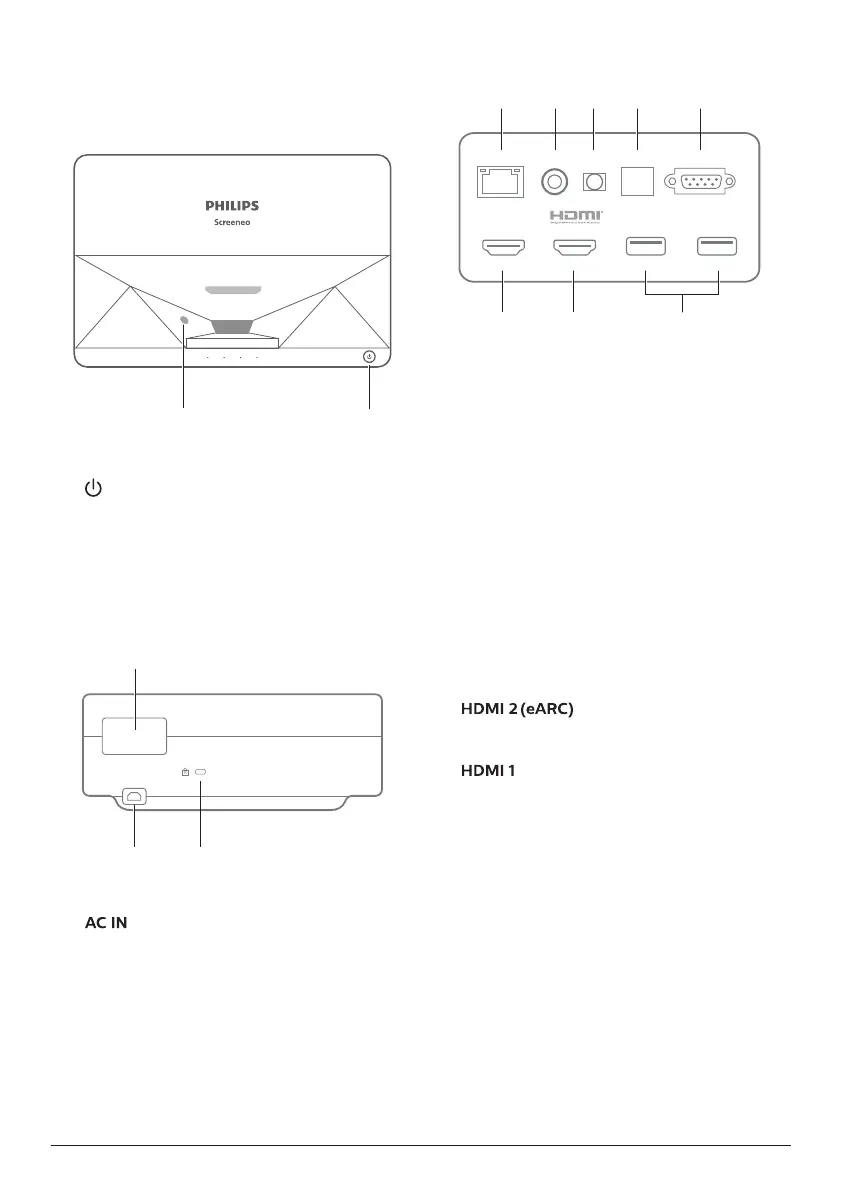
Top view
ba
a
Eye protection sensor
b
Power button and indicator
• Press for 2 seconds: switch the projector
on or off.
• Press for 1 second: switch the projector
to standby.
Rear view
a
b
c
a
Connection ports
b
Connect to a suitable power supply.
c
Kensington Security Slot™
Connection ports
USB (5V/1A) USB (5V/1A)
HDMI 1
LAN COAXIAL SPDIF RS-232
HDMI 2 (eARC)
AUX
gh
ed
cba
f
a
LAN
For wired network connections.
b
COAXIAL
The coaxial output mainly provides the
transmission of digital audio signals and
can be connected to an external sound
system.
c
AUX
Provide output of analog audio signal (L/R).
d
S/PDIF
Fiber interface for digital audio output.
e
RS-232
Control interface.
f
USB 2�0
For connection with USB devices, such as
flash drives, mobile hard disks, etc.
g
input
For connection with external devices with
HDMI™ ports (eARC).
h
input
For connection with external devices with
HDMI™ ports.















 To Next Page