7
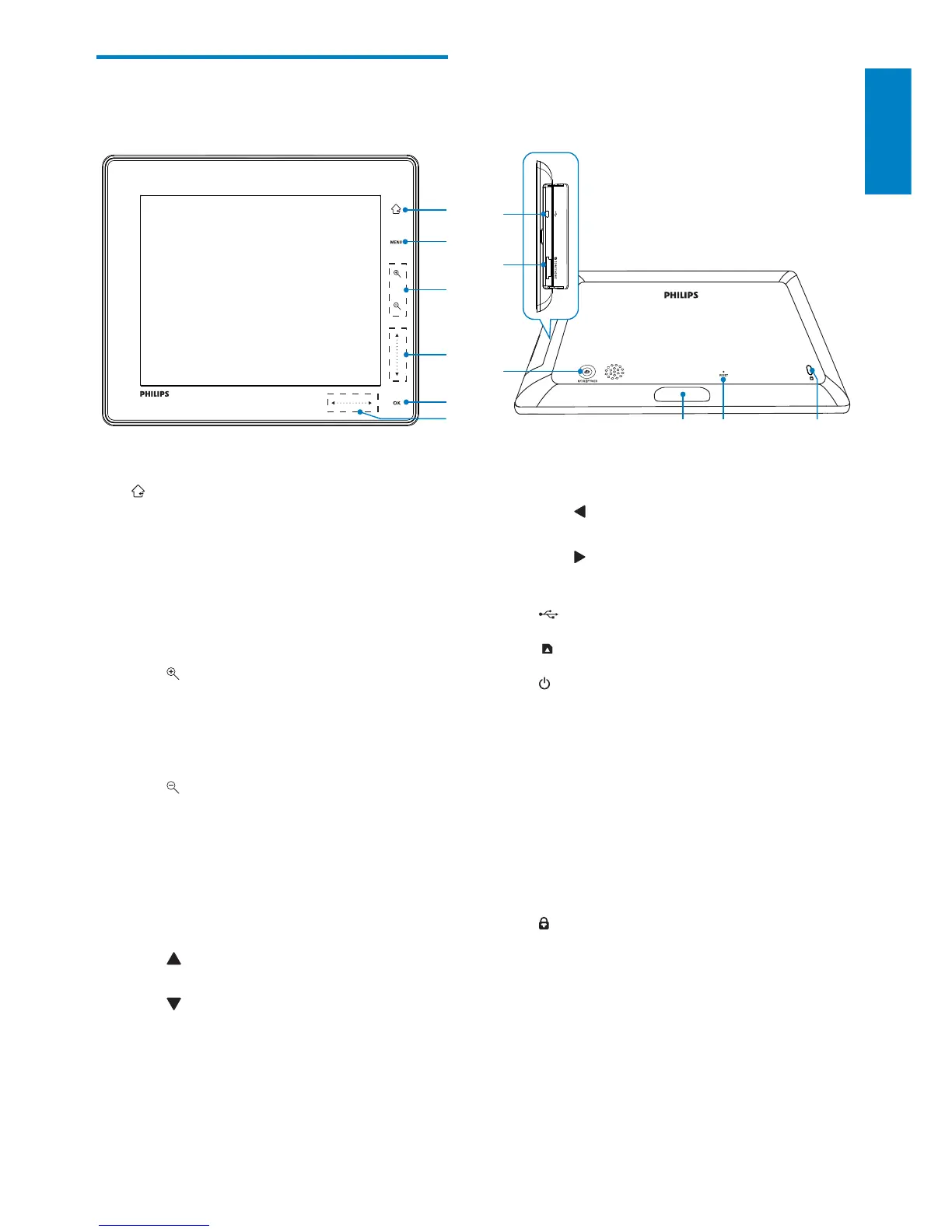
f Left-right slider
•
Tap to skip left
•
Tap to skip right
g
Mini USB jack
h
SD/MMC/xD/MS/MS Pro card slot
i
Press to turn on the PhotoAlbum•
Press and hold to turn off the •
PhotoAlbum
Press to switch modes (between •
slideshow and clock/calendar; or,
between wave view and album view)
j Charging dock connector
k RESET
l
Kensington lock
Overview of your
PhotoAlbum
a
Hold to go to the home screen•
Tap to return to the upper-level •
menu
b MENU
Tap to access/exit the option menu•
c Zoom buttons
•
Tap to zoom in
Tap to switch modes (wave mode ->
album mode -> slideshow mode ->
zoom in twice -> zoom in 4 times)
•
Tap to zoom out
Tap to switch modes (wave mode
<- album mode <- slideshow mode
<- zoom out twice <- zoom out 4
times)
d Up-down slider
•
Tap to scroll up
•
Tap to scroll down
e OK
Tap to play/pause slideshow•
Tap to confirm a selection•
a
c
d
e
f
k
j
l
i
g
h
b
English
EN



 To Next Page