The Inline controller under PC Worx/PC Worx Express
8385_en_02 PHOENIX CONTACT 47
PC/network adapter To determine whether your network permits the IP settings used in the example project (see
Figure 3-4 on page 47), proceed as follows:
• In the Windows Control Panel, check the settings for your PC network adapter.
• If necessary, adjust these settings so that the ILC 151 ETH can be accessed in your
network via the IP address used in the example project.
If your network does not permit the use of the IP address used in the example project, adjust
the settings in the project information accordingly (see Figure 3-1 on page 44).
Assigning IP settings To set the IP address in PC Worx/PC Worx Express, proceed as described below.
• Establish an Ethernet connection between your PC and the controller.
• Switch to the bus configuration workspace.
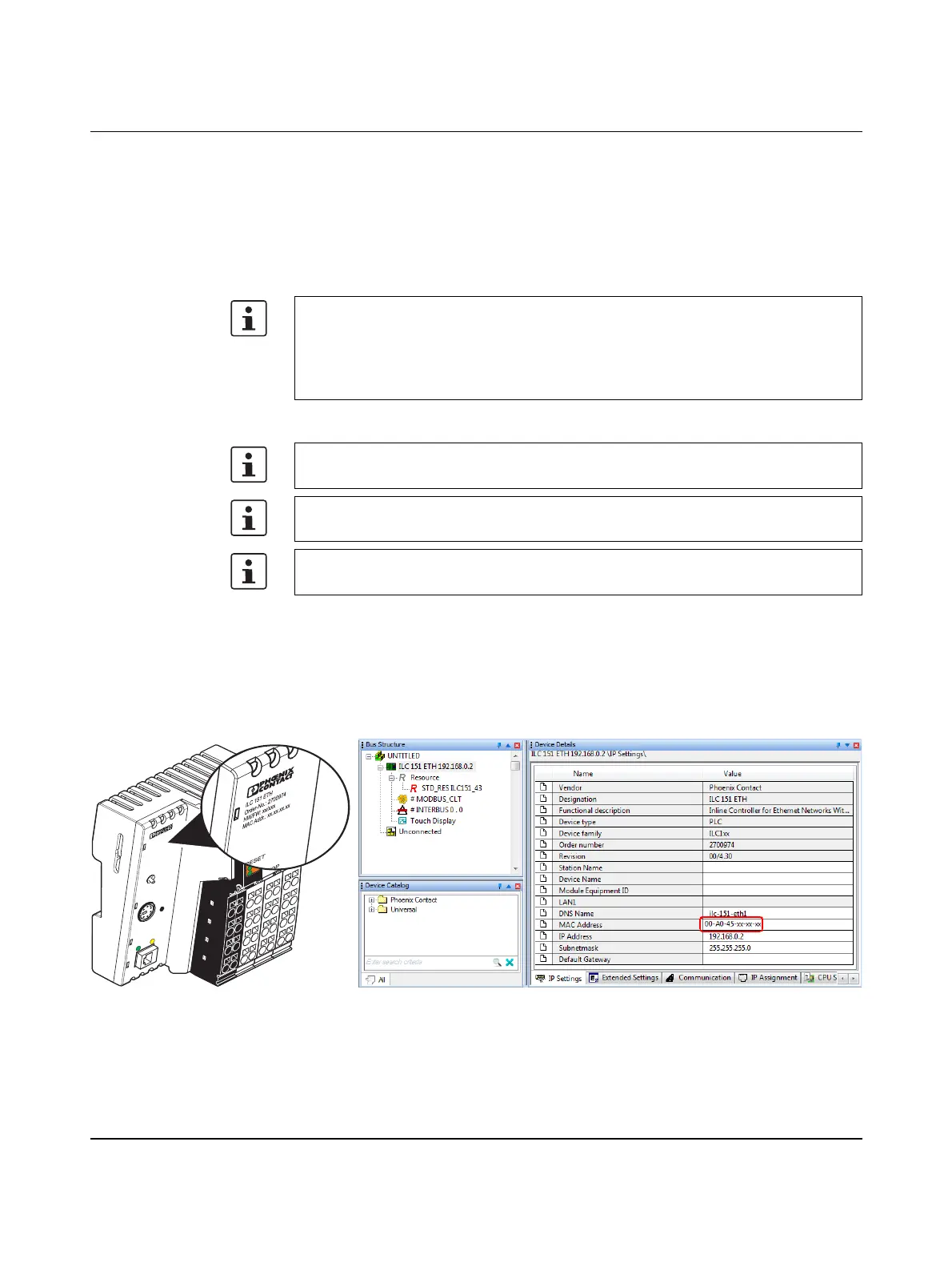
• Select the controller node (in the example: “ILC 151 ETH”).
• In the “Device Details” window, select the “IP Settings” tab.
• Enter the MAC address of the controller (see Figure 3-4). It is printed on the device
(“00.A0.45.xx.xx.xx”).
Figure 3-4 Entering the MAC address
• In the PC Worx Express menu bar, select the
“Extras, BootP/SNMP/TFTP-Configuration...” menu.
Changes to project information are not applied automatically
If any modifications are made to the project information (see Figure 3-1) that affect the IP
settings for the controller, a warning is displayed. However, the modification is not imple-
mented automatically.
When a new project is created, the default settings are specified under “IP Settings”.
Please note that BootP is preset on the Inline controller by default.
The IP address that is assigned here for the controller is also implemented as the IP ad-
dress for the communication path via TCP/IP.
After assigning the IP address, PC Worx Express automatically creates a link via TCP/IP
as a communication path to the Inline controller.
IL
C
1
5
1
E
T
H
O
r
d
e
r
-
N
o
.:
2
7
0
0
9
7
4
H
W
/
F
W
: x
x
/x
x
x
M
A
C
A
d
d
r
.: x
x
.x
x
.x
x
.x
x
U
L
U
S
U
M
I1
I3
I2
I4
I6
I5
I8
I7
R
E
S
E
T
E
Q
2
Q
1
Q
3
Q
4
1
P
R
G
F
F
L
N
K
A
C
T
M
R
E
S
E
T
R
U
N
/P
R
O
G
S
T
O
P
F
R
P
F
R
D
Y
F
A
IL



 To Next Page