24
IS16
English
8. Dynamics
TheIS16providesabuilt-inGate,Expander,CompressorandLimiteroneachinputChannel,Multi1to8outputsandMainMix.Dynamics
arenotlimitedbyDSPresources,andcanbeconguredaspre-orpost-EQ/Delayforeachchannel.Allbuilt-indynamicsparametersare
adjustedusingthetouch-screenandonboardcontrols.
AnoiseGateisadynamicprocessthatturnsofforsignicantlyattenuatestheaudiosignalpassingthroughitwhenthesignallevelfalls
belowauseradjustablethreshold.AnExpanderhelpstomaketroublesomebackgroundnoise(suchashumming)inaudiblebyreducing
signalswithlowamplitudes.ACompressorreducessignalsoverauser-denedthresholdbyauser-denedamount/ratio.Limiterswork
justasCompressorsdo,witharatiopermanentlysettoinnity-to-1.
Tobypassthedynamicsprocessor,simplypushtheON/OFFbuttonorpressthe“GATE”,“EXP”,“COMP”and“LIM”buttonstotogglethe
individual processes on and off.
Eachofthepages/tabsintheDynamicsmenuisessentiallythesame,providingsimilarattributesfortheindividualprocesses.
8.1 Channel Select
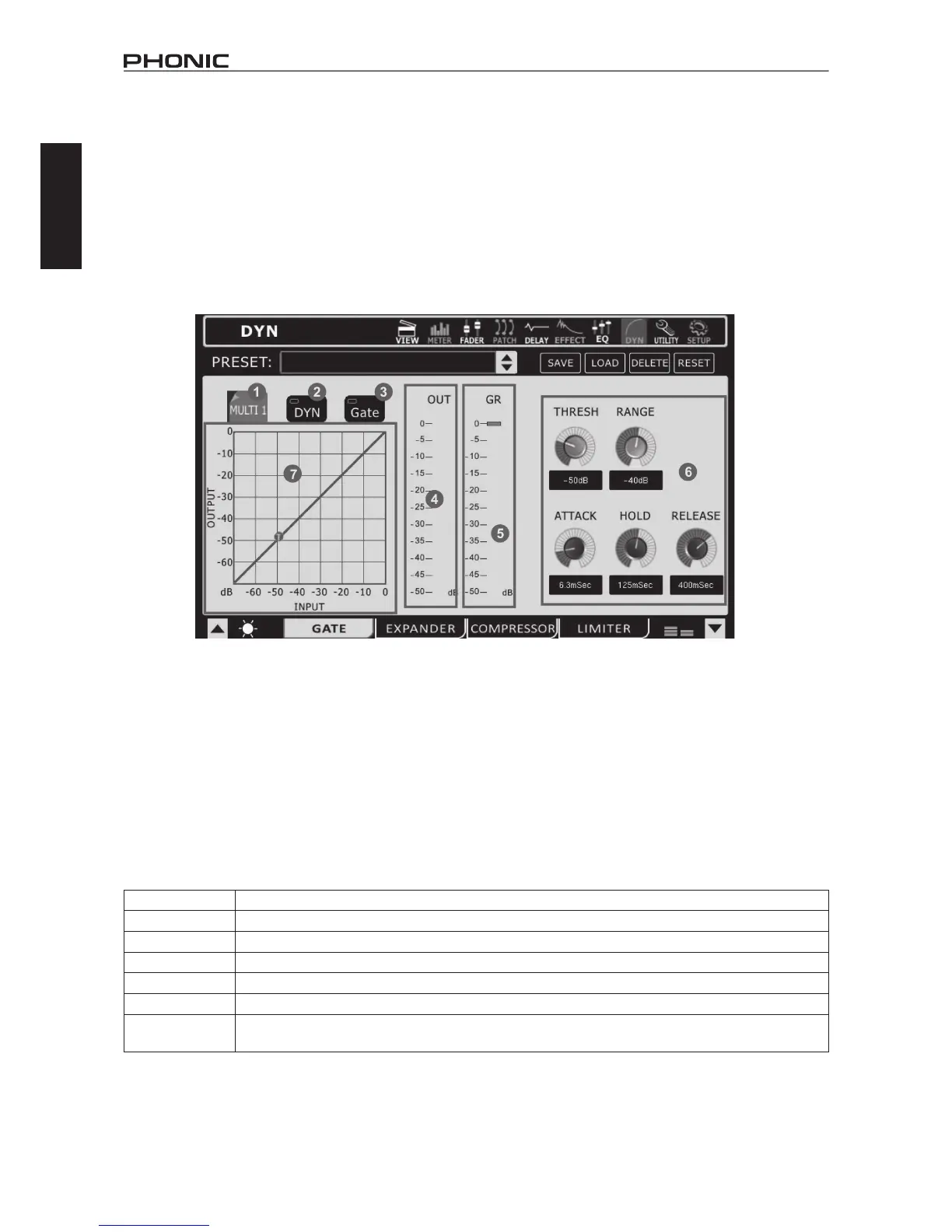
Use this button and the subsequent menu to select the channel you wish to apply the dynamic effect to. Users can select from any of the
inputchannels,anyofthemultioutputs,andthemainstereomix.
8.2 Dynamic Processor On/Off
Use this button to turn dynamic processor on and off for the currently selected channel.
8.3 Gate/Expander/Compressor/Limiter On/Off
This button turns the currently selected dynamic process on and off.
8.4 Output Level Meter
Thismetergivesthenaloutputlevelofthedynamiceffectforthecurrentlyselectedchannel.
8.5 Gain Reduction Meter
This meter shows the amount of gain reduction that is applied to the currently selected dynamic process. This is essentially the decrease
in gain applied when the signal crosses the selected threshold of the dynamic process.
8.6 Parameters
Eachofthedynamicprocesseshasitsownuser-denableparameters.Pleaseconsultthetablebelowfordetailsoneachparameter.
Parameter What It Does
Ratio Adjuststhecompressororexpanderinputtooutputsignalratio.
Thresh Adjuststhethresholdofthegate,compressor,andexpandereffects.
Attack Adjuststhetimeitwilltakefortheeffecttokickinafterthesignalrisesabovethesetthreshold.
Release Adjuststhetimeitwilltakefortheeffecttodeactivateafterthesignalfallsbelowthesetthreshold.
Output Gain Increasesthenaloutputsignalofthecompressor.
Range
Onthegatefunction,therangeparameterallowsuserstoselectthelevel(indecibels)bywhichthesignalwill
attenuate.
8.7 Dynamic Chart
Thisgraphgivesavisualrepresentationofthedynamicprocessor’sfunction.Currentlyactiveprocesseswillbeindicatedinorange,while
theprocessyou’recurrentlyadjustingisindicatedinblue.Usersareabletoadjustthethresholdandratiooffunctionsusingtheappropriate
onscreen icons.



 To Next Page