25
IS16
English
9. Utility
9.1 Scene
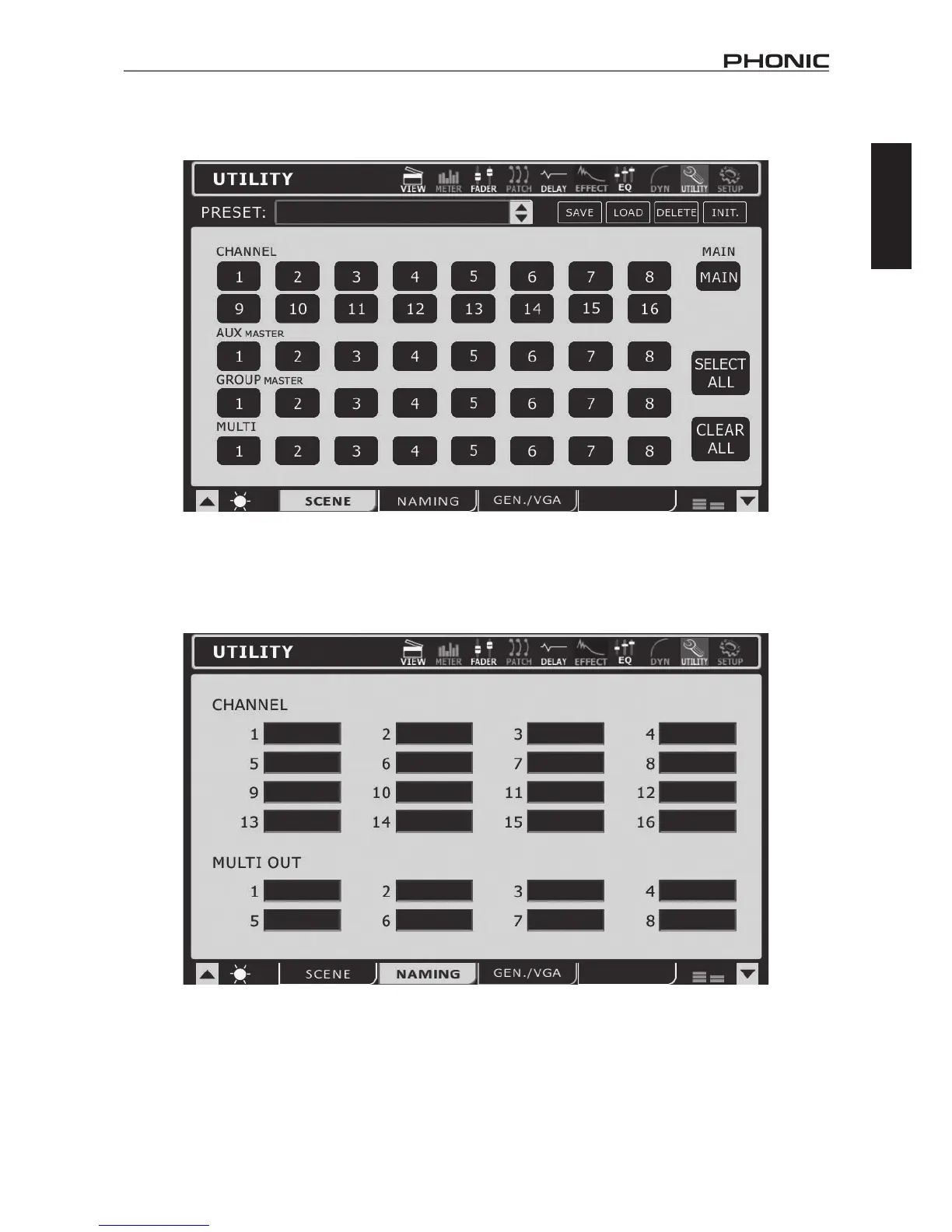
Inthescenemenu,userscanselectwhichchannelstheywishtosavethecurrentsettingsof.Selectoneormoreoftheavailableinput
channels,AUXchannels,GroupchannelsortheMainmix,andselectSave.Usersarealsoabletoselectandunselectallchannelswith
the included buttons.
Thesavedsettingsforeachare:select,faderlevels,on/off,panning,equalizer,dynamics,effects,AUXsends,delayandrouting.
9.2 Naming
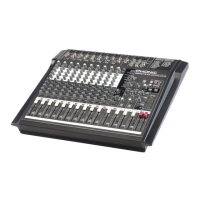
This function will allow users to assign names to each of the input channels and the multi outputs. Names can be up to 9 characters long
andcontainletters,numbers,parenthesis,dashesandunderscores.Simplyclickthedisplaywindowoftheappropriatechanneltobring
up a digital keyboard. Users can use this to key in a name for the channel. This can be anything from the name of the instrument/input
source,tothenameofthepersonplayingsaidinstrument.FortheMultiOutputs,userscan–forexample–enterthedestinationofthe
signal(thenameofaperformermonitoringthesignal,recordingdevice’smodelnumber,andsoon).



 To Next Page