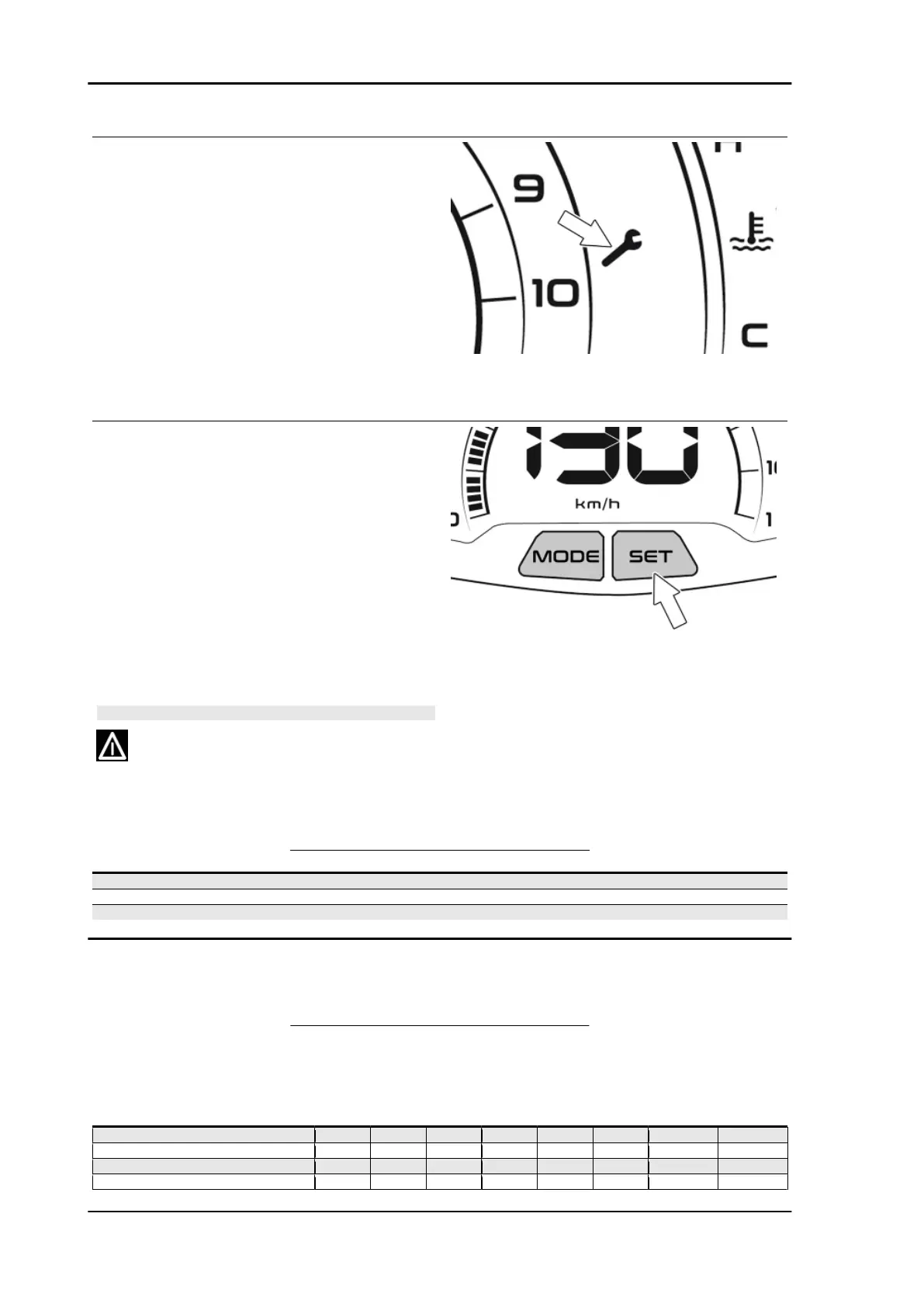
MAINTENANCE ICON OPERATION
This function indicates the scheduled mainte-
nance interventions. For each time the key is
turned to "ON", once the instrument panel has per-
formed the initial check, if the value of the remain-
ing kilometres until the next intervention is less
than 300 Km (186.41 mi), the indicated icon will
flash for 5 seconds. Once the service intervention
mileage is reached, each time the key is turned to
"ON", the icon remains lit steadily until it is reset.
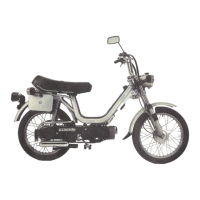
MAINTENANCE ICON RESETTING
The maintenance icon is reset by pressing the
SET key on the instrument cluster for more than 5
seconds, while turning the key to the "ON".
During the first 5 seconds, the digital display will
not generate any signal; during the next 5 sec-
onds, the maintenance icon will flash with a fre-
quency of 1 Hz.
If the SET key is released before the 5 seconds,
the scheduled service is not reset
CAUTION
THE MAINTENANCE ICON RESET PROCEDURE MAY ON-
LY BE PERFORMED WHEN THE VEHICLE IS AT A STAND-
STILL (SPEED = 0 Km/h).
SHORT PRESS/PROLONGED PRESS
Specification Desc./Quantity
SHORT PRESS (PRESS AND RELEASE) LESS THAN 0.5 SECONDS.
PROLONGED PRESS (PRESS AND HOLD) BETWEEN 1 AND 5 SECONDS.
INPUT, CONFIRM AND TIMEOUT TIMES LONGER THAN 5 SECONDS.
Maintenance chart
SCHEDULED MAINTENANCE TABLE
I:CHECK AND CLEAN, ADJUST, LUBRICATE OR REPLACE IF NECESSARY.
C: CLEAN, R:REPLACE, A:ADJUST, L:LUBRICATE
* Clean more frequently in cases of intensive use on gravel roads.
km x 1,000 (mi x 1,000) 1 (0.6) 10 (6.2) 20
(12.4)
30
(18.6)
40
(24.8)
50
(31.0)
EVERY 12
MONTHS
EVERY 24
MONTHS
Safety blocks I I I I I I
Spark plug R R
Centre stand L L L L L L L
Drive belt R R
Maintenance Beverly 400 E5
MAIN - 54






 To Next Page