Commissioning
Operating Manual PNOZ m B1
1003790-EN-02
| 27
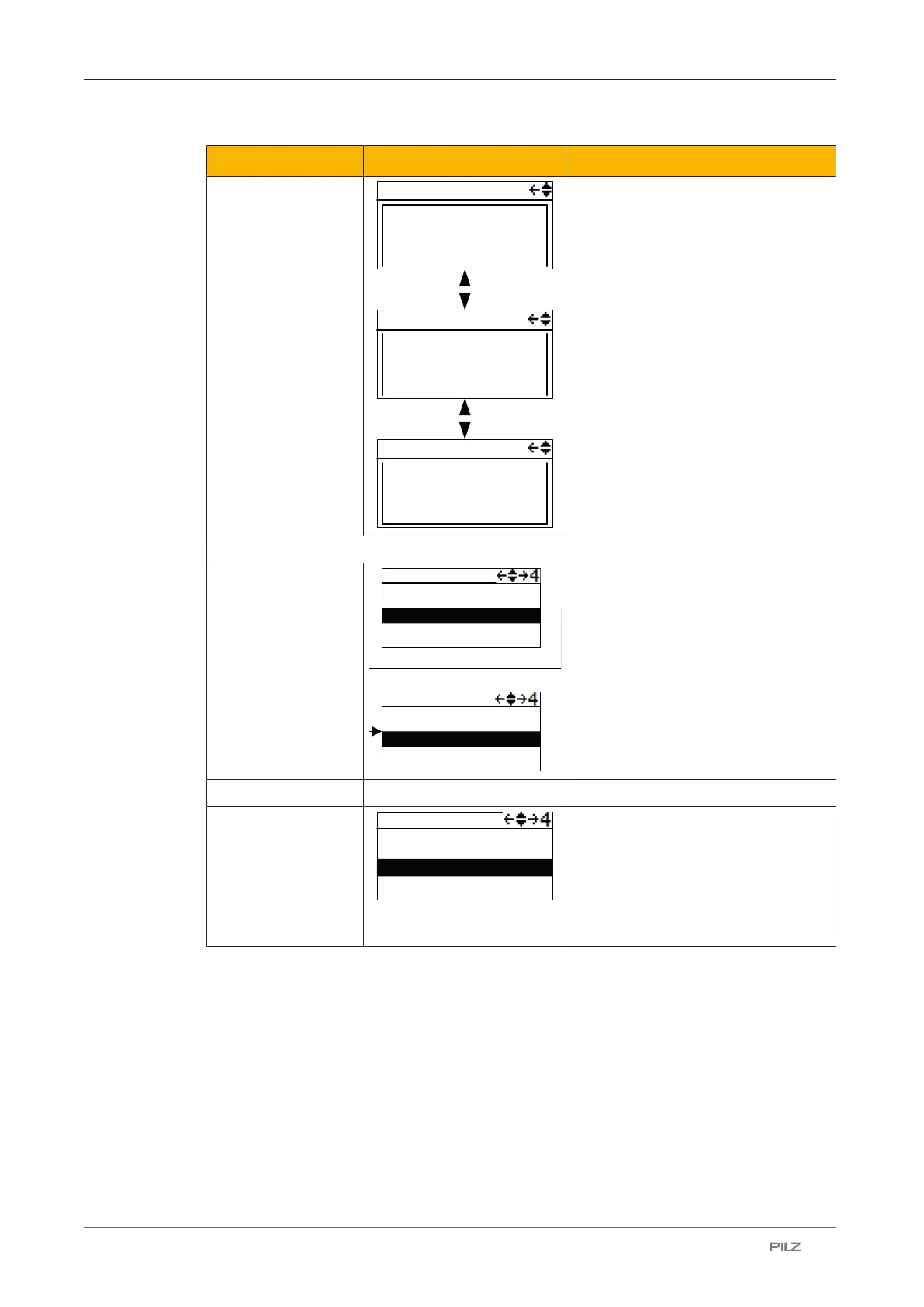
Display Display Description
Name
Date / Time
Check sum FS
Check sum DP pos
x
...
History x/16
Name:
_programname_
History x/16
Date 2014-01-31
Time 08:30:59
History x/16
Checksums FS:
total AB08
Operating hours
12345
Display of project information for a
selected project
Select:
Activate project
0\
\..
_dirA_
...
1\_dirA_
\..
_file.mpnoz2_
Select project contained in the USB
memory and activate it on the base
unit
} Prerequisite: Device must be
stopped
} Hold down multifunction switch for
4 s in order to activate the project
Reset:
Reset or update pro-
ject.
After a reset, the active project is re-
loaded from the USB memory
} Prerequisite: Device must be
stopped
} Hold down multifunction switch for
4 s in order to reset


 To Next Page
 Loading...