Commissioning
Operating Manual PNOZ m B1
1003790-EN-02
| 30
6.7.2.6 Connections menu
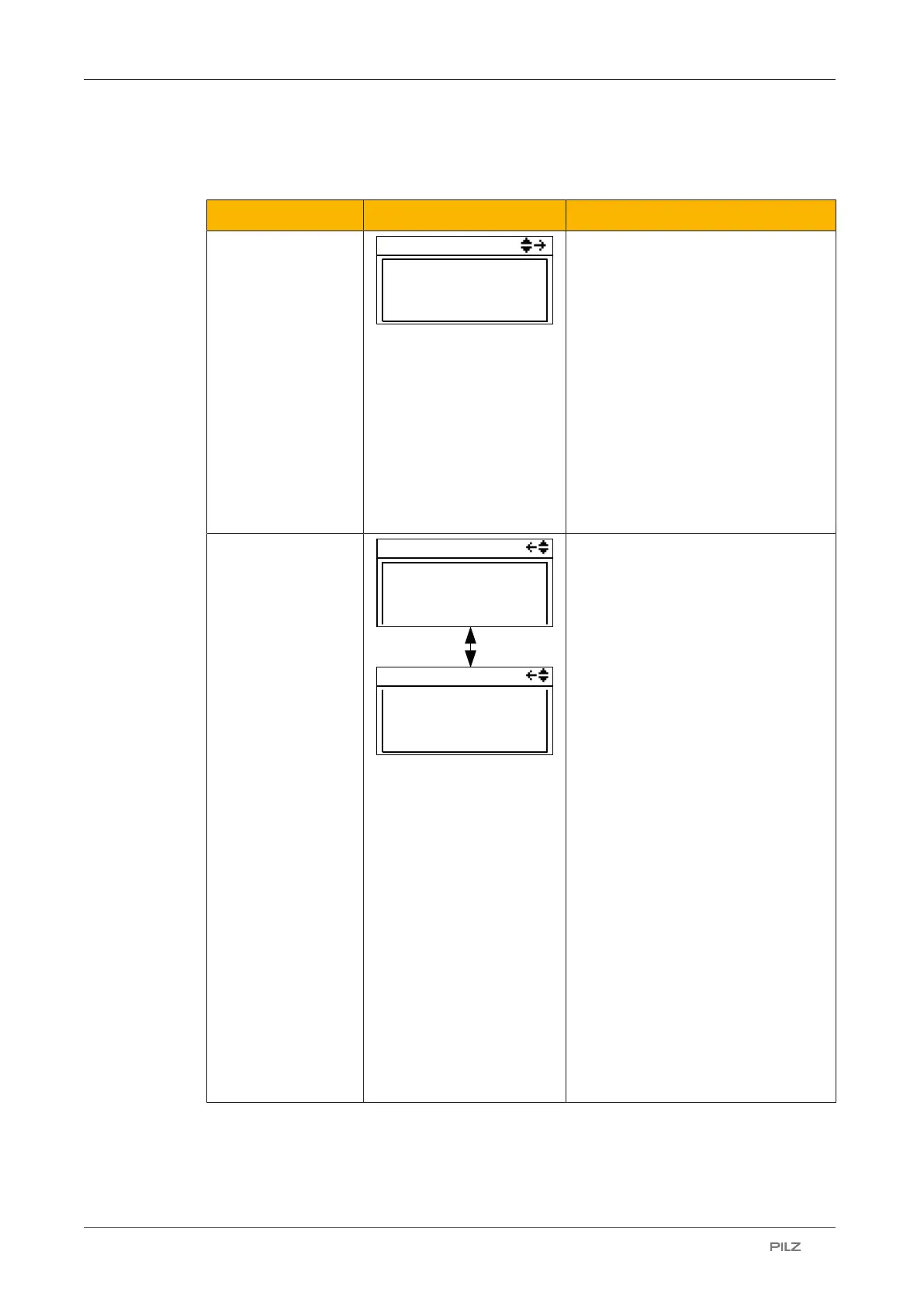
In the Connections menu the connections to the PNOZmulti can be displayed.
Display Example Description
Conn. x/n
Conn. x/n
PITreader
169.254.60.123
>
Connected
Information on the connected device:
} Device
} IP address
} Connection status:
– Connected:
Connected
– Connecting:
Connecting
– Failed:
Connection has failed
– Error
Error in the connection
PITreader
PITreader
Status:
Authenticated
1
Permission:
Security ID:
12 34 56 78
9A BC DE F0
PITreader
Status information on PITreader:
} Status:
– Authenticated:
PITreader detected the
transponder key. Permission
exists
– No key
There is no transponder key in-
serted in PITreader
– No permission
The transponder key has no
permission (permission = 0)
– Auth. failed
Authentication has failed. The
data from PITreader are invalid
– Not ready
The connection to PITreader is
interrupted.
} Permission:
Permission 1… 64 of the transpon-
der key
Security ID:
Safety identifier of the transponder
key
6.7.2.7 Ethernet menu
The Ethernet configuration can be displayed and changed in the Ethernet menu.



 To Next Page
 Loading...