The default channel bandwidth
Check this option to enable auto
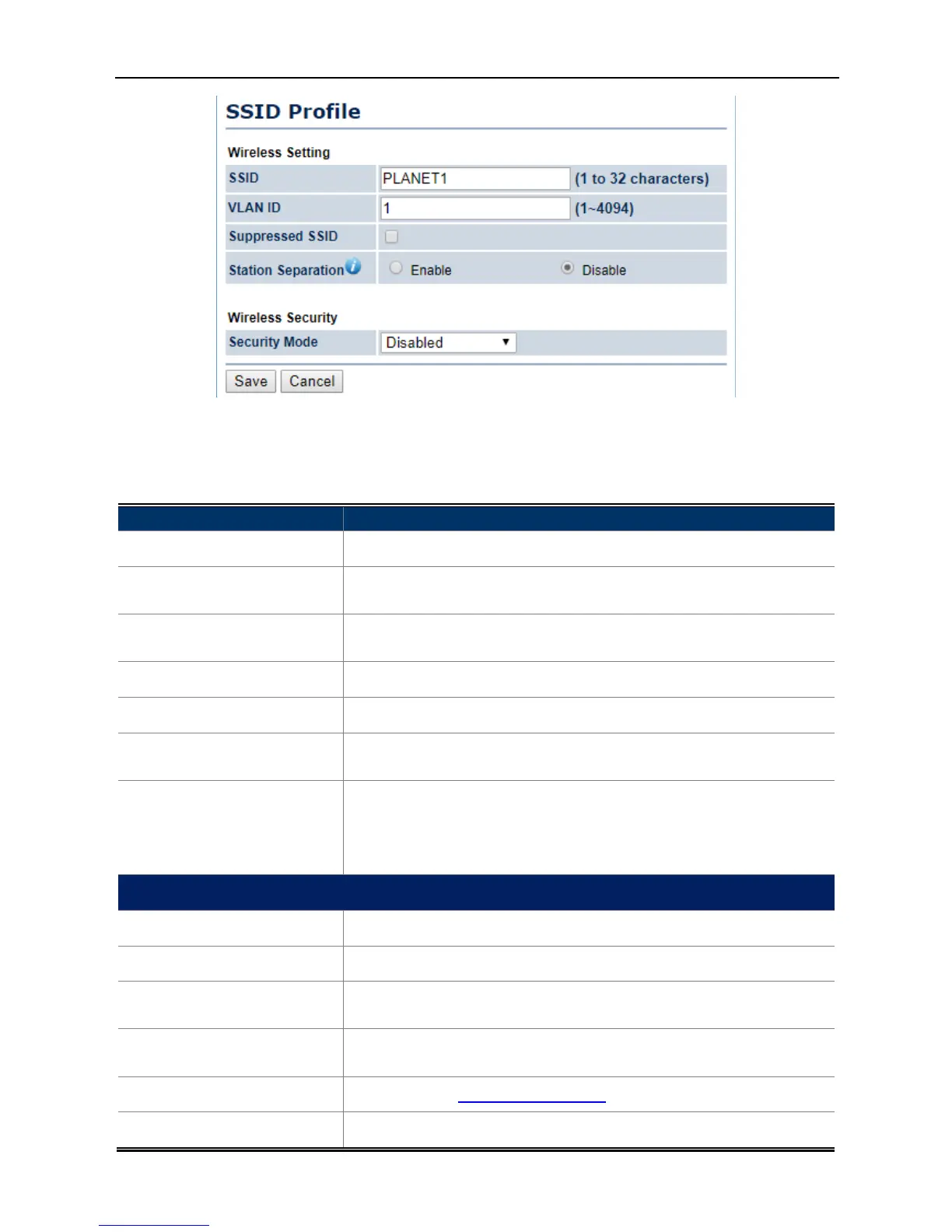
Configure up to four different SSIDs. If many client devices will be
accessing the network, you can arrange the
Specify the SSID for the current profile.
Specify the VLAN tag for the current profile.
Check this option to hide the SSID from
not appear in the site survey.
Click the appropriate radio button to allow
4-25 Wireless Network – SSID Profile
The default channel bandwidth
is 20/40MHz. The larger the channel, the
the transmission quality and speed.
upper or lower channel. Your selection may affect the Auto
Check this option to enable auto
Detection can select the best channel to use by scanning nearby
Configure up to four different SSIDs. If many client devices will be
accessing the network, you can arrange the
devices into SSID groups.
to configure the profile and check whether you want to enable
Specify the SSID for the current profile.
Specify the VLAN tag for the current profile.
Check this option to hide the SSID from
clients. If checked, the SSID will
not appear in the site survey.
Click the appropriate radio button to allow
is 20/40MHz. The larger the channel, the
upper or lower channel. Your selection may affect the Auto
Detection can select the best channel to use by scanning nearby
Configure up to four different SSIDs. If many client devices will be
devices into SSID groups.
to configure the profile and check whether you want to enable
clients. If checked, the SSID will



 To Next Page