22
Connecting the UTP Cable
The 10G/5G/2.5G/1G/100BASE-T port uses RJ45 socket --
similar to phone jack -- for connection of unshielded twisted-
pair cable (UTP). The 802.3u/802.3ab/802.3bz/802.3ae Ethernet
standard requires Category 5 UTP for 100Mbps 100BASE-TX.
10G/5G/2.5G/1G/100BASE-T uses Cat5e/6/6A/7 UTP (see table
below). Maximum distance is 100 meters (328 feet).
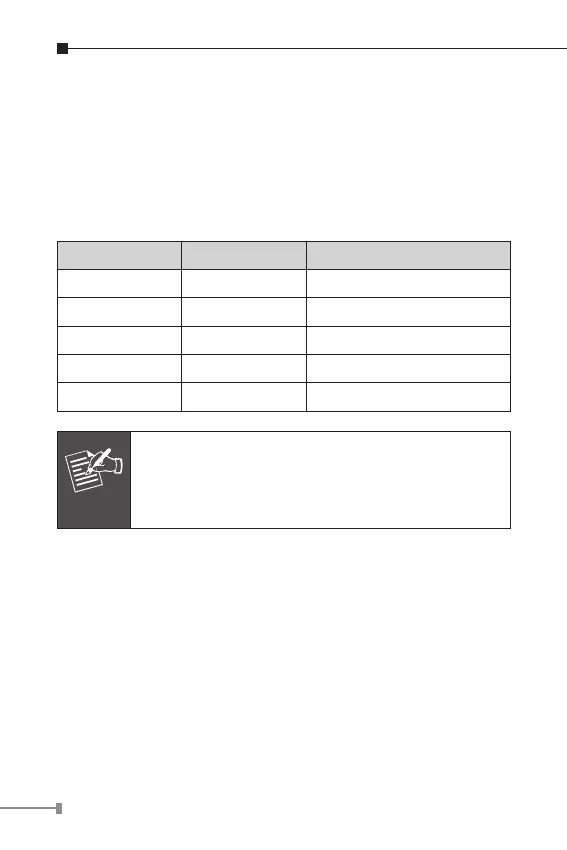
Standard Transfer Speed Cable Requirement (100M)
10GBASE-T 10000Mbit/s Cat 6A/7
5GBASE-T 5000Mbit/s Cat 6/6A/7
2.5GBASE-T 2500Mbit/s Cat 5e/6/6A/7
1000BASET 1000Mbit/s Cat 5e/6/6A/7
100BASE-TX 100Mbit/s Cat 5/5e/6/6A/7
Note
Be sure the connected network devices support
MDI/MDI-X. If it does not support, then use the
crossover Category 5e6/6A/7 cable.



 To Next Page