Attention
If you activate this checkbox, the main window will appear as
following:
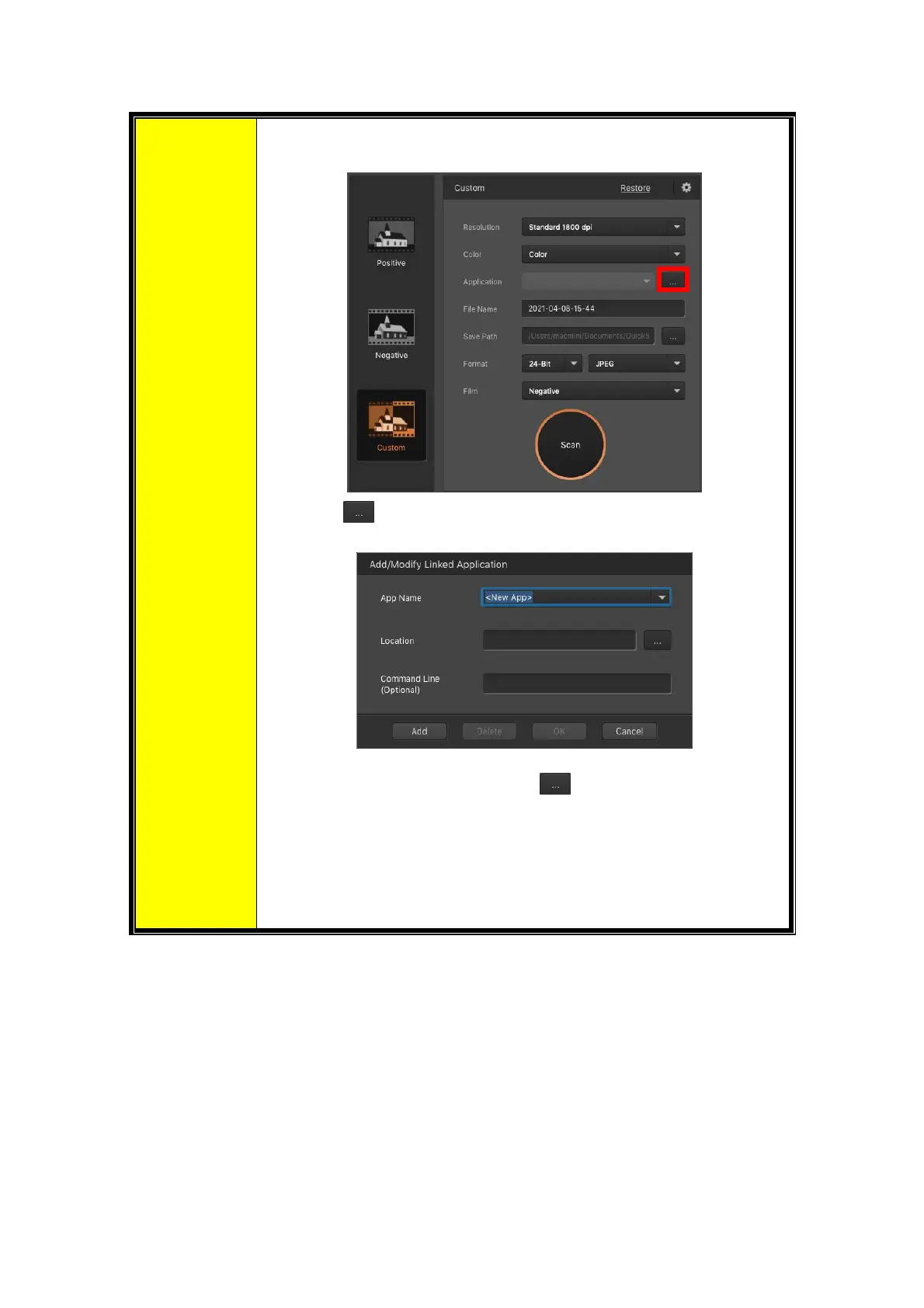
Click the
button to add desired applications, for example:
Photoshop,GIMP.Youmayaddupto5applications.
• [AppName]:Entertheapplicationname.
• [App Location]: Click on the
button to browse to the
desiredprogramfolderandselecttheexecutablefile(*.exe) of
thedesiredapplication.
• [CommandLine (Optional)]: Itisrecommendedthatyouleave
this field blank if you will not use or are unsure of the
commandline.
[Power Saving]:Activatethischeckboxandselectavaluefromthedrop‐downlist
tosetwhenthescannerwillenterpowersavingmode.Simplypressonany ofthe
scanner'sphysicalbuttonstowakeit.
[ICCProfile]:Activatethischeckboxandselectaprofilefrom
thedrop‐downlistto
setdeviceoutputcolorstandard.
[AutoExposure]:Activatethischeckboxtoperformautoexposure.
[Dust/Scratch Removal]: Activate this checkbox and select a desired mode from
the drop‐down list to remove scratch/dust. This function is only for the infrared
built‐inmodel.
24














 To Next Page