7.2 Complete dialogue
A main menu for selecting the sub-menus, which can be used for selecting an instrument and application-dependent
number of pages.
Sub-menu Page contents
Level 1 data
The operating pages of VWERT, VPARA, VBAR, VTREND, APROG, DPROG, CONTR and
CONTR+ are shown: display and adjustment of operating values.
Parameter
For each function used, which has adjustable parameters a separate page is
prepared: parameter display and adjustment.
I/O data
There is a separate page for each used function:
Input and output data display.
Configuration
There is a separate page for each used function, which must be configured:
configuration data display and adjustment. For changing a configuration, the
instrument must be set to ‘offline’. (r operating modes).
Miscellaneous
Page Date, Time: date, time display and adjustment. Ü
Page Device data: interface, mains frequency, language display and adjustment.
Page Online/Offline: online i offline, configuration cancelation.
Page Calibration: Display and calibration of signals to be calibrated.
Page Info: hardware, software order no., software version no. display. *
Page Status CAN-BUS: State of eventually connected CAN-Nodes. Ö
Page Status PROFIBUS: bus access, data communication status display. £
Page Status INTERBUS: bus access, data communication status display. ¤
Only with option B with built-in real-time clock
The operating version is also displayed from operating version 2
Only KS98+ (with CAN I/O extension (see page ))
Only with option B with PROFIBUS
Only with option B with INTERBUS
g
Prior to operating version 2 KS98: was displayed additionally in the headers of main menu and five
sub-menus. Example KS98: main menu
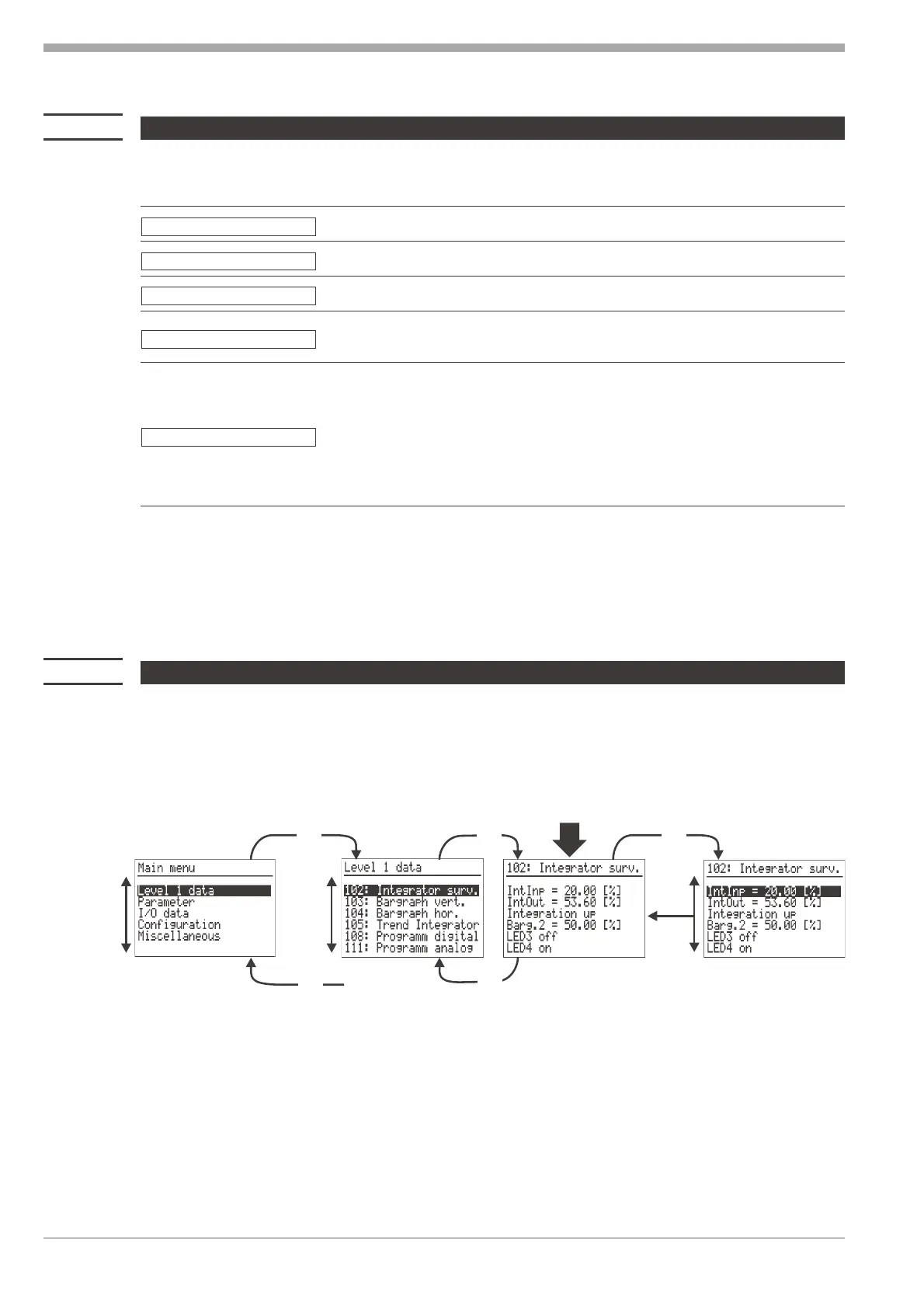
7.3 Selection (switch-on and operating pages)
After power supply switch-on, logo and Main menu wait! followed by the sub-menu during some seconds
are displayed. Unless a selection is made during this time, the first operating page entered in the sub-menu without
marked line is displayed. At each pressure of I / D a line (inverted display) is marked. When the page without marked
line is reached again by pressing keys I / D, return to the sub-menu is possible by pressing key M. When the End is
reached by pressing keys I / D, return to the main menu is possible by pressing key M.
Keys I / D scroll the marked line up to the menu start or down to the menu end. When pressing the key again, the
marked line jumps from the start to the end or vice versa.
Menu 9499 040 50611
Complete dialogue 22
End
.
.
.
D
I
D
I
M M
M
M
D


 To Next Page