13.2 ABIN (analog i binary conversion)
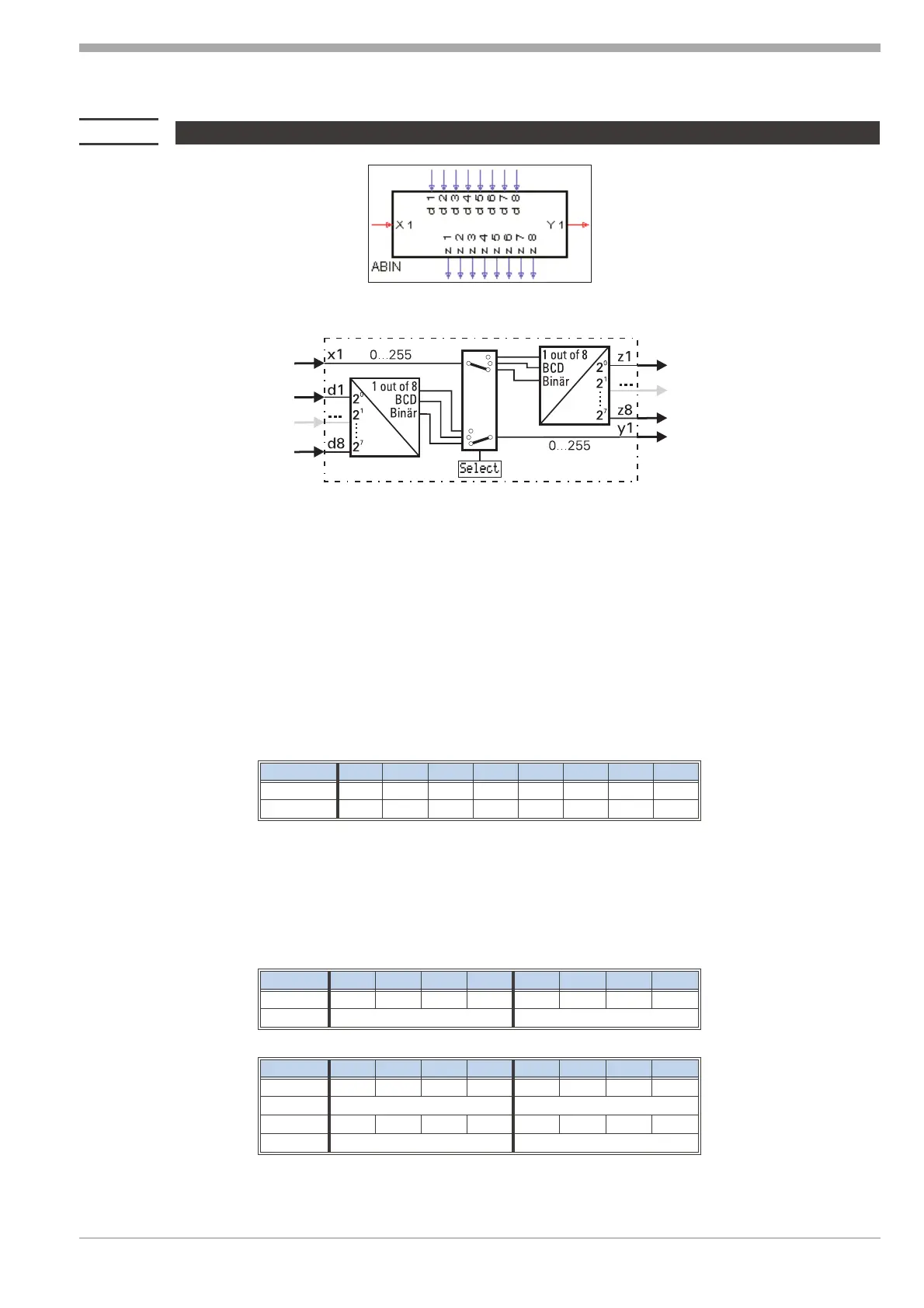
Analog input variable x1 is converted into a binary number, a BCD number or a selection “1 out of 8". Thereby, x1 is
always rounded off (down for values < 0,5, up for values ? 0,5).
Simultaneously, binary input values d1...d8 ( considered as a binary number or a BCD number) can be converted into
an analog output variable.
The conversion mode is determined by configuration parameter Select.
Analog/binary conversion - binary/analog conversion (Select = ana<->bin)
Conversion analog value into binary number:
The analog input value at x1 is converted into a binary variable, which is output in binary form at outputs z1...z8
(z1=2
0
... z8=2
7
). The range is within 0...255.
Out of the range, the output allocation is:
Input
z1 z2 z3 z4 z5 z6 z7 z8
x1 ß 0
00000000
x1 ? 255
11111111
Conversion binary number into analog value
A binary number at digital inputs d1...d8 (d1=2
0
...d8=2
7
) is converted into an analog output variable and output at
analog output y1. The range is within 0...255.
BCD - conversion (Select = ana<->BCD) Converting a value into a BCD number
The analog input value at x1 (range 0...99) is output as a BCD number at outputs z8...z5 and z4...z1.
Example: x1 = 83 r the output allocation is:
Input
z8 z7 z6 z5 z4 z3 z2 z1
x1 =8310000011
BCD 8 3
Out of the range, the output allocation is:
Input
z8 z7 z6 z5 z4 z3 z2 z1
x1 ? 9900000000
00
x1 ß 010011001
99
9499 040 50611 Signal converters
65 ABIN (analog i binary conversion)


 To Next Page