42
Charging the battery
Your scanner receiver is supplied with a rechargeable battery pack, desktop charging cra-
dle and AC adaptor.
To charge the battery:
1. Fit the battery to the receiver (see instructions above). Ensure the receiver is switched
off.
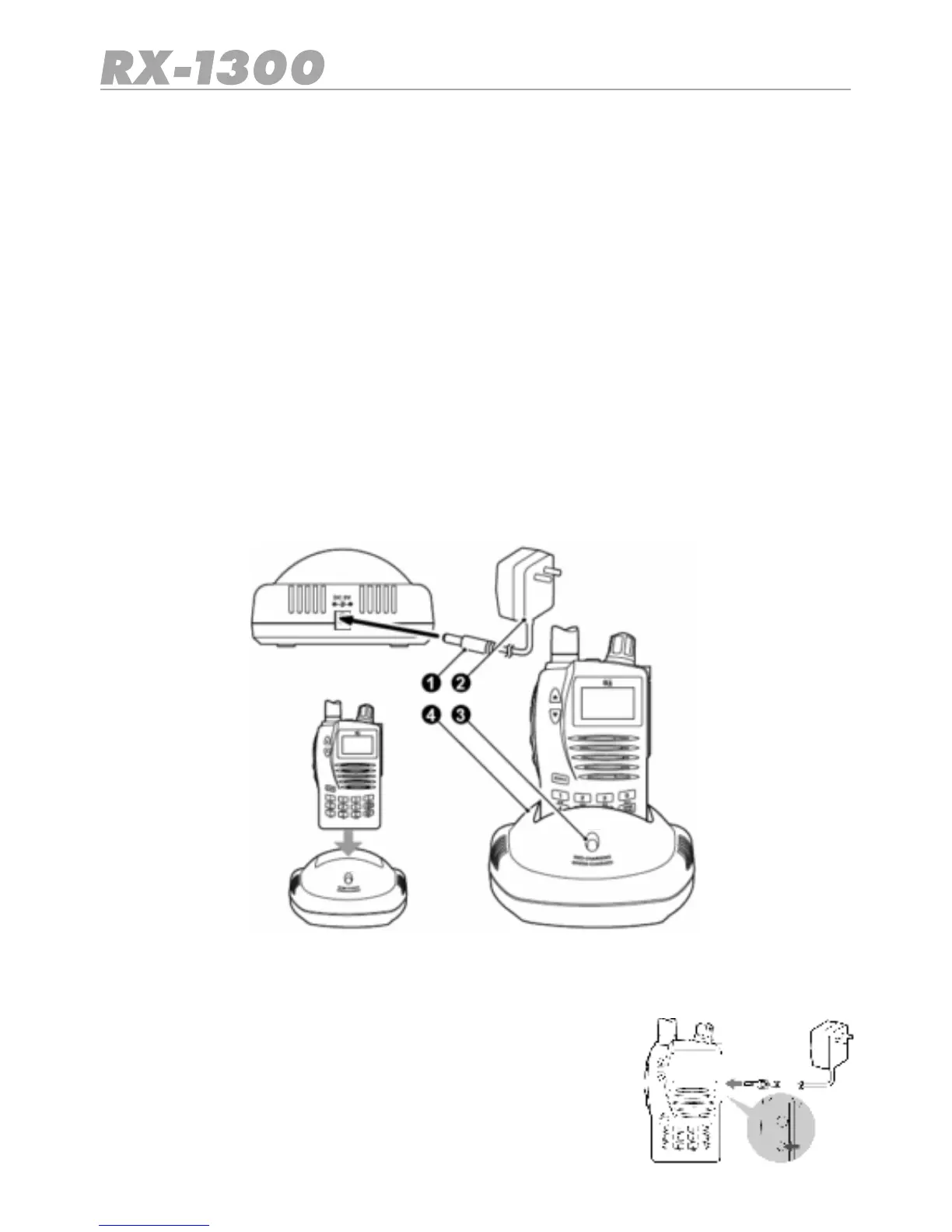
2. Connect the AC Adaptor to the charging cradle.
3. Plug the AC adaptor into a mains power outlet.
4. Insert the receiver into the charging cradle until it ‘clicks’ home. The charging LED will
glow RED and charging will begin.
•If the charging LED blinks RED and GREEN or does not light at all, remove the receiver
into the cradle and reinsert it.
The charging time for a discharged battery is typically 12– 15 hours. When the battery is
fully charged, the LED will turn GREEN.
Note:
Ifyoundyourselfinapositionwhereyouneedtochargethe
battery but the charging Cradle is not available, you can plug
the AC Adaptor directly into the receivers ilchargng socket oca-
ted under the Accessory Jack cover.
1. Adaptor DC Plug
2. AC Adaptor
3. Charging LED
4. Chaging Cradle


 To Next Page