51
Frequency bands
The Scanner supports the following Frequency Bands
Frequency Band Start up Frequency Default Mode Default Step
150 kHz to 495 kHz AM 5 kHz
504 kHz to 1.620 MHz 1.5 MHz AM 5 kHz
1.625 MHz to 29.995 MHz 5 MHz AM 5 kHz
30 MHz to 87.975 MHz 51 MHz FM 25 kHz
88 MHz to 107.950 MHz 88 MHz WFM 50 kHz
108 MHz to 135.975 MHz 118 MHz AM 25 kHz
136 MHz to 255.100 MHz 150 MHz FM 25 kHz
255.1125 MHz to 382.100 MHz 370 MHz FM 12.5 kHz
382.125 MHz to 769.800 MHz 430 MHz FM 25 KHz
769.8125 MHz to 960.100 MHz 850 MHz FM 12.5 KHz
960.125 MHz to 1309.975 MHz 1295 MHz FM 25 kHz
Frequency search
Band Search
Use the Search function to locate active frequencies in one or more bands
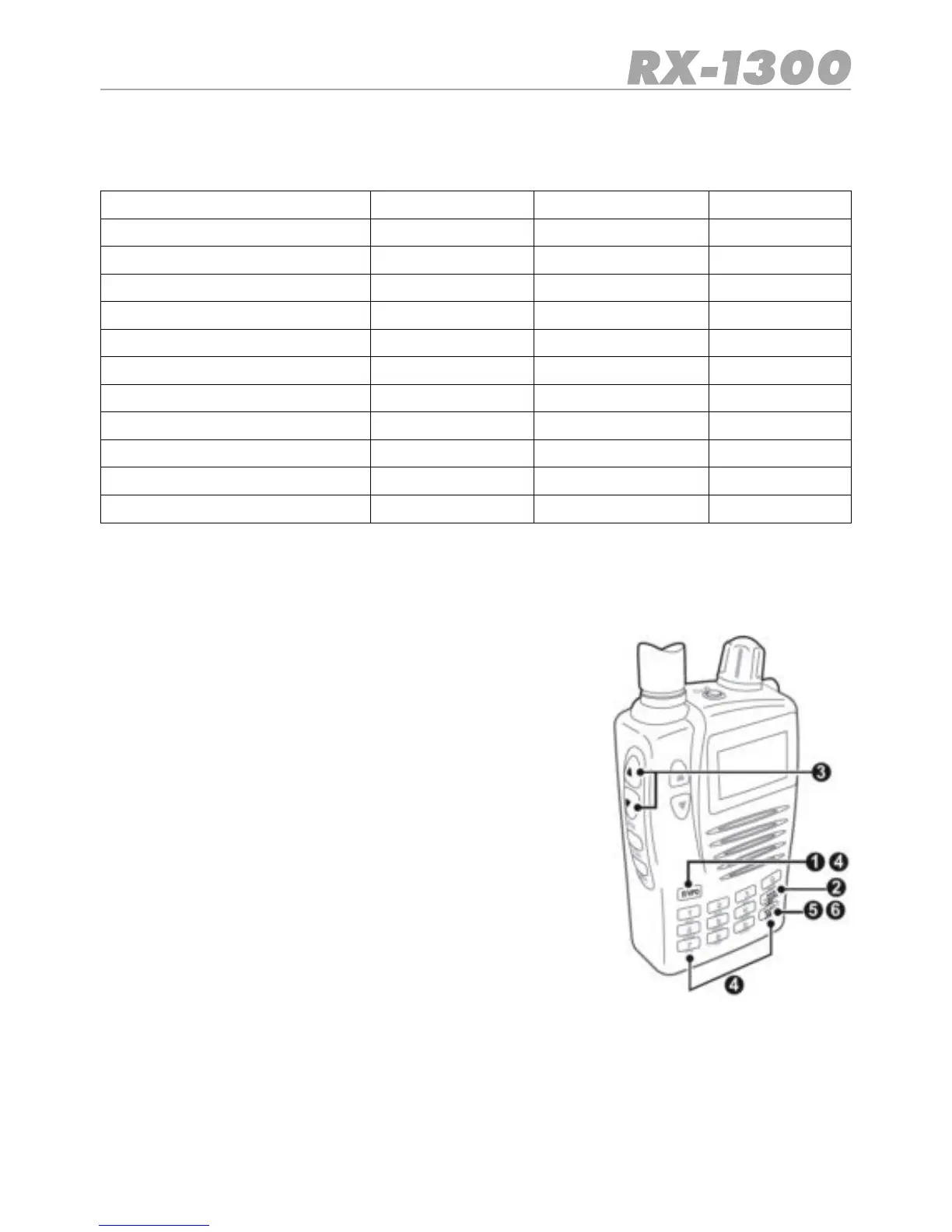
1. Press the E/VFO key to select VFO Mode. (Note: the re-
ceiver automatically selects the VFO mode when it is tur-
ned on).
2. Press the BAND key to select the required Band. There
are 10 factory preset Bands to choose from (see Frequen-
cy Band Table).
3. Set the Squelch level using the Squelch ▲ or ▼keys so
that the noise just disappears.
4. Select a start frequency to Search from. To do this, enter
the frequency on the keypad, then press E/VFO key.
5. Press the SCAN SRCkeybriey.The‘SRCH’iconwillbe
displayed and the receiver will Search the selected Band
starting from the start frequency. Once the end of the
band is reached the Search continues at the beginning of
the selected Band.
6. To stop the Search, press the SCAN SRC key again.
•During the Search, press the BANK BAND key to move to
the next Band.
•To change the Search direction rotate the Control knob
clockwise or counter clockwise.
•The receiver will stay on an active channel according to the Scan Timer settings in the
VFO Menu. If the Scan Timer is set to ‘5 seconds’, the receiver will continue Searching
after 5 seconds even if the channel is still busy. If the Scan Timer is set to ‘Busy’, the
receiver will remain on the busy frequency for as long as it stays busy, then resume sear-
ching when the signal disappears.


 To Next Page