43
Comand
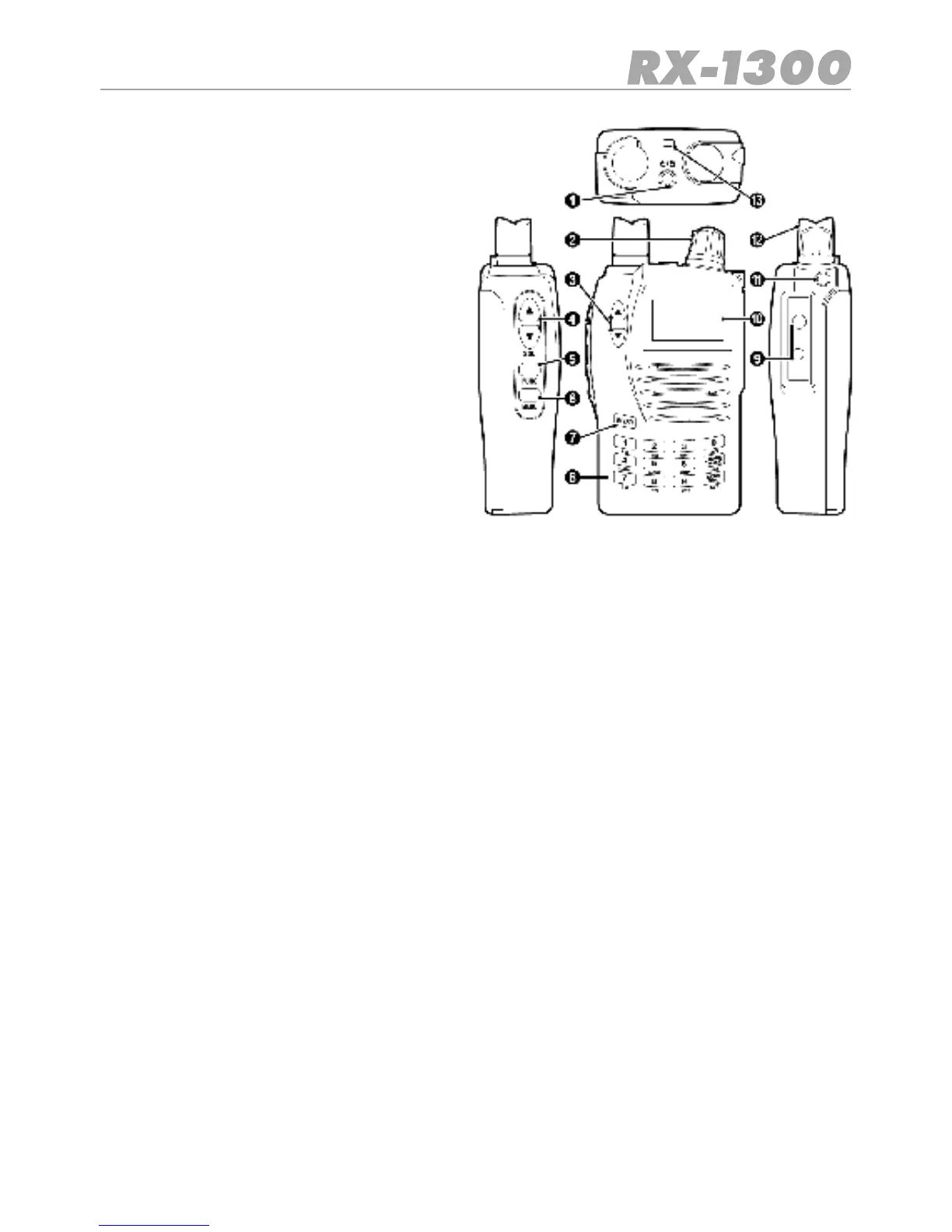
1. Power On/Off Lock Button
2. Control Knob
3. Up/Down Keys
4. Squelch Up/Down Keys
5. Function Key
6. Menu Key
7. Enter/VFO Key
8. Keypad
9. Accessory Jack
10. LCD Display 10
11. Jack Cover Securing Point
12. Antenna 12
13. Lanyard Slot 13
1. Power On/Off Lock Button
Turns the receiver on and off. Also Locks the keypad.
2. Control Knob
Selects frequencies and channels and selects values from menus.
3. Up/Down Keys
Adjusts the Volume and selects Menu items and frequency steps.
4. Squelch Up/Down Keys
Opens and closes the squelch.
5. Function Keys
Enables extended keypad functions.
6. Menu Keys
Provides access to setup menus.
7. Enter/VFO Keys
ConrmsselectionsandselectstheVFOmode
8. Keypad
Allows direct entry of frequencies and selection of functions.
9. Accessory Jack
Provides charging and earphone jacks.
10. LCD Display
Shows frequencies and selected functions.
11. Jack Cover Securing Point
Holds the accessory jack cover in place.
12. Antenna
Provides reception of signals.
13. Lanyard Slot
Allows connection of the Lanyard to protect the receiver from being accidentally
dropped.


 To Next Page