59
Limited Search Memories
Here you will be storing a pair of frequencies that represents the upper and lower limits of
a section of frequency band you wish to search for signals.
To store a pair of frequency limits into the Limited Search Memories.
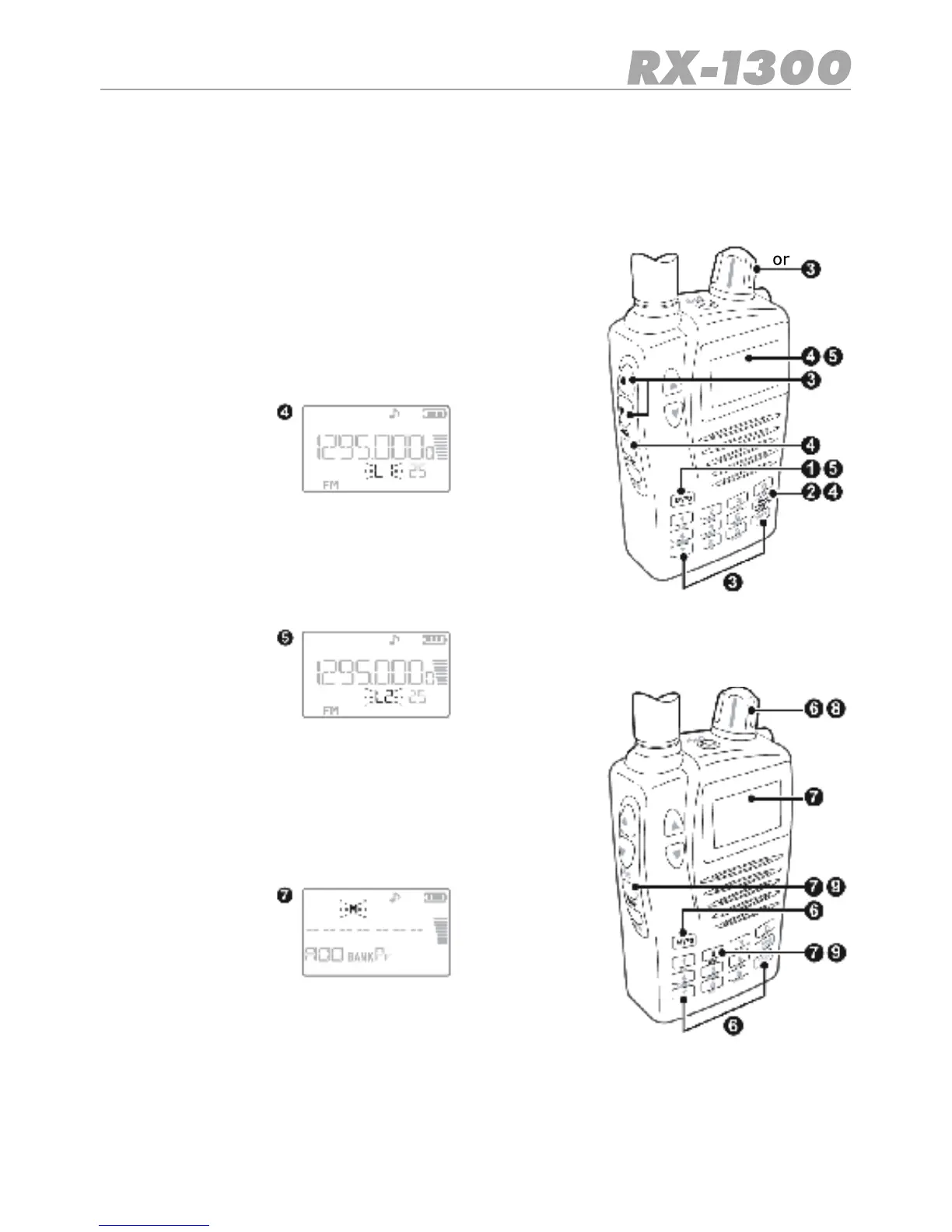
1. Press the E/VFO key to select VFO Mode.
2. Press the Band key to select the required band.
3. Enter the frequency that represents one end of the range
you wish to search.
4. Press Func LMT.L1willashonthedisplaytoindicate
thatyouareenteringtherstfrequencylimit
5. Press the E/VFOkeytoaccept.L2willashonthedi-
splay to indicate you are now entering the second limit
frequency.
6. Enter the second frequency limit then press E/VFO to
accept it.
7. Now press Func MW. The receiver enters the Memory
Write mode and selects the Pr memory bank.
8. Use the control knob to select an empty channel to store
the frequency pair.
9. Press Func MW again to store the frequencies.
The selected frequencies limits will be stored as a pair of channels in locations Axx and bxx
where xx is the channel number you selected in step 8.


 To Next Page