53
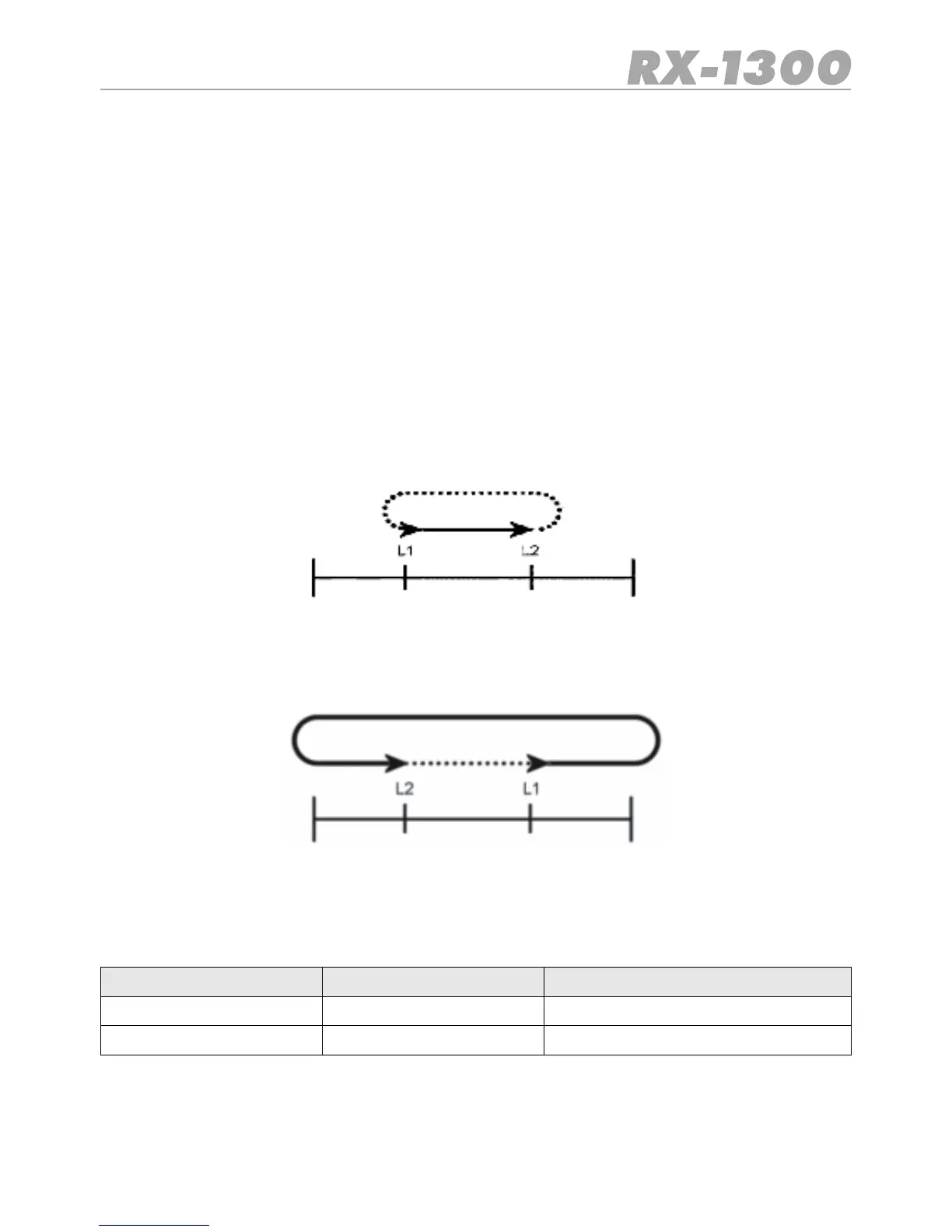
Lower band
edge
Upper band
edge
L1 is a lower frequency than L2
Lower band
edge
Upper band
edge
L1 is a higher frequency than L2
Example
1st Frequency 1nd Frequency Frequencies Searched
40 MHz 50 MHz 40 - 50 MHz
50 MHz 40 MHz 1309.995 MHz, 150 KHz-40 MHz
6. Enter the Second frequency using the keypad or the Control knob.
7. Press SCAN SRC.TheLimitedSearchwillbegin,searchingupwardsfromtherstfre-
quency to the second in a continuous cycle.
8. To stop the Search, press the SCAN SRC key again.
•To change the Search direction rotate the Control knob clockwise or counter clockwise
•The receiver will stay on an active channel according to the Scan Timer settings in the
VFO Menu. If the Scan Timer is set to ‘5 seconds’, the receiver will continue Searching
after 5 seconds even if the channel is still busy. If the Scan Timer iss et to ‘Busy’, the
receiver will rem ain o n the busy frequency for as long as it st a ys busy, then resume
searching when the signal disappears.
Note:
TheLimitSearchalwaysSearchesupwardsinFrequency.Iftherstfrequencyislower
thantheseconditwillsearchbetweenthetwofrequencies.Iftherstfrequencyishigher
then the second it will search outside the two frequencies.


 To Next Page