Chapter 2: Using Basic Features
25
To call from your Favorites list:
1 From Home view, tap New Call.
2 From the Dialer, tap Favorites.
3 From your Favorites list, tap the favorite you want to call. The call is automatically placed.
Timesaver: Automatically Dialing Favorites
You can quickly dial a favorite from Home or Lines view:
From Home view: Tap the phone line, and tap the favorite you want to call.
From Lines view: Tap the favorite you want to call.
To call from your Directory:
1 Access your directory by doing the following:
○ From Home view, tap Directories, and tap Contact Directory.
or
○ From Home view, tap New Call, and tap Directory.
2 From your Directory, tap the contact you want to call.
3 From the contact’s information screen, tap the contact’s phone number. The call is automatically
placed.
Redialing Numbers
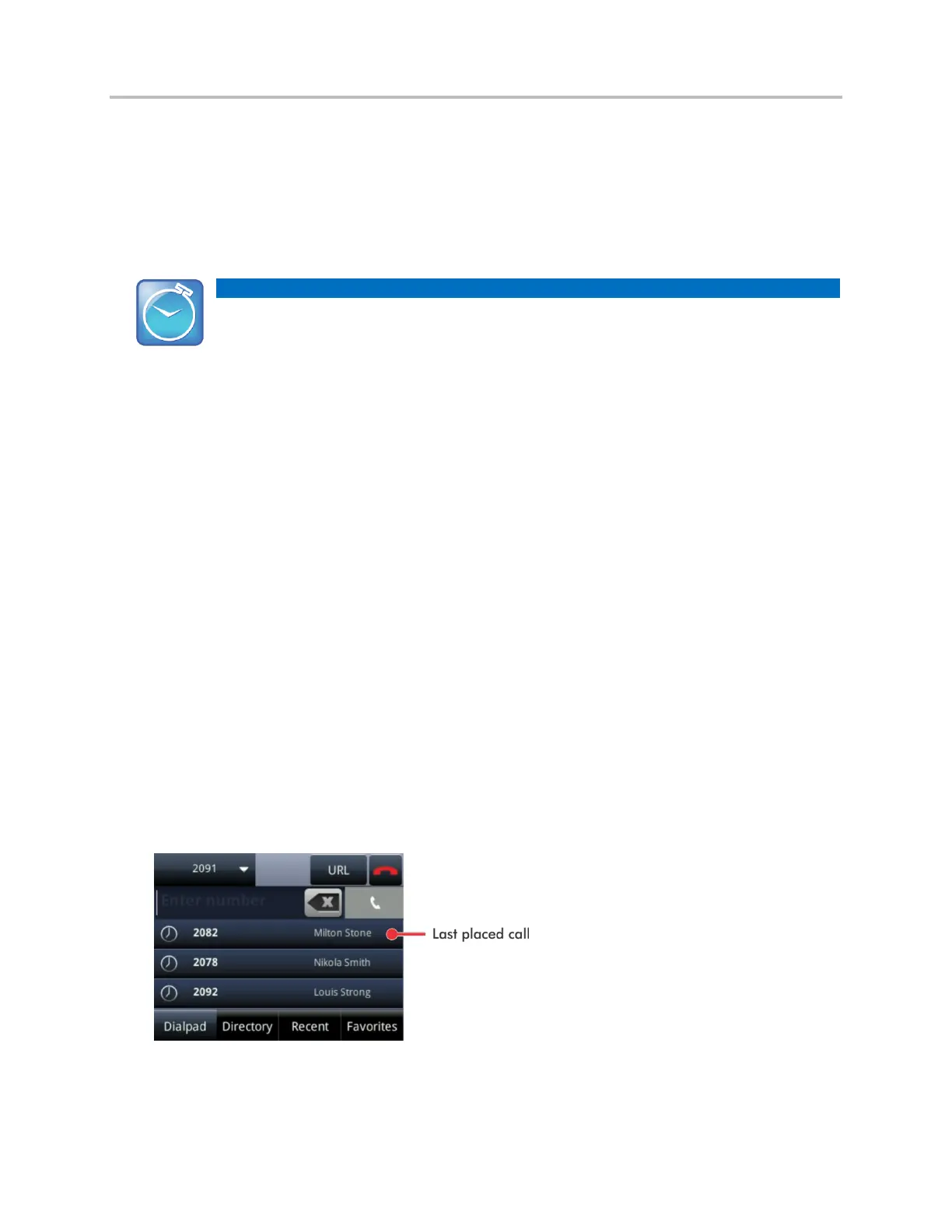
To dial the last number you called, open the Dialer. The first number in the list is the last call you placed.
To redial a number:
1 From the Dialer (shown next), tap the first number in the list.
2 Place the call.



 To Next Page