Poly® VVX® 500 and Poly® VVX® 600 Business Media Phones User Guide
64
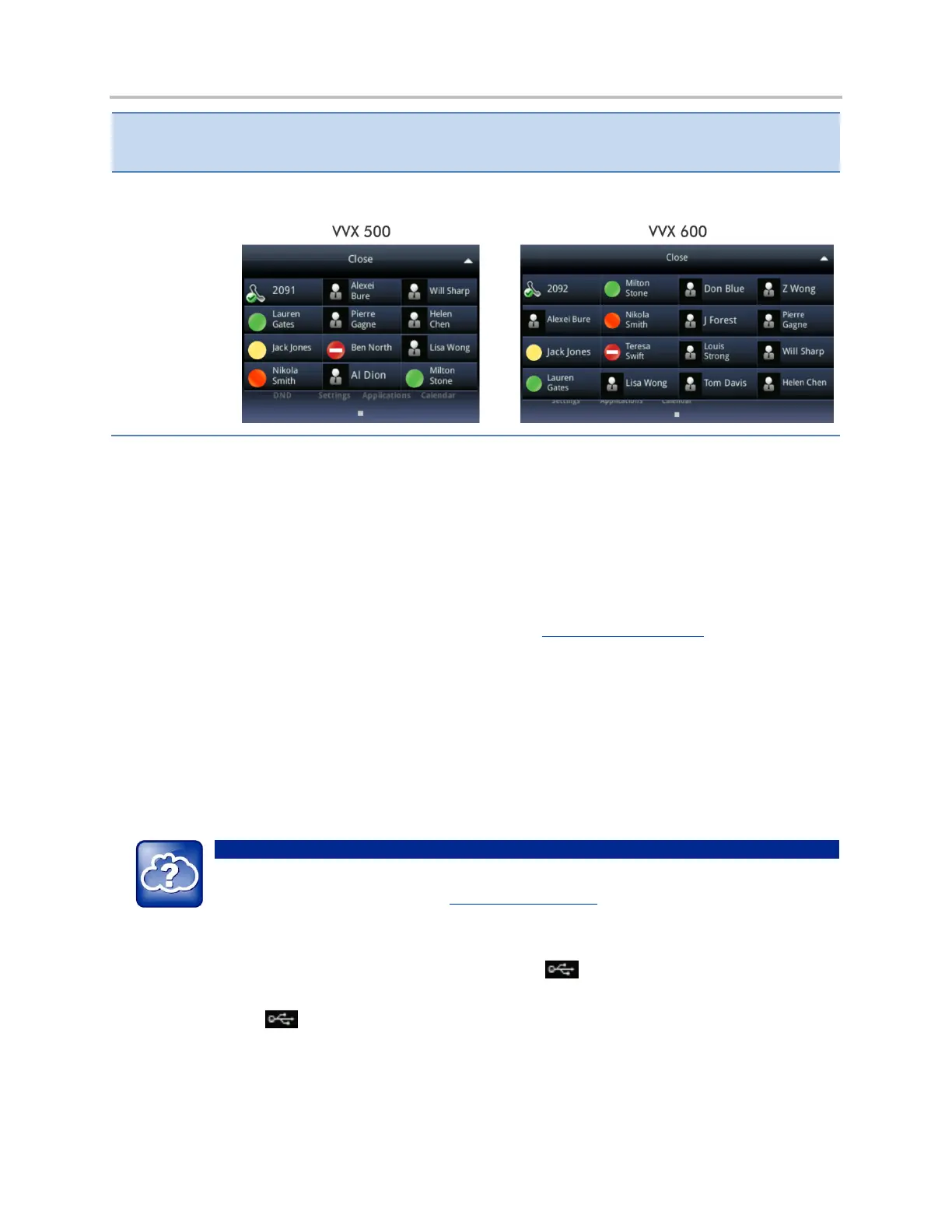
From Home view, tap the phone line. The buddies who are favorites display their status, as
shown next.
Integrating with Microsoft Lync Server
Your system administrator can configure your phone to work with Microsoft Lync Server and
communicate with others using Microsoft Lync. From your phone, you can monitor the status of your
Microsoft Lync contacts. For more information on integrating with Microsoft Lync Server, see your
system administrator, or refer to Using Poly Phones with Microsoft Lync Server Quick User Guide,
available by navigating to your phone’s Support page from the Business Media Phones Support page.
Recording Calls
If the call recording feature is available, and you connect a USB flash drive to the USB port on your
phone, you can record active calls on your phone. Recordings are stored as .wav files on the USB flash
drive. You can record up to four hours in one file.
Web Info: How Do I Attach a USB Flash Drive to My Phone?
To attach a USB flash drive, see the Quick Start Guide for your phone, available by navigating to
your phone’s Support page from the Business Media Phones Support page.
When you attach a USB flash drive to your phone, a USB icon, , displays in the status bar, together
with a message that tells you how much recording time is available on the USB flash drive. If you have a
VVX 600, you can tap to view your recordings and USB properties.



 To Next Page