Chapter 3: Using Advanced Features
65
You can’t record when:
There are no connected calls on your phone.
You place a new call to transfer a call or set up a conference.
The phone prompts you to answer an incoming call.
If you hold a call, recording pauses. Recording continues if the called party places you on hold. Recording
stops if all active calls end, no matter who ends the calls.
If you press while recording, only the called parties are recorded.
Tones and indications, such as the dialing of digits or ringing from another party’s phone, that occur
before a call connects are not recorded. Local tones and indications, such as DTMF tones when dialing,
are not recorded. However, tones from another party’s phone may be recorded.
You control recording by tapping Start, Pause, Resume, and Stop. All active calls that occur on your
phone between the time you tap Start and Stop are recorded, alternating in the same .wav file.
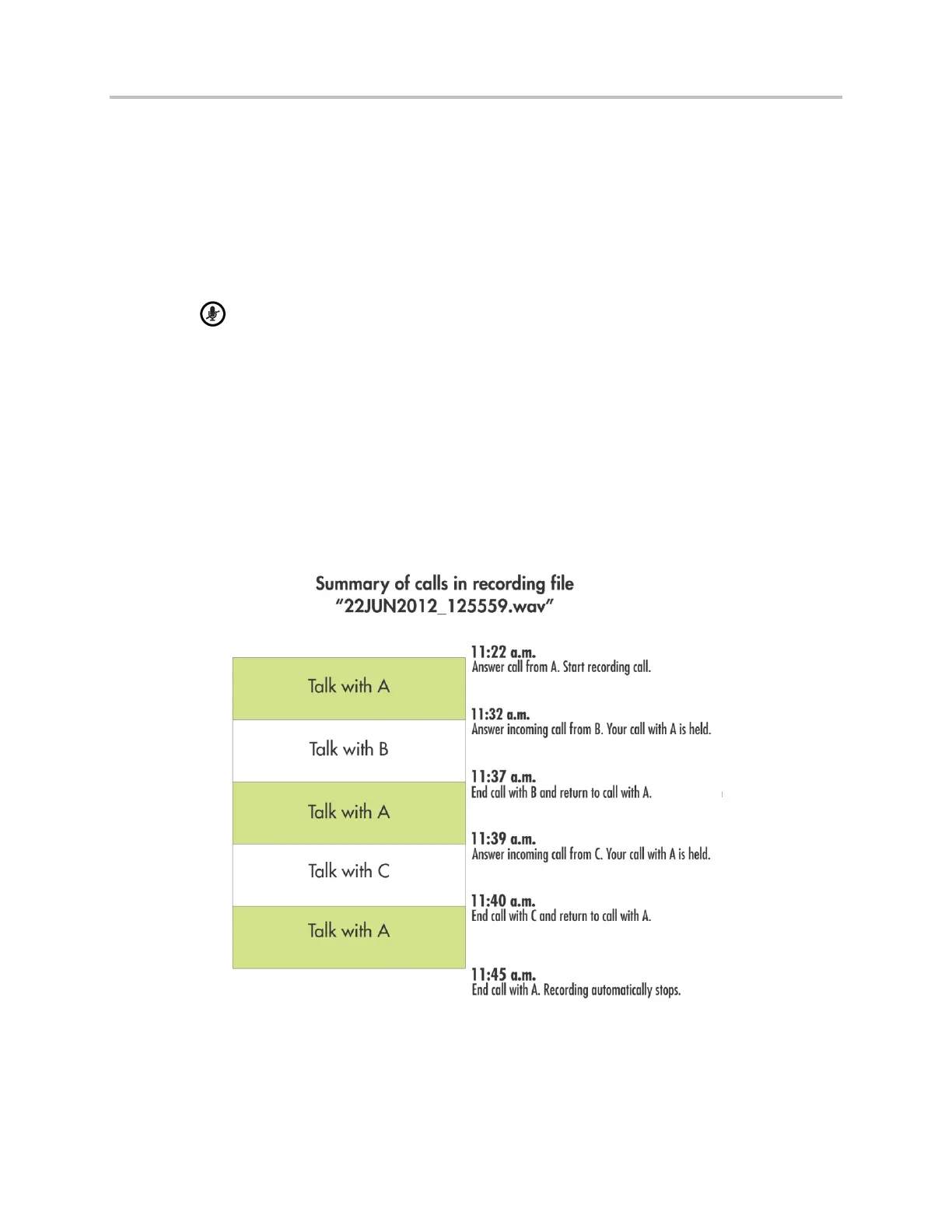
For example, on June 22, 2012 at 11:22 a.m., you answer a call from party A. During your call with party
A, you answer calls from party B and party C. Your conversations with parties A, B, and C are all recorded
in the same .wav file as follows:



 To Next Page