Poly® VVX® 500 and Poly® VVX® 600 Business Media Phones User Guide
40
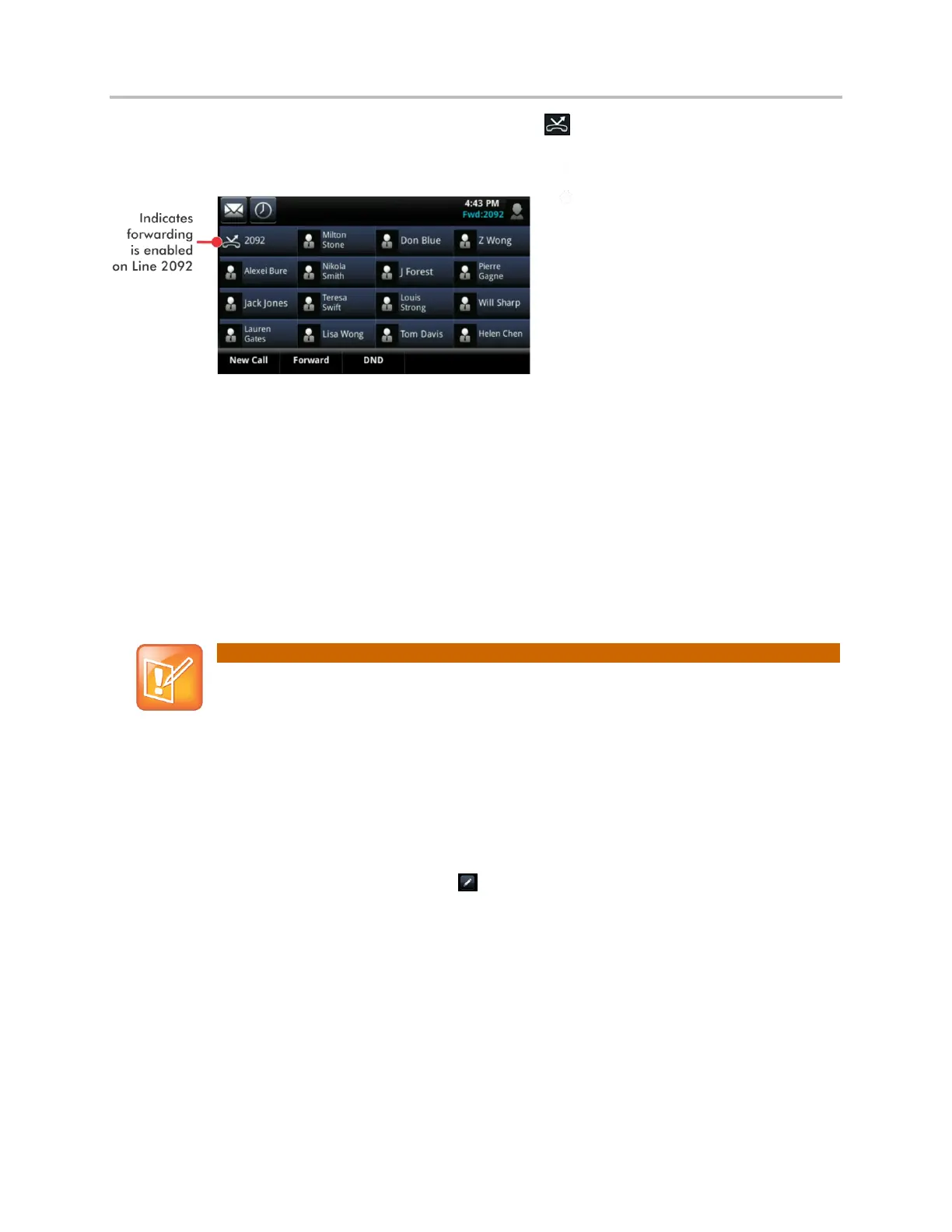
If a phone line is idle, Lines view displays the forwarding icon, next to the phone line, as shown next.
To disable call forwarding:
1 From Home view, tap Forward.
2 If your phone is set up with multiple lines, tap the line to disable forwarding for.
3 From the Forwarding Type Select screen, tap the forwarding type to disable, and tap Disable.
Rejecting Calls from a Contact
You can send incoming calls from a particular contact to your voicemail system.
Note: Rejecting Calls and Shared Lines
You can’t reject calls on shared lines. You can only silence them. For more information, see
Working with Shared Lines.
To send incoming calls from a contact to your voicemail system:
1 Tap Directories from Home view, and tap Contact Directory.
2 From your directory, tap the contact whose calls you want to reject.
3 From the contact’s information screen, tap .
4 From the Edit Contact screen, tap Auto Reject, tap Enabled, and then tap Save.
Diverting Calls from a Contact to Another Person
The Divert option enables you to transfer all incoming calls from a particular contact to another person.
To divert incoming calls from a contact to another person:
1 Tap Directories from Home view, and tap Contact Directory.
2 From your directory, tap the contact whose calls you want to send to another person.



 To Next Page