Poly® VVX® 500 and Poly® VVX® 600 Business Media Phones User Guide
30
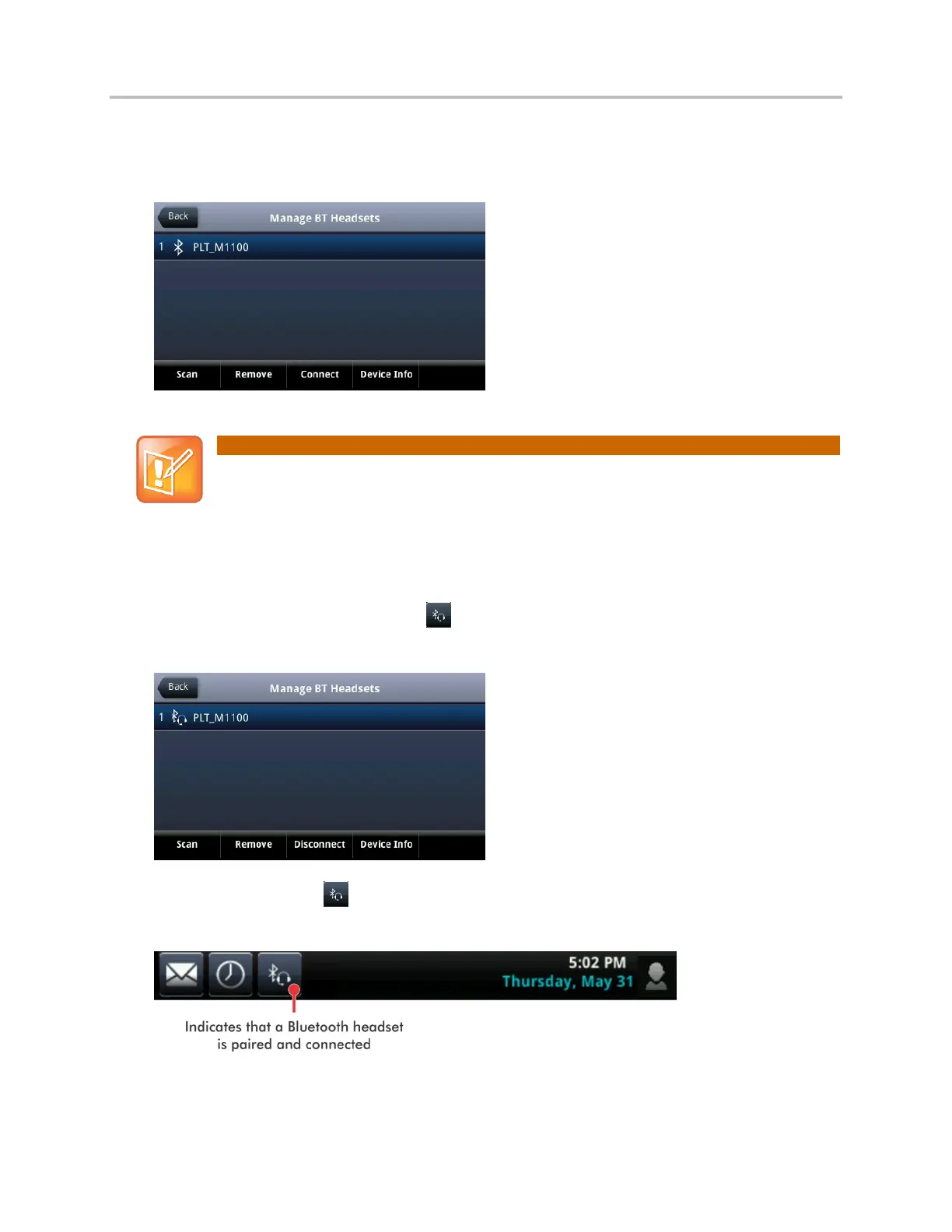
4 Tap the headset you want to pair and tap Add to begin the pairing process. An Adding device
message displays. After your headset is added, the Manage BT Headsets screen displays. Your
headset will be paired, but not connected, as shown next.
Note: Why Doesn’t My Headset Pair Automatically?
If your headset is an older model, you may have to enter a password (for example, 0000) before
the headset can pair with your phone.
5 Tap the headset you want to connect, and tap Connect. A Connecting device message displays.
After your headset connects, a Headset attached message displays, and your headset model will
display next to the Bluetooth/Headset icon—the icon that indicates that your headset is both
paired and connected (shown next).
The Bluetooth/Headset icon will also display in the status bar, as shown next. If you tap the
icon, the Bluetooth Settings screen displays.
You can now use your headset to handle calls.



 To Next Page